Loading
Form preview
  • US Legal Forms
  • Form Library
  • More Forms
  • More Multi-State Forms
  • Assoc-pens

Get Assoc-pens

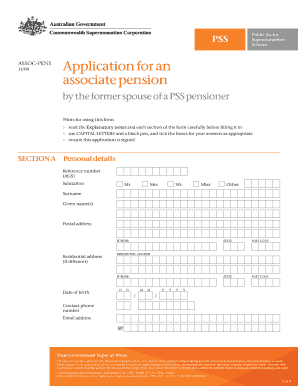
Use is receiving a pension from the PSS and you have been granted a portion of that pension under a Family Law payment split. This form should be sent to: PSS GPO Box 2252 Canberra City ACT 2601 This form should not be used if you have your own account with the PSS as a result of a Family Law split which occurred while your former spouse was still a contributing member of the PSS. The appropriate form to use in these circumstances is the Age retirement for associate members form. * Under the sch.

How it works

  1. Open form

    Open form follow the instructions

  2. Easily sign form

    Easily sign the form with your finger

  3. Share form

    Send filled & signed form or save

How to fill out the ASSOC-PENS online

Filling out the ASSOC-PENS form is essential for former spouses of Public Sector Superannuation (PSS) pensioners. This guide provides a step-by-step approach to help users complete this application accurately and efficiently.

Follow the steps to complete your ASSOC-PENS application easily.

  1. Click the ‘Get Form’ button to obtain the ASSOC-PENS form and open it in the editor.
  2. Begin by entering your personal details in Section A. This includes your reference number, salutation, surname, given names, postal address, residential address, date of birth, contact phone number, and email address.
  3. In Section B, specify your method of payment. Select the type of financial institution (savings bank, building society, trading bank, or credit union) and provide the necessary account details, ensuring that the account is in your name.
  4. Complete Section C if your pension amount is less than $1,300 per annum. Indicate your choice to commute your benefit either as a lump sum payment or a rollover to a super fund.
  5. In Section D, gather the required identification documents. You need to provide certified copies of one document from Column A and three documents from Column B to verify your identity.
  6. Review all the information you have provided for accuracy. Ensure that you have signed the application and included any necessary attachments.
  7. After finalizing the form, you can save changes, download, print, or share the document as needed.

Start completing your ASSOC-PENS form online today!

Get form

Experience a faster way to fill out and sign forms on the web. Access the most extensive library of templates available.
Get form

Related content

BIG DUTCHMANS NATL CHRISTIAN LABOR ASSOC USA PEN
Participants in PBGC-trusteed plans can use PBGC's fast, free, and secure online service...
Learn more
Pens
Mayo Clinic Alumni Association Mayo heritage wood fountain pen. Regular price From $100.00...
Learn more
Anachronia Dinosaur Farm
Anachronia livestock require level 42 to 118 Farming and level 45 to 90 Construction to...
Learn more

Related links form

(State Board Of Accounts USE ONLY) CONTENTS PART PART PART PART PART PART PART PART PART PART 1 2 3 2008 BFPD Annual Report - State Of Indiana - In PART 12 - FINANCIAL ASSISTANCE TO NONGOVERNMENTAL ENTITIES - In PORTER COUNTY - In

Questions & Answers

Get answers to your most pressing questions about US Legal Forms API.

Contact support

Filling ink into a pen generally depends on its type. For disposable pens, you simply replace the ink cartridge. For refillable pens, insert a syringe or cartridge into the ink reservoir, depending on the design. Using ASSOC-PENS enhances the writing experience while ensuring your pen stays filled effortlessly.

To fill a piston filler pen, twist the piston knob to lower the piston inside the ink chamber. Place the nib in the ink and turn the knob the opposite way to draw ink into the pen. Ensure the nib is fully submerged for optimal filling, and enjoy the smooth flow of ASSOC-PENS as you write.

Filling a fountain pen without a converter involves a simple method. Dip the nib directly into the ink, allowing it to absorb the liquid. Then, gently wipe off any excess ink before reassembling the pen. This method provides a quick solution for using ASSOC-PENS efficiently.

To fill a piston pen, begin by twisting the piston knob to draw it down. Submerge the nib in the ink bottle, and then turn the knob in the opposite direction to draw ink into the chamber. Repeat if necessary, then wipe the nib and cap the pen, ensuring a smooth writing experience with ASSOC-PENS.

Filling ink in an injection pen is straightforward. Start by removing the pen’s barrel to access the ink chamber. Carefully inject the ink using a syringe, ensuring you do not overfill. After filling, close the barrel tightly, and your injection pen is ready, embodying the durability of ASSOC-PENS.

To fill a cartridge in a pilot pen, first, remove the cap and pull out the used cartridge. Next, take a new cartridge and align it with the pen’s tip. Gently push it in until you hear a click, ensuring it is secure. Now, replace the cap, and your pilot pen is ready for use with ASSOC-PENS.

Setting file associations in Windows 10 is straightforward. Start by going to Settings, then Apps, followed by Default Apps. From this menu, you can set default applications by file type, ensuring that the files you work with open in the programs you prefer; features like ASSOC-PENS greatly assist in this process.

Indexing your files enhances searchability on your computer. You can enable indexing in Windows through the Control Panel by accessing 'Indexing Options.' This feature works best with ASSOC-PENS, as it helps categorize your files for easy retrieval, making your overall experience smoother.

To associate a program with a specific file extension, you can go to Settings in Windows. Navigate to 'Default Apps' and scroll down to 'Choose default apps by file type.' Here, find your desired extension, select the program that will handle it, and save your settings; this is where ASSOC-PENS makes file handling more efficient.

To associate a file, locate the file on your computer, right-click it, and select 'Open with.' From there, you can choose an application to set as the default for that file type. This association process is simplified with features like ASSOC-PENS, which streamline file management and improve your productivity.

Get This Form Now!

Use professional pre-built templates to fill in and sign documents online faster. Get access to thousands of forms.
Get form
If you believe that this page should be taken down, please follow our DMCA take down processhere.

Industry-leading security and compliance

US Legal Forms protects your data by complying with industry-specific security standards.
  • In businnes since 1997
    25+ years providing professional legal documents.
  • Accredited business
    Guarantees that a business meets BBB accreditation standards in the US and Canada.
  • Secured by Braintree
    Validated Level 1 PCI DSS compliant payment gateway that accepts most major credit and debit card brands from across the globe.
Get ASSOC-PENS
Get form
Form Packages
Adoption
Bankruptcy
Contractors
Divorce
Home Sales
Employment
Identity Theft
Incorporation
Landlord Tenant
Living Trust
Name Change
Personal Planning
Small Business
Wills & Estates
Packages A-Z
Form Categories
Affidavits
Bankruptcy
Bill of Sale
Corporate - LLC
Divorce
Employment
Identity Theft
Internet Technology
Landlord Tenant
Living Wills
Name Change
Power of Attorney
Real Estate
Small Estates
Wills
All Forms
Forms A-Z
Form Library
Customer Service
Your Privacy Choices
Terms of Service
Privacy Notice
Legal Hub
Content Takedown Policy
Bug Bounty Program
About Us
Help Portal
Legal Resources
Blog
Affiliates
Contact Us
Delete My Account
Site Map
Industries
Forms in Spanish
Localized Forms
State-specific Forms
Forms Kit
Legal Guides
Real Estate Handbook
All Guides
Prepared for You
Notarize
Incorporation services
Our Customers
For Consumers
For Small Business
For Attorneys
Our Sites
US Legal Forms
USLegal
FormsPass
pdfFiller
signNow
altaFlow
DocHub
Instapage
Social Media
Call us now toll free:
+1 833 426 79 33
As seen in:
  • USA Today logo picture
  • CBC News logo picture
  • LA Times logo picture
  • The Washington Post logo picture
  • AP logo picture
  • Forbes logo picture
© Copyright 1997-2026
airSlate Legal Forms, Inc.
3720 Flowood Dr, Flowood, Mississippi 39232
Form Packages
Adoption
Bankruptcy
Contractors
Divorce
Home Sales
Employment
Identity Theft
Incorporation
Landlord Tenant
Living Trust
Name Change
Personal Planning
Small Business
Wills & Estates
Packages A-Z
Form Categories
Affidavits
Bankruptcy
Bill of Sale
Corporate - LLC
Divorce
Employment
Identity Theft
Internet Technology
Landlord Tenant
Living Wills
Name Change
Power of Attorney
Real Estate
Small Estates
Wills
All Forms
Forms A-Z
Form Library
Customer Service
Your Privacy Choices
Terms of Service
Privacy Notice
Legal Hub
Content Takedown Policy
Bug Bounty Program
About Us
Help Portal
Legal Resources
Blog
Affiliates
Contact Us
Delete My Account
Site Map
Industries
Forms in Spanish
Localized Forms
State-specific Forms
Forms Kit
Legal Guides
Real Estate Handbook
All Guides
Prepared for You
Notarize
Incorporation services
Our Customers
For Consumers
For Small Business
For Attorneys
Our Sites
US Legal Forms
USLegal
FormsPass
pdfFiller
signNow
altaFlow
DocHub
Instapage
Social Media
Call us now toll free:
+1 833 426 79 33
As seen in:
  • USA Today logo picture
  • CBC News logo picture
  • LA Times logo picture
  • The Washington Post logo picture
  • AP logo picture
  • Forbes logo picture
© Copyright 1997-2026
airSlate Legal Forms, Inc.
3720 Flowood Dr, Flowood, Mississippi 39232