Get Usps Ps 2430 2001-2026
How it works
-

Open form follow the instructions
-

Easily sign the form with your finger
-

Send filled & signed form or save
How to fill out the USPS PS 2430 online
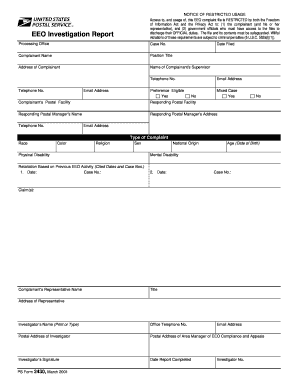
Filling out the USPS PS 2430 form is a crucial step for users involved in the Equal Employment Opportunity complaint process. This guide will provide you with clear, step-by-step instructions to complete the form effectively online.
Follow the steps to accurately complete the USPS PS 2430 form online.
- Click ‘Get Form’ button to obtain the USPS PS 2430 form and access it for editing.
- Begin by entering the case number at the top of the form. Make sure this number corresponds to the EEO complaint you are reporting.
- Input the complainant's name, making sure to use the full legal name as it appears on official documents.
- Fill in the position title of the complainant. This should reflect their current job title within the postal service.
- Provide the complete address of the complainant, including street, city, state, and zip code.
- Enter the name of the complainant's supervisor to ensure the complaint reaches the appropriate level of authority.
- Record the date the complaint was filed, ensuring the format is consistent with date regulations.
- List the telephone number and email address of the complainant for any follow-up related to the complaint.
- Indicate the complainant's preference eligibility status by selecting either 'Yes' or 'No'.
- If applicable, specify if this is a mixed-case complaint by selecting 'Yes' or 'No'.
- Provide the postal facility of the complainant and the responding postal facility information.
- Include the name and address of the responding postal manager along with their telephone number and email for direct communication.
- Identify the type of complaint by checking all that apply: race, color, religion, sex, national origin, physical disability, mental disability, or retaliation based on previous EEO activity.
- List any dates of prior EEO activity and corresponding case numbers related to your complaint.
- Enter the complainant's date of birth as required for age-related claims.
- Complete the claims section with a detailed description of the allegations being reported.
- If applicable, fill out the details for the complainant’s representative, including their name, title, and address.
- Provide the investigator's name, office telephone number, and postal address.
- Include the postal address of the area manager of EEO compliance and appeals.
- Have the investigator sign the form and add the date the report was completed.
- After all sections are complete, save your changes, and you can choose to download, print, or share the form as needed.
Take the next step in your EEO complaint process by completing your USPS PS 2430 form online today.
To obtain a USPS nonprofit authorization number, you need to complete the application for nonprofit mailing. This application requires you to provide specific documentation proving your organization's nonprofit status. After submitting your application, the USPS will review it and, if approved, issue your authorization number. If you need detailed guidance during this process, platforms like USLegalForms can help you access the necessary forms and instructions.