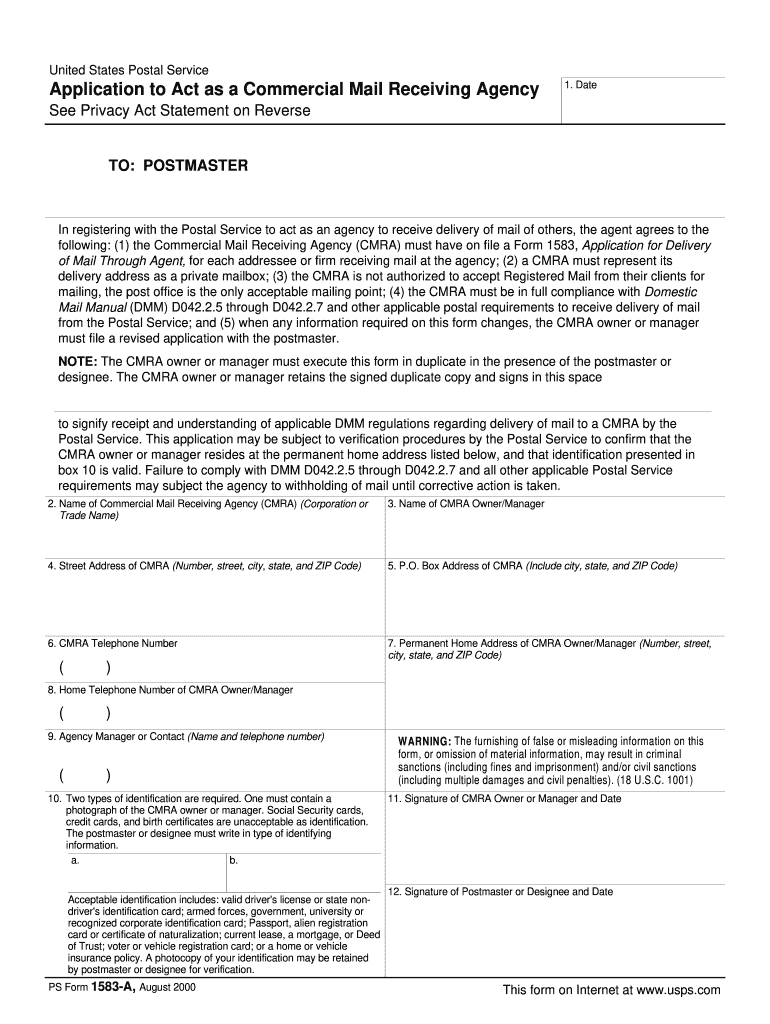
As an agency to receive delivery of mail of others, the agent agrees to the following: (1) the Commercial Mail Receiving Agency (CMRA) must have on file a Form 1583, Application for Delivery of Mail Through Agent, for each addressee or firm receiving mail at the agency; (2) a CMRA must represent its delivery address as a private mailbox; (3) the CMRA is not authorized to accept Registered Mail from their clients for mailing, the post office is the only acceptable mailing point; (4) the CMRA must.
Loading

Open form follow the instructions

Easily sign the form with your finger

Send filled & signed form or save
How to fill out the USPS PS 1583-A online
This guide provides a step-by-step approach to filling out the USPS PS 1583-A form online. By following these instructions, users can successfully complete the application to act as a Commercial Mail Receiving Agency.
Follow the steps to complete the USPS PS 1583-A form online.
- Press the ‘Get Form’ button to access the USPS PS 1583-A form online and open it in the editing interface.
- Enter the date in the first field. This is the date you are completing the form.
- In the section labeled 'Name of Commercial Mail Receiving Agency (CMRA)', provide the full name of the agency as registered.
- Fill in the 'Name of CMRA Owner/Manager' with the full name of the individual overseeing the CMRA.
- Complete the 'Street Address of CMRA' section by providing the full address, including the number, street name, city, state, and ZIP code.
- In the 'P.O. Box Address of CMRA', input the P.O. Box details, including the city, state, and ZIP code.
- Provide the 'CMRA Telephone Number' in the designated field to allow for communication.
- Enter the 'Permanent Home Address of CMRA Owner/Manager' with the complete details similar to previous address fields.
- Fill in the 'Home Telephone Number of CMRA Owner/Manager' for additional contact information.
- In the 'Agency Manager or Contact' field, write the name and phone number of a designated contact person for the agency.
- List two types of identification in the provided fields, ensuring that one includes a photograph. Avoid using Social Security cards, credit cards, or birth certificates as acceptable IDs.
- Sign and date in the 'Signature of CMRA Owner or Manager' section, indicating acknowledgement of the responsibilities outlined in the form.
- The final step requires the 'Signature of Postmaster or Designee' and date to validate the form.
- After completing all sections, you can save the changes, download, print, or share the form as required.
Complete your USPS PS 1583-A form online today for efficient management of your Commercial Mail Receiving Agency.
Experience a faster way to fill out and sign forms on the web. Access the most extensive library of templates available.
Related content
Any person who establishes, owns, or manages a CMRA must provide Form 1583-A to the...
PS Form 1583 is an application for mail delivery through an agent, requiring the agent to...
co.uk ISSN 1464-2786 USPS 024-183 evo (USPS 024-183) is published monthly by Dennis...
Get answers to your most pressing questions about US Legal Forms API.
What makes a mailbox USPS approved?
A mailbox becomes USPS approved when it meets specific safety and accessibility guidelines set by USPS. The mailbox must be placed in an accessible location, with proper visibility for postal service delivery. Additionally, the mailbox design should conform to USPS specifications. Completing the USPS PS 1583-A is crucial for securing that official approval status.
Does USPS 1583 need to be notarized?
Yes, the USPS PS 1583-A form requires notarization. This step is essential to verify your identity and ensure the authenticity of your application. Presenting a notarized form helps prevent fraud and allows for a smoother approval process. Remember to find a notary public who can witness your signature before submitting the form to USPS.
How to get approval to move your mailbox?
To move your mailbox, you’ll need to complete the USPS PS 1583-A form again, indicating the new location. Be sure to inform your local post office about the move so that they can update their records. They will review the new address to ensure it meets USPS standards for mailbox placements. Once approved, you can proceed with the relocation.
How do I get my mailbox approved by USPS?
Getting your mailbox approved by USPS involves filling out the USPS PS 1583-A form accurately. You must provide identification and address verification. Once the form is submitted, USPS will assess the application to determine if it meets their criteria. A prompt and complete submission increases the likelihood of swift approval.
How do I get my new mailbox approved?
To get approval for your new mailbox, you must complete the USPS PS 1583-A form. This form requires basic information about you and the mailbox location. After submitting the form to your local post office, they will review your application and notify you of your approval status. It’s essential to ensure that all details are accurate to avoid delays in the approval process.
Does USPS form 1583 need to be notarized?
Yes, it is a requirement for USPS PS 1583-A to be notarized before submission. Notarization provides an extra layer of security and validation, ensuring that the form accurately represents your authorization for mail delivery. Be sure to complete this step; it protects both you and your agent in the delivery process.
How to complete verification on anytime mailbox?
To verify your identity on Anytime Mailbox, you will need to follow the instructions provided on their platform. Generally, this will involve uploading a valid ID and filling out necessary details from USPS PS 1583-A. This process is crucial to ensure the security of your mail and to confirm that you have authorized the designated recipient to handle your mail.
What ID is acceptable for USPS 1583?
When completing USPS PS 1583-A, acceptable forms of ID include a government-issued photo ID, like a driver's license or passport. Additionally, you might need to show a secondary form of identification to confirm your identity. This process ensures that your mail is delivered securely and only to the authorized person or agent.
How to complete USPS application for delivery of mail through agent?
To complete the USPS PS 1583-A application for mail delivery through an agent, start by filling in your personal information accurately. Next, include your agent's details and ensure both signatures are present. After filling out the application, have the document notarized and submit it at your local post office or online, depending on available options.
Does form 1583 need to be notarized?
Yes, USPS PS 1583-A does require notarization. This requirement helps to verify the identity of both the individual filling out the form and the designated recipient. Notarization prevents fraud and ensures that your authorization for mail delivery through your agent is valid. Remember to take your completed form to a notary before submission.
Use professional pre-built templates to fill in and sign documents online faster. Get access to thousands of forms.
If you believe that this page should be taken down, please follow our DMCA take down process here.
This form is available in several versions. Select the version you need from the drop-down list below.