We use cookies to improve security, personalize the user experience, enhance our marketing activities (including cooperating with our marketing partners) and for other business use.
Click "here" to read our Cookie Policy. By clicking "Accept" you agree to the use of cookies. Read less
Read more
Accept
Loading
Form preview
  • US Legal Forms
  • Form Library
  • More Forms
  • More Multi-State Forms
  • T2014 Registered Pension Plan Priority Identification Form

Get T2014 Registered Pension Plan Priority Identification Form

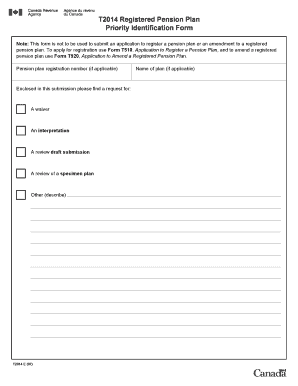
An or an amendment to a registered pension plan. To apply for registration use Form T510, Application to Register a Pension Plan, and to amend a registered pension plan use Form T920, Application to Amend a Registered Pension Plan. Pension plan registration number (if applicable) Enclosed in this submission please find a request for: A waiver An interpretation A review draft submission A review of a specimen plan Other (describe) T2014 E (07) Name of plan (if applicable).

How it works

  1. Open form

    Open form follow the instructions

  2. Easily sign form

    Easily sign the form with your finger

  3. Share form

    Send filled & signed form or save

How to fill out the T2014 Registered Pension Plan Priority Identification Form online

Completing the T2014 Registered Pension Plan Priority Identification Form is essential for effectively communicating your needs regarding a registered pension plan. This guide will provide you with a clear and straightforward approach to filling out the form online.

Follow the steps to complete the form accurately.

  1. Click ‘Get Form’ button to obtain the form and open it in your preferred editor.
  2. Fill in the pension plan registration number, if applicable. This number helps identify your specific pension plan.
  3. In the submission section, choose the request you are making from the options: waiver, interpretation, review draft submission, review of a specimen plan, or other. If selecting 'other', be sure to describe your request clearly.
  4. If your plan has a name, enter it in the designated field. This helps specify which pension plan your request pertains to.
  5. Review all your entries for accuracy and completeness to ensure your request is clear and well-documented.
  6. Once you are satisfied with the information provided, save your changes, and choose to download, print, or share the completed form as needed.

Start filling out the T2014 Registered Pension Plan Priority Identification Form online today for a smoother pension plan management experience.

Get form

Experience a faster way to fill out and sign forms on the web. Access the most extensive library of templates available.
Get form

Related content

2014 Publication 15
Dec 18, 2013 — The social security tax rate is 6.2% each for the employee and em...
Learn more
Access to social benefits: Reducing non-take-up...
The European Commission has made 'ensuring fairness, combating poverty and promoting equal...
Learn more
Sustainability Standards for Infrastructure...
by M Bennon · 2018 · Cited by 14 — GRESB Infrastructure is both a project-level and a...
Learn more

Related links form

Lawrence Gleason - Division Of Tax Appeals/Tax Appeals Tribunal - Nysdta West Pakistan Shops And Establishments Ordinance 1969 Ordinance - Knox County Government - Knoxcounty Mining The Web For IP Address Geolocations - Microsoft Research

Questions & Answers

Get answers to your most pressing questions about US Legal Forms API.

Contact support

Choosing between an RRSP and a registered savings plan (RSP) depends on personal financial goals and circumstances. RRSPs offer individual control over contributions and withdrawals, while RSPs are often tied to employer plans. When evaluating your options, the T2014 Registered Pension Plan Priority Identification Form can help clarify the benefits of each type and guide your decision-making process.

Yes, it is possible to transfer funds from a registered pension plan (RPP) to a registered retirement savings plan (RRSP). This transfer typically occurs when an employee leaves an employer, and understanding the implications is crucial for financial planning. The T2014 Registered Pension Plan Priority Identification Form can guide you through the necessary steps to ensure a smooth transition.

The key difference lies in their structure and purpose. A registered pension plan is managed by an employer, providing a predictable income for employees upon retirement, while an RRSP is a self-directed account that individuals can contribute to as they choose. Completing the T2014 Registered Pension Plan Priority Identification Form ensures compliance with regulations, particularly when these plans interact.

No, a registered pension plan (RPP) and an RRSP are not the same. An RPP is established by an employer to provide retirement income to employees, while an RRSP is a personal savings plan for individuals. Understanding this distinction is essential, especially when completing the T2014 Registered Pension Plan Priority Identification Form, as it involves different regulatory frameworks and obligations.

Both the RRSP and STRP are types of tax-deferred retirement savings plans, but they serve different purposes. The RRSP, or Registered Retirement Savings Plan, is primarily for individual savings, while the STRP, or Specified Trust Retirement Plan, is employer-sponsored and is designed for employee benefits. To fill out the T2014 Registered Pension Plan Priority Identification Form, understanding these distinctions helps employers and employees align their retirement strategies effectively.

The minimum amount an employer must contribute to a pension plan is determined by several factors, including the plan's design and legal requirements. Regular contributions help maintain the plan's solvency and benefit eligibility for employees. The T2014 Registered Pension Plan Priority Identification Form provides a structured approach to determine these contributions, ensuring compliance and protection for all stakeholders involved.

The minimum funding requirement ensures that pension plans maintain sufficient assets to cover all promised benefits. This requirement varies based on the type of pension plan and the regulations in your jurisdiction. By using the T2014 Registered Pension Plan Priority Identification Form, employers can better understand and manage their funding obligations, providing peace of mind to both employers and employees.

The minimum pension requirement establishes the least amount of pension benefits that must be provided to plan members. This requirement aims to ensure that individuals receive adequate financial support upon retirement. With the T2014 Registered Pension Plan Priority Identification Form, you can navigate these requirements with ease, ensuring that your pension plan complies with legal standards.

The funding ratio of a pension fund is the ratio of the fund's current assets to its current liabilities. A higher funding ratio indicates that the fund is on stable financial footing. By utilizing the T2014 Registered Pension Plan Priority Identification Form, plan administrators can evaluate their funding status more effectively, ensuring the fund can meet its future obligations.

The minimum funding required of employers in a registered pension plan typically depends on various factors, including plan type and regulations. With the T2014 Registered Pension Plan Priority Identification Form, employers can assess their obligations accurately. Ensuring compliance with these requirements is essential for maintaining the plan’s integrity and providing security to plan members.

Get This Form Now!

Use professional pre-built templates to fill in and sign documents online faster. Get access to thousands of forms.
Get form
If you believe that this page should be taken down, please follow our DMCA take down processhere.

Industry-leading security and compliance

US Legal Forms protects your data by complying with industry-specific security standards.
  • In businnes since 1997
    25+ years providing professional legal documents.
  • Accredited business
    Guarantees that a business meets BBB accreditation standards in the US and Canada.
  • Secured by Braintree
    Validated Level 1 PCI DSS compliant payment gateway that accepts most major credit and debit card brands from across the globe.
Get T2014 Registered Pension Plan Priority Identification Form
Get form
Form Packages
Adoption
Bankruptcy
Contractors
Divorce
Home Sales
Employment
Identity Theft
Incorporation
Landlord Tenant
Living Trust
Name Change
Personal Planning
Small Business
Wills & Estates
Packages A-Z
Form Categories
Affidavits
Bankruptcy
Bill of Sale
Corporate - LLC
Divorce
Employment
Identity Theft
Internet Technology
Landlord Tenant
Living Wills
Name Change
Power of Attorney
Real Estate
Small Estates
Wills
All Forms
Forms A-Z
Form Library
Customer Service
Terms of Service
Privacy Notice
Legal Hub
Content Takedown Policy
Bug Bounty Program
About Us
Help Portal
Legal Resources
Blog
Affiliates
Contact Us
Delete My Account
Site Map
Industries
Forms in Spanish
Localized Forms
State-specific Forms
Forms Kit
Legal Guides
Real Estate Handbook
All Guides
Prepared for You
Notarize
Incorporation services
Our Customers
For Consumers
For Small Business
For Attorneys
Our Sites
US Legal Forms
USLegal
FormsPass
pdfFiller
signNow
altaFlow
DocHub
Instapage
Social Media
Call us now toll free:
+1 833 426 79 33
As seen in:
  • USA Today logo picture
  • CBC News logo picture
  • LA Times logo picture
  • The Washington Post logo picture
  • AP logo picture
  • Forbes logo picture
© Copyright 1997-2025
airSlate Legal Forms, Inc.
3720 Flowood Dr, Flowood, Mississippi 39232
Form Packages
Adoption
Bankruptcy
Contractors
Divorce
Home Sales
Employment
Identity Theft
Incorporation
Landlord Tenant
Living Trust
Name Change
Personal Planning
Small Business
Wills & Estates
Packages A-Z
Form Categories
Affidavits
Bankruptcy
Bill of Sale
Corporate - LLC
Divorce
Employment
Identity Theft
Internet Technology
Landlord Tenant
Living Wills
Name Change
Power of Attorney
Real Estate
Small Estates
Wills
All Forms
Forms A-Z
Form Library
Customer Service
Terms of Service
Privacy Notice
Legal Hub
Content Takedown Policy
Bug Bounty Program
About Us
Help Portal
Legal Resources
Blog
Affiliates
Contact Us
Delete My Account
Site Map
Industries
Forms in Spanish
Localized Forms
State-specific Forms
Forms Kit
Legal Guides
Real Estate Handbook
All Guides
Prepared for You
Notarize
Incorporation services
Our Customers
For Consumers
For Small Business
For Attorneys
Our Sites
US Legal Forms
USLegal
FormsPass
pdfFiller
signNow
altaFlow
DocHub
Instapage
Social Media
Call us now toll free:
+1 833 426 79 33
As seen in:
  • USA Today logo picture
  • CBC News logo picture
  • LA Times logo picture
  • The Washington Post logo picture
  • AP logo picture
  • Forbes logo picture
© Copyright 1997-2025
airSlate Legal Forms, Inc.
3720 Flowood Dr, Flowood, Mississippi 39232