Get Nwcg Ics 204 Wf 2017-2026
How it works
-

Open form follow the instructions
-

Easily sign the form with your finger
-

Send filled & signed form or save
How to fill out the NWCG ICS 204 WF online
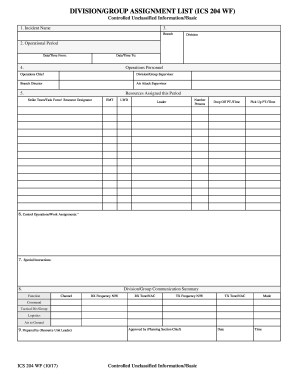
The NWCG ICS 204 WF is an essential document used during incident management to capture operational details and assignments. This guide will help you fill out the form accurately and efficiently, ensuring that all necessary information is documented.
Follow the steps to accurately complete the NWCG ICS 204 WF.
- Click ‘Get Form’ button to obtain the form and open it in the editor.
- In the first section, enter the incident name in the designated field. This should reflect the specific event or situation you are documenting.
- Next, specify the operational period by filling in the date and time both from and to. Ensure these values are accurate to align with the incident timeline.
- In the operations personnel section, list the key roles including operations chief, division/group supervisor, branch director, and air attack supervisor. Input the names of the individuals fulfilling these roles.
- Detail the resources assigned for this period. This includes strike teams, task forces, or any resource designators. Fill in the number of persons assigned and their leaders, along with drop-off and pick-up points and times for each resource.
- Record any control operations or work assignments in the provided area. Ensure each assignment is clear and specific to avoid confusion.
- Include any special instructions that may be relevant to the operations in the designated section to communicate critical information succinctly.
- Next, summarize the division/group communication by entering functions, channels, RX and TX frequencies, tones/NAC, and modes for command and tactical communication.
- In the prepared by section, enter the name of the resource unit leader and date and time. Then, include the planning section chief’s name in the approved by section to finalize the document.
- Finally, review all entries for accuracy, then save your changes, download the form, print it, or share it as needed.
Take the first step in managing your documents by filling out the NWCG ICS 204 WF online.
ICS Form 204 is used to describe resources assigned to an incident, detailing their status, location, and operational period objectives. This form is vital for maintaining situational awareness in incident management. The NWCG ICS 204 WF specifically helps track where resources are needed and supports coordination among teams. Utilizing this form effectively can lead to improved incident outcomes and efficient resource allocation.