Loading
Get Gsa Sf 700 1985-2026
How it works
-

Open form follow the instructions
-

Easily sign the form with your finger
-

Send filled & signed form or save
How to fill out the GSA SF 700 online
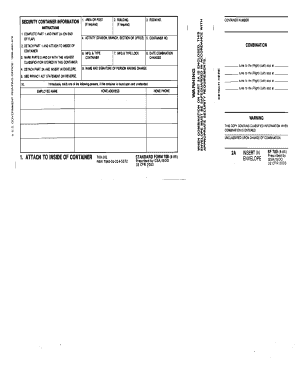
This guide provides clear and detailed instructions on how to effectively complete the GSA SF 700 form online. Whether you are new to digital document management or simply need a refresher, this resource will help you navigate each section with confidence.
Follow the steps to complete the form accurately and efficiently.
- Click ‘Get Form’ button to obtain the form and open it in the digital editor.
- Begin by filling out the 'Area or Post' section if required. This information helps identify the location associated with the security container.
- Enter the 'Room No.' and 'Building' fields as necessary. Providing this information is crucial for accurate identification and access management.
- Complete the 'Activity' section by specifying the division, branch, section, or office associated with the container to ensure accountability.
- When filling out Part 2, mark it with the highest classification level stored in the container to maintain security compliance.
- Detach Part 1 as indicated and attach it securely to the inside of the container. This is essential for proper documentation.
- Detach Part 2A and insert it into an envelope as instructed. This step is important for safeguarding sensitive information.
- Complete the 'Container Number' and 'Manufacturing Type' fields. Ensure these details are accurate for effective container tracking.
- Record the 'Date Combination Changed' and ensure the 'Name and Signature of Person Making Change' fields are filled out appropriately to maintain accurate records.
- Once all fields are completed, review your entries for accuracy, and then save changes, download, print, or share the form as required.
Complete your GSA SF 700 form online today for streamlined document management.
The SF701 is designed to verify that security checks are completed daily for sensitive areas and operations. This form integrates seamlessly with the GSA SF 700 strategy by documenting ongoing security activities, ensuring that potential vulnerabilities are caught early. Regular use of the SF701 fosters a culture of security awareness and responsibility among staff.