Get Gsa 850 2017
How it works
-

Open form follow the instructions
-

Easily sign the form with your finger
-

Send filled & signed form or save
How to fill out the GSA 850 online
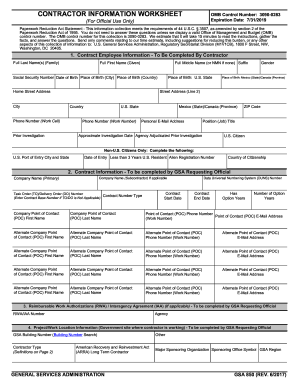
The GSA 850, known as the Contractor Information Worksheet, is an essential document used for providing comprehensive information about contractors within the General Services Administration. This guide will walk you through the step-by-step process of completing this form online, ensuring that you have all the necessary details at your fingertips.
Follow the steps to successfully complete your GSA 850 online.
- Press the ‘Get Form’ button to access the GSA 850 form and open it in the editor.
- Begin filling out Section 1, 'Contract Employee Information'. Start with entering the full last name, first name, and middle name if applicable. Input your Social Security Number, date of birth, and place of birth, which includes the city and country. Ensure you provide your home street address, city, country, state, and ZIP code. Include your work and cell phone numbers, email address, job title, and details regarding any prior investigation.
- Proceed to Section 2, 'Contract Information'. In this section, the GSA requesting official will need to enter the primary company name, DUNS number, and subcontractor details if applicable. Fill in the contract start and end dates, contract number, and point of contact information including names, phone numbers, and email addresses for both the primary POC and any alternates.
- If applicable, complete Section 3, which concerns Reimbursable Work Authorizations (RWA) or Interagency Agreement (IAA) details, and include the RWA/IAA number and agency name.
- In Section 4, the GSA requesting official must provide project/work location information, which includes the GSA building number, contractor type, major sponsoring organization, and the GSA region.
- Complete Section 5, which involves indicating the type of investigation requested, along with any requirements for a Homeland Security Presidential Directive card.
- Finally, finish with Section 6 by providing the GSA requesting official's information again, including last name, first name, title, email, and phone number. If there are alternative contacts, ensure to fill those out as well.
- After completing all sections, review the entire form for accuracy. Once confirmed, you can save your changes, download the completed form, print it if necessary, or share it with the relevant parties.
Ready to complete your GSA 850 online? Start now!
Get form
BMW GSA stands for the BMW Adventure model, specifically designed for adventurous riders. It encapsulates features that support off-road capability, comfort, and technology for long-distance travel. If you want a model that embodies exploration, the GSA 850 fits that bill perfectly. Exploring the specifications and benefits of this model will help you appreciate its engineering.