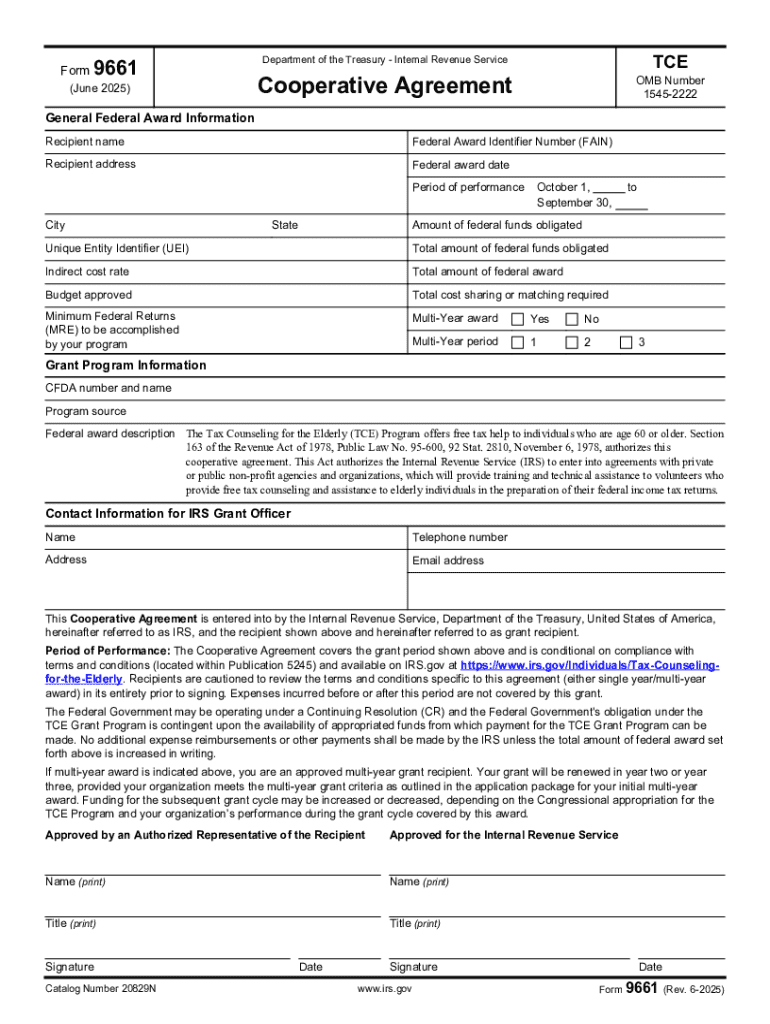
This document outlines the Cooperative Agreement for the Tax Counseling for the Elderly (TCE) Program, which provides free tax assistance to individuals aged 60 and older. It specifies the responsibilities.
Loading

Open form follow the instructions

Easily sign the form with your finger

Send filled & signed form or save
How to fill out the IRS 9661 online
Filling out the IRS 9661 form is an essential step for recipients of federal awards under the Tax Counseling for the Elderly program. This guide provides clear, step-by-step instructions for completing the form online, ensuring users understand each component effortlessly.
Follow the steps to fill out the IRS 9661 accurately.
- Click ‘Get Form’ button to obtain the form and open it in your editor.
- Enter the recipient name in the designated field, ensuring it matches the legal name registered with federal authorities.
- Fill in the Federal Award Identifier Number (FAIN) accurately to link the grant specifics to the recipient.
- Provide the recipient address, ensuring all components such as street, city, and state are thoroughly filled out.
- Indicate the federal award date as well as the period of performance, using the specified format from October 1 to September 30.
- Fill in the Unique Entity Identifier (UEI) to maintain compliance with federal requirements regarding funding identification.
- Complete the indirect cost rate field if applicable, ensuring clarity in how funds will be allocated.
- Provide the total cost sharing or matching required based on the program guidelines.
- Indicate if this is a multi-year award by selecting either 'Yes' or 'No' and completing the multi-year period details if applicable.
- Include the Catalog of Federal Domestic Assistance (CFDA) number and name for grant program identification.
- Provide a description of the federal award, specifically focusing on the Tax Counseling for the Elderly program and its benefits.
- Complete the contact information sections for the IRS Grant Officer, including name, telephone number, address, and email address.
- Review all entries for accuracy, ensuring all necessary fields are completed before proceeding.
- Once the form is complete, save changes, then download, print, or share the IRS 9661 form as needed.
Complete your IRS 9661 form online today for a seamless grant application process.
Experience a faster way to fill out and sign forms on the web. Access the most extensive library of templates available.
Related content
Form 9661 (Rev. 6-2025). Form 9661. (June 2025). Department of the Treasury - Internal...
Form 9661, Dept. of the Treasury -- Internal Revenue Service cooperative ... Form W-7...
Jun 30, 2020 — 9,661. Gain (loss) on sale of real estate assets. 1,665. (16) ... In...
Get answers to your most pressing questions about US Legal Forms API.
Why is the IRS not accepting my IP PIN?
If the IRS is not accepting your IP PIN, it could be due to input errors or mismatches with their records. Recheck your entry for accuracy, ensuring it matches what the IRS provided. If problems continue, reach out to the IRS directly or find structured guidance on the US Legal Forms platform to address issues related to your IP PIN effectively.
What does IRS reject code IND 996 mean?
Reject code IND 996 usually indicates that the IRS has found a discrepancy with your submitted tax return, often relating to incorrect taxpayer information. This could involve mismatched details such as your name or Social Security number. To resolve this issue, review your return carefully and consider the support available on the US Legal Forms site to assist with any necessary corrections.
What is the IRS form for digital assets?
The IRS requires reporting of digital assets on Form 1040 and its associated schedules when applicable. Specifically, Schedule 1 allows for declarations related to cryptocurrency and other digital currencies. If you need help with filing or understanding your obligations regarding digital assets, US Legal Forms can provide helpful templates and resources that streamline the process.
What is the IRS Code 661?
IRS Code 661 typically pertains to a refund processing error related to fraud or identity theft. This code indicates that the IRS has flagged a return for additional scrutiny. If you encounter this code, it might be beneficial to resolve any discrepancies or seek assistance through US Legal Forms to navigate the complexities of your situation.
What if my IP PIN is not working?
If your IP PIN isn't working, first ensure that you are entering it correctly, as it is case sensitive. If you believe your IP PIN is still valid, check your tax documents from the IRS to verify the correct number. If issues persist, consider contacting the IRS or utilizing the US Legal Forms resources to find effective solutions related to your tax situation.
How do I fix reject code IND 996?
Fixing reject code IND 996 may require you to review your tax return for errors in your information, such as your name, Social Security number, or filing status. Ensure that all data matches the IRS records. Once corrected, you can resubmit your return. For thorough guidance, you can explore resources on the US Legal Forms platform aimed specifically at addressing IRS issues like the IND 996 rejection.
How to spot an IRS notice?
Spotting an IRS notice can be straightforward if you know what to look for. The IRS typically sends official notices via mail, and these documents will have the IRS logo. Look for information regarding any balances due, tax account discrepancies, or important deadlines. If you receive an IRS notice, consider reviewing it carefully to determine if it relates to IRS 9661.
How do I download a PDF from the IRS?
To download a PDF from the IRS, visit their official website and navigate to the forms and publications section. You can search for specific forms like IRS 9661 to find the exact documentation you need. Once located, simply click the download link to save a copy to your device.
How do I write a reasonable cause letter to the IRS?
When writing a reasonable cause letter to the IRS, begin by explaining the circumstances that led to your issue or late payment. Be straightforward and provide evidence to support your claim; this helps the IRS understand your situation better. Referring to IRS 9661 in your letter could bolster your request for leniency based on valid circumstances.
How to write a letter of forgiveness to the IRS?
To write a letter of forgiveness to the IRS, clearly state your request for forgiveness and provide reasons for your situation. Explain any hardship you have faced and include supporting documentation. Mention IRS 9661 if applicable, as this form may provide guidelines for requesting tax relief.
Use professional pre-built templates to fill in and sign documents online faster. Get access to thousands of forms.
If you believe that this page should be taken down, please follow our DMCA take down process here.