Loading
Get Eoir Immigration Court Practice Manual Sample Proposed Order 2017-2026
How it works
-

Open form follow the instructions
-

Easily sign the form with your finger
-

Send filled & signed form or save
How to fill out the EOIR Immigration Court Practice Manual Sample Proposed Order online
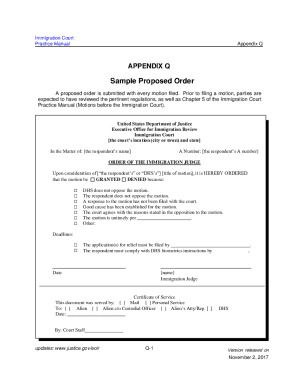
This guide provides a step-by-step approach to filling out the EOIR Immigration Court Practice Manual Sample Proposed Order online. Whether you are new to legal documentation or seeking to enhance your understanding, this resource will support you through the process.
Follow the steps to successfully complete the proposed order form.
- Click ‘Get Form’ button to access the proposed order form and open it in the document editor.
- Begin by filling in the court’s location, including the city or town and state where the Immigration Court is situated.
- In the section labeled ‘In the Matter of,’ include the full name of the respondent, the person whose case is being addressed.
- Next, locate the ‘A Number’ field and provide the respondent’s unique alien registration number.
- Under the ‘ORDER OF THE IMMIGRATION JUDGE’ section, specify whether the motion is being granted or denied by checking the appropriate box.
- Provide the reasons for granting or denying the motion by checking the relevant boxes, ensuring you include any additional information in the ‘Other’ section if applicable.
- Fill in any deadlines pertinent to the application(s) for relief that must be filed, as well as the compliance deadlines related to DHS biometrics instructions.
- At the bottom of the form, complete the name field for the Immigration Judge who will be reviewing the proposed order.
- Mark the method of service used in the Certificate of Service section, indicating whether it was through mail or personal service, and to whom the document was served.
- Finally, review all entries for accuracy, then save your changes, and download, print, or share the completed form as needed.
Start completing your EOIR Immigration Court proposed order online today!