Loading
Get Canada North Vancouver School District Peak Performance Alternate Timetable Request Student 2013-2026
How it works
-

Open form follow the instructions
-

Easily sign the form with your finger
-

Send filled & signed form or save
How to fill out the Canada North Vancouver School District Peak Performance Alternate Timetable Request Student online
Filling out the Peak Performance Alternate Timetable Request Student form is an important process for students seeking specialized programming in North Vancouver School District. This guide provides clear, step-by-step instructions to help you successfully navigate the online application.
Follow the steps to complete your application with ease.
- Click ‘Get Form’ button to obtain the form and open it in the editor.
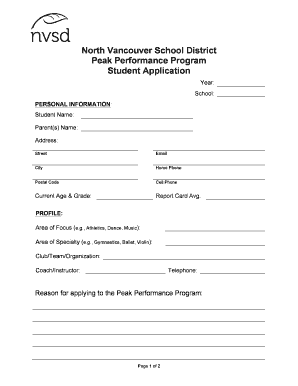
- Begin by entering the current year and the student's school in the designated fields. This information helps to categorize the application correctly.
- Fill in your personal information, including the student's name, parent(s) name, address, email, home phone, cell phone, and postal code. Ensure that the information is accurate and up-to-date.
- Indicate the current age and grade of the student, along with their report card average to provide context to your application.
- In the profile section, specify the area of focus, such as athletics or music, and the particular area of specialty like gymnastics or violin. This helps the school understand the student's unique talents.
- Provide details about the club, team, or organization the student is involved in, along with the coach or instructor's name and telephone number. This information is essential for verifying the student's commitment.
- Articulate the reason for applying to the Peak Performance Program. Use clear language to explain the student’s aspirations and objectives.
- Describe the training program, including the weekly hours spent practicing and competing. This gives insight into the student's dedication and effort.
- Outline long-term goals related to the area of specialty, as this will help assess the suitability for the program.
- List any involvement in activities outside the specialty area, including school and community clubs. This shows the well-roundedness of the student.
- Attach any required documents, such as a copy of the most recent report card, training and competition schedule signed by the coach/instructor, and a biography of achievements.
- Make sure to include the coach/instructor verification form and ensure it is filled out accurately.
- After completing the form, review all entries for accuracy and completeness. Save your changes, and then download, print, or share the form as required.
Take the next step and complete your Peak Performance application online now.