Loading
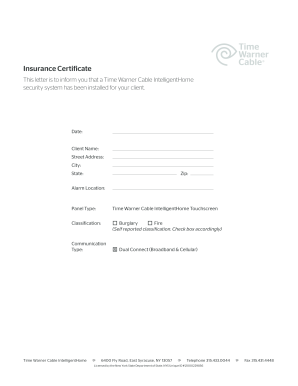
Get Twc Insurance Certificate
How it works
-

Open form follow the instructions
-

Easily sign the form with your finger
-

Send filled & signed form or save
How to fill out the TWC Insurance Certificate online
Completing the TWC Insurance Certificate online ensures proper documentation for your client's Time Warner Cable IntelligentHome security system installation. This guide will walk you through each section of the form, making the process straightforward and accessible.
Follow the steps to fill out the TWC Insurance Certificate accurately.
- Click the ‘Get Form’ button to access the TWC Insurance Certificate and open it in the designated editor.
- Begin by entering the date of the certificate's issuance in the designated date field.
- Input the client's full name in the 'Client Name' section to ensure accurate identification.
- Provide the complete street address where the security system is installed, including any necessary apartment or suite numbers.
- Fill in the city, state, and zip code to ensure accurate geolocation of the service.
- Specify the alarm location by entering relevant details that identify where the security system is situated.
- Select the panel type from the options provided, ensuring you accurately reflect the equipment used.
- Check the appropriate classification boxes to indicate if the system covers burglary or fire. You may also indicate dual connectivity.
- Review all entries for accuracy to prevent errors that could affect the certificate's legitimacy.
- Once complete, save your changes, download a copy, print the certificate, or share it as necessary.
Start filling out the TWC Insurance Certificate online to ensure your documentation is complete and accurate.
Texas Workforce Commission Form C-3 is used to report your company's unemployment insurance taxes and verify your taxable wages. This form is essential for maintaining your TWC Insurance Certificate and staying compliant with your reporting obligations. Completing this form accurately can prevent future audits and penalties.