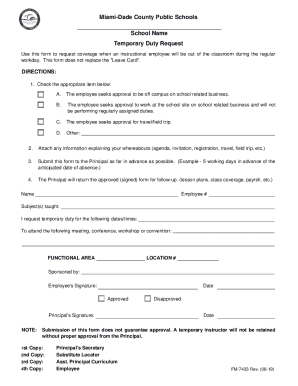
Clear Form Miami-Dade County Public Schools School Name Temporary Duty Request Use this form to request coverage when an instructional employee will be out of the classroom during the regular workday.

How it works
  • Open form

    Open form follow the instructions

  • Easily sign form

    Easily sign the form with your finger

  • Share form

    Send filled & signed form or save

How to fill out the FL Miami-Dade County Public Schools FM-7433 online

The FL Miami-Dade County Public Schools FM-7433 form is essential for instructional employees to request coverage during their absence from the classroom. This guide provides clear step-by-step instructions to complete the form effectively and efficiently online.

Follow the steps to fill out the FM-7433 form online.

  1. Click the ‘Get Form’ button to obtain the form and open it in the editor.
  2. Review the form's first section, where you need to check the appropriate item indicating your reason for absence: A) off-campus school-related business, B) working on-site without regular duties, C) travel or field trip, or D) other.
  3. Attach any supporting documents that explain your whereabouts, such as an agenda, invitation, registration details, or field trip information.
  4. Fill in your personal details, including your name, employee number, subjects taught, and the dates/times for which you request temporary duty.
  5. Specify the meeting, conference, workshop, or convention you wish to attend in the designated area.
  6. Sign the form in the employee's signature section and note the date of submission.
  7. Submit the completed form to the Principal well in advance, ideally five working days prior to your expected absence.
  8. Await feedback from the Principal; they will return the signed approval for follow-up tasks like lesson plans and class coverage.
  9. After receiving the signed form, ensure to save your changes, download, print, or share the document as necessary.

Complete your FM-7433 online today to ensure your absence is appropriately managed.

Get form

Experience a faster way to fill out and sign forms on the web. Access the most extensive library of templates available.

Related content

BUDGET AND MULTI-YEAR CAPITAL PLAN

Sep 20, 2022 — We have the opportunity and responsibility to deploy new revenue sources...

Learn more
Educational Programs for Deaf Students

This listing provides directory information on U.S. schools and programs for preschool...

Learn more
Certified School List 06-03-2015.xlsx

Jun 3, 2015 — ... Miami. FL. 103705. A F International School of Languages Inc. A F...

Learn more
Questions & Answers

Get answers to your most pressing questions about US Legal Forms API.

Contact support

What is the email format for Miami-Dade County Public Schools?

The email format for Miami-Dade County Public Schools typically follows a standard structure, which is usually first initial followed by last name, like jdoe@dadeschools. It's advisable to visit their official website for specific email addresses related to departments or personnel. Make sure to include relevant details about your concern, particularly when addressing issues related to FL Miami-Dade County Public Schools FM-7433.

To make a complaint about a local school, contact the school’s administration directly and explain your issue. If your concerns are not addressed adequately, you can escalate by filling out the district’s formal complaint form available online. Utilizing this structured approach is key to addressing your concerns effectively within the framework of FL Miami-Dade County Public Schools FM-7433.

If you need to complain about the Miami-Dade County School Board, begin by documenting your concerns thoroughly. You can submit your complaint via their official website, where they provide avenues for public feedback. This process is essential for ensuring your voice is heard, especially regarding issues relevant to FL Miami-Dade County Public Schools FM-7433.

Contacting Dade County Public Schools is easy and can be done through various channels. You can visit their official website for phone numbers, email addresses, and office hours. Additionally, consider utilizing their online contact forms for specific inquiries related to FL Miami-Dade County Public Schools FM-7433, as this method ensures your query reaches the right department.

To file a complaint with Miami-Dade County Public Schools, first reach out to the school directly to address your concerns. If unresolved, utilize the district’s official complaint form, which can be found on their website. This form allows you to submit your complaint formally, ensuring that it aligns with the policies outlined for FL Miami-Dade County Public Schools FM-7433.

Filing a complaint with Miami-Dade County is straightforward. You can visit the county's official website and navigate to the complaints section. Moreover, you can complete a complaint form and submit it online or in person at your local government office. Make sure to include all relevant details to ensure your complaint is processed efficiently in line with FL Miami-Dade County Public Schools FM-7433.

The default password for Mdcps is typically determined during the account creation process and may vary per user. If you encounter issues with accessing your account, please reach out to the helpdesk of FL Miami-Dade County Public Schools FM-7433 for help with password recovery or other access-related questions.

The initial password for the Dadeschools student portal is often provided upon enrollment. If you don't have access to it or need assistance, contact your school's support team at FL Miami-Dade County Public Schools FM-7433. They can help with setting up your account and provide any necessary support.

The password for the noun student portal is specific to each user, set during registration. If you are unable to log in, it's best to reach out to your school's administration at FL Miami-Dade County Public Schools FM-7433 to assist you with resetting your password.

The password for the Fugashua student profile login can vary. Generally, it is created during the initial account setup. If you need to reset or retrieve your password, you can reach out to your school's tech support through FL Miami-Dade County Public Schools FM-7433 for guidance.

Get This Form Now!

Use professional pre-built templates to fill in and sign documents online faster. Get access to thousands of forms.

If you believe that this page should be taken down, please follow our DMCA take down process here.

Get FL Miami-Dade County Public Schools FM-7433