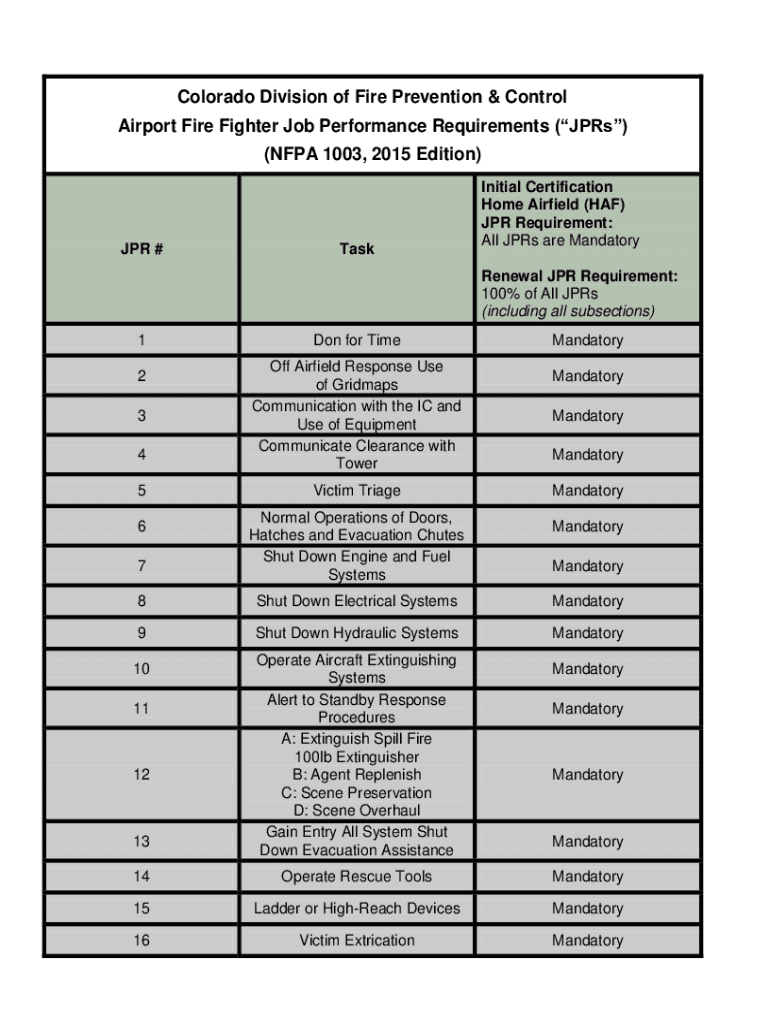
Requirement: All JPRs are Mandatory Renewal JPR Requirement: 100% of All JPRs (including all subsections) 1 2 3 4 5 6 7 Don for Time Off Airfield Response Use of Gridmaps Communication with the IC and Use of Equipment Communicate Clearance with Tower Victim Triage Normal Operations of Doors, Hatches and Evacuation Chutes Shut Down Engine and Fuel Systems Mandatory Mandatory Mandatory Mandatory Mandatory Mandatory Mandatory 8 Shut Down Electrical Systems Mandatory 9 Shut Down Hydraulic S.
Loading

Open form follow the instructions

Easily sign the form with your finger

Send filled & signed form or save
How to fill out the CO NFPA 1003 online
The CO NFPA 1003 form is essential for documenting the job performance requirements for airport firefighters. This guide provides a step-by-step approach to filling out the form online, ensuring clarity and accuracy in your submissions.
Follow the steps to successfully complete the CO NFPA 1003 form online.
- Use the ‘Get Form’ button to access the CO NFPA 1003 form and open it in your document editor.
- Begin by entering your personal details in the designated fields. Include your name, certification ID, and contact information as required.
- Fill out the job performance requirements (JPRs) section, ensuring that all mandatory tasks are included. Each task must be marked as completed once done.
- For each task listed, provide the date of completion and any relevant remarks regarding your performance.
- Review the general skill requirements and ensure that all specified tasks are adequately documented based on your performance.
- Check for any safety violations and add notes where necessary to clarify any issues encountered during training or assessments.
- Once all fields have been completed, you can save your changes, download the form, print it for your records, or share it as needed.
Complete your CO NFPA 1003 documentation online today to maintain your compliance and certification.
Experience a faster way to fill out and sign forms on the web. Access the most extensive library of templates available.
Related content
Home Airfield and Live Burn, NFPA 1003 Standard, 2019 Edition - Updated 10/18/2024...
May 19, 2021 — The NFPA 1003-2019 edition, Professional Qualifications for Airport Fire...
The information contained in this document is subject to change without notice and may not...
Get answers to your most pressing questions about US Legal Forms API.
What is NFPA approval?
NFPA approval indicates that products, systems, or practices meet the standards set by the National Fire Protection Association. This approval reflects an assurance of safety and compliance within the fire protection industry. Understanding NFPA approval is vital for compliance, and US Legal Forms can assist you in obtaining the required documentation, ensuring you are aligned with CO NFPA 1003 regulations.
How to look up NFPA code?
To look up NFPA codes, you can visit the NFPA's official website or refer to their published codes and standards, which provide comprehensive guidelines for fire protection practices. Additionally, many local fire departments and libraries may also have access to NFPA codes for public view. For a more tailored approach, check out US Legal Forms, which offers tools to help you access and understand the relevant codes, including those related to CO NFPA 1003.
How is NFPA rating calculated?
NFPA ratings are calculated based on a comprehensive evaluation of various factors, such as the potential hazards of materials, the degree of hazard, and the environment. The assessment takes into account recommendations and standards established by the National Fire Protection Association. Understanding this calculation process is crucial, and resources like US Legal Forms can help you navigate the necessary documentation and compliance.
How to find NFPA rating?
Finding an NFPA rating can often be done through official NFPA publications or through their website, where you can access detailed product specifications. Additionally, consider contacting manufacturers directly for their product ratings, as they frequently provide this information. To streamline your search for information related to CO NFPA 1003, take advantage of US Legal Forms, which can simplify the process of obtaining necessary documents.
How to get NFPA 1033?
Acquiring NFPA 1033 certification involves meeting the qualifications set by the National Fire Protection Association. This typically includes completing a training program that covers fire investigation fundamentals and passing an examination. Platforms like US Legal Forms can provide valuable resources and templates to help you prepare for the certification process, ensuring you meet all the necessary criteria.
How to get an NFPA rating?
To obtain an NFPA rating, you should start by understanding the specific standards applicable to your situation. The ratings are determined by the National Fire Protection Association, which assesses various factors such as materials, structures, and environmental conditions. Utilizing resources like the US Legal Forms platform can guide you in collecting the necessary documentation and understanding compliance requirements related to CO NFPA 1003.
What does JPR stand for in firefighting?
In firefighting, JPR stands for Job Performance Requirement. These are specific skills and tasks that firefighters must demonstrate to meet the standards set by codes like CO NFPA 1003. Understanding JPRs is crucial for training and operational effectiveness.
How to access NFPA code?
You can access the CO NFPA 1003 code through the official NFPA website or through authorized online platforms. Many institutions also provide copies or subscriptions to ensure compliance with fire safety standards. Additionally, USLegalForms offers resources to help navigate these codes.
How to cite an NFPA code?
Citing the CO NFPA 1003 code involves including the full title, standard number, and any amendments if applicable. Adhere to your specific style guide, whether APA, MLA, or another format, to maintain consistency. Accurate citations enhance the credibility of your documents.
How to reference NFPA code?
When referencing CO NFPA 1003, it’s important to include the standard number, title, and year of adoption. Clearly state the section number and any relevant specifics to make your citation accurate. This approach ensures clarity in your references and supports compliance efforts.
Use professional pre-built templates to fill in and sign documents online faster. Get access to thousands of forms.
If you believe that this page should be taken down, please follow our DMCA take down process here.