Loading
Form preview
  • US Legal Forms
  • Other Templates
  • More Forms
  • More Multi-State Forms
  • Rtl Application - Login - North Carolina Medical Board

Get Rtl Application - Login - North Carolina Medical Board

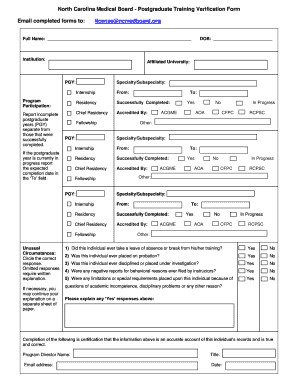
Affiliated University: PGY: Specialty/Subspecialty: Internship From: Program Participation: Residency Successfully Completed: Report incomplete postgraduate years (PGY) separate from those that were successfully completed. Chief Residency Accredited By: Fellowship PGY: If the postgraduate year is currently in progress report the expected completion date in the To field. Yes ACGME No AOA In Progress CFPC RCPSC Other: Specialty/Subspecialty: From: Residency Successfully.

How it works

  1. Open form

    Open form follow the instructions

  2. Easily sign form

    Easily sign the form with your finger

  3. Share form

    Send filled & signed form or save

How to use or fill out the RTL Application - Login - North Carolina Medical Board online

Filling out the RTL Application is an essential step for individuals seeking to verify their postgraduate training with the North Carolina Medical Board. This guide will provide a clear, step-by-step approach to ensure that you can complete the application accurately and efficiently.

Follow the steps to complete the RTL Application - Login.

  1. Click ‘Get Form’ button to obtain the form and open it in the editing interface.
  2. Fill in your full name in the designated space to identify yourself on the application.
  3. Specify the institution where your training took place by entering its name.
  4. Provide the name of your affiliated university to facilitate verification of your training.
  5. Indicate your postgraduate year (PGY) alongside your chosen specialty or subspecialty.
  6. For your internship details, indicate the program participation duration by inputting the associated dates.
  7. Complete the residency section by detailing the successful completion of your residency training, including any chief residency experiences.
  8. If you are currently completing a postgraduate year, enter the expected completion date in the designated ‘To’ field.
  9. Address any unusual circumstances by answering the questions. If any responses require explanation, provide a written response as needed.
  10. Enter your date of birth in the specified space for identity verification.
  11. Certify the information by entering your program director's name, title, and email address followed by the current date.
  12. Once the form is completely filled, review it for accuracy, and then save your changes. You can download, print, or share the completed form as needed.

Complete the RTL Application online now to ensure your postgraduate training verification.

Get form

Experience a faster way to fill out and sign forms on the web. Access the most extensive library of templates available.
Get form

Related content

Resident Training Licenses Must be Updated...
Aug 3, 2021 — 1. Visit the NCTracks Secure Provider Portal (http://www.nctracks.nc.gov/)...
Learn more
Residency Paperwork | Office of the Registrar
Verification of Medical Education: This is North Carolina's licensure form – be sure...
Learn more
Guide for the Analysis of Multimodal Corridor...
Systematic, well-designed, and implementable research is the most effective way to solve...
Learn more

Related links form

PROPERTY DEMAND SURVEY FORM Applicant Details Appl. 1 ... Inb2a Pha Gov Pk Application Form Disney International College Program Role Checklist

Questions & Answers

Get answers to your most pressing questions about US Legal Forms API.

Contact support

The time required to receive an NC PA license typically ranges from three to five weeks after submitting your application. This timeline can vary based on application volume and the completeness of your submission. To enhance your experience, utilize uslegalforms, which can assist you in preparing a thorough application for the RTL Application - Login - North Carolina Medical Board.

To apply for a North Carolina medical license, start by accessing the RTL Application - Login - North Carolina Medical Board site. Complete the application, provide proof of your medical education and training, and ensure all necessary documentation is included. Taking the time to carefully follow the application guidelines can lead to a smoother approval process.

Getting a North Carolina medical license can feel overwhelming, but breaking it down into steps helps simplify the process. The requirements include submitting your RTL Application - Login - North Carolina Medical Board, providing your education and training documentation, and passing the relevant examinations. Many applicants successfully complete these requirements with careful preparation and by utilizing available resources.

To register with the North Carolina Board of Nursing, you need to complete the RTL Application - Login - North Carolina Medical Board online. Create an account, fill out the required forms, and submit the necessary documents, including your educational credentials. Always double-check your submissions to avoid delays in your registration process.

The time it takes to obtain a North Carolina nursing license can vary based on several factors, including the completeness of your application. Generally, you can expect the process to take anywhere from four to six weeks once you submit your RTL Application - Login - North Carolina Medical Board application. To streamline your submission, consider using uslegalforms, which provides guidance through the required steps.

The time it takes to obtain a NC medical license can vary, but typically, it ranges from a few weeks to several months. Once you complete your RTL Application - Login - North Carolina Medical Board and submit all documents, the review process can begin. Stay informed by checking your application status online and responding promptly to any requests from the board.

You can verify your NC medical board license easily by using the RTL Application - Login - North Carolina Medical Board. Simply access the verification section on the website, enter your details, and you will see your license status. This tool is helpful for both practitioners and employers looking to confirm licensure.

To apply for a North Carolina medical license, start by completing the RTL Application - Login - North Carolina Medical Board on the official website. Ensure you gather all necessary documents, including your medical school transcripts and proof of residency. Once you submit your application, monitor its status through the board's portal for updates on your licensure process.

You can contact the North Carolina Medical Board by visiting their official website, where you will find various options for communication, including email and phone numbers. If you prefer a more personal approach, visiting their office in person for questions regarding your application is also an option. Remember, the RTL Application - Login - North Carolina Medical Board may have contact information readily available, simplifying your outreach.

A North Carolina medical license is generally valid for a period of one year before it requires renewal. During that time, it is essential to maintain continuing education and stay compliant with medical board regulations. To avoid any delays, make sure to check the renewal process well ahead of the expiration date. The RTL Application - Login - North Carolina Medical Board simplifies the renewal process, helping you stay up to date effortlessly.

Get This Form Now!

Use professional pre-built templates to fill in and sign documents online faster. Get access to thousands of forms.
Get form
If you believe that this page should be taken down, please follow our DMCA take down processhere.
Get RTL Application - Login - North Carolina Medical Board
Get form
  • Adoption
  • Bankruptcy
  • Contractors
  • Divorce
  • Home Sales
  • Employment
  • Identity Theft
  • Incorporation
  • Landlord Tenant
  • Living Trust
  • Name Change
  • Personal Planning
  • Small Business
  • Wills & Estates
  • Packages A-Z
  • Affidavits
  • Bankruptcy
  • Bill of Sale
  • Corporate - LLC
  • Divorce
  • Employment
  • Identity Theft
  • Internet Technology
  • Landlord Tenant
  • Living Wills
  • Name Change
  • Power of Attorney
  • Real Estate
  • Small Estates
  • Wills
  • All Forms
  • Forms A-Z
  • Other Templates
  • Legal Hub
  • About Us
  • Help Portal
  • Legal Resources
  • Blog
  • Affiliates
  • Contact Us
  • Delete My Account
  • Site Map
  • Industries
  • Forms in Spanish
  • Localized Forms
  • State-specific Forms
  • Forms Kit
  • Real Estate Handbook
  • All Guides
  • Notarize
  • Incorporation services
  • For Consumers
  • For Small Business
  • For Attorneys
  • USLegal
  • FormsPass
  • pdfFiller
  • signNow
  • altaFlow
  • DocHub
  • Instapage
Form Packages
  • Adoption
  • Bankruptcy
  • Contractors
  • Divorce
  • Home Sales
  • Employment
  • Identity Theft
  • Incorporation
  • Landlord Tenant
  • Living Trust
  • Name Change
  • Personal Planning
  • Small Business
  • Wills & Estates
  • Packages A-Z
Form Categories
  • Affidavits
  • Bankruptcy
  • Bill of Sale
  • Corporate - LLC
  • Divorce
  • Employment
  • Identity Theft
  • Internet Technology
  • Landlord Tenant
  • Living Wills
  • Name Change
  • Power of Attorney
  • Real Estate
  • Small Estates
  • Wills
  • All Forms
  • Forms A-Z
  • Other Templates
Customer Service
  • Legal Hub
  • About Us
  • Help Portal
  • Legal Resources
  • Blog
  • Affiliates
  • Contact Us
  • Delete My Account
  • Site Map
  • Industries
  • Forms in Spanish
  • Localized Forms
  • State-specific Forms
  • Forms Kit
Legal Guides
  • Real Estate Handbook
  • All Guides
Prepared for you
  • Notarize
  • Incorporation services
Our Customers
  • For Consumers
  • For Small Business
  • For Attorneys
Our Sites
  • USLegal
  • FormsPass
  • pdfFiller
  • signNow
  • altaFlow
  • DocHub
  • Instapage
Social Media
Call us now toll free:
+1 833 426 79 33
As seen in:
© Copyright 1999-2026 airSlate Legal Forms, Inc. 17 Station Street, Ste. 203, Brookline, MA 02445
  • Your Privacy Choices
  • Terms of Service
  • Privacy Notice
  • Content Takedown Policy
  • Bug Bounty Program