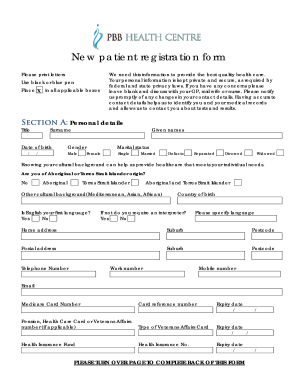
Get Pbb Health Centre New Patient Registration Form
How it works
-

Open form follow the instructions
-

Easily sign the form with your finger
-

Send filled & signed form or save
How to fill out the PBB Health Centre New Patient Registration Form online
This guide provides clear and comprehensive instructions for filling out the PBB Health Centre New Patient Registration Form online. Your personal information is vital for receiving quality health care and is kept secure as mandated by privacy laws.
Follow the steps to complete your registration carefully.
- Press the ‘Get Form’ button to obtain the registration form and open it for editing.
- Begin with Section A: Personal details. Enter your title, surname, date of birth, and given names. Select your gender and marital status by placing a mark in the appropriate box.
- Provide your cultural background. Indicate whether you identify as Aboriginal or Torres Strait Islander and specify if English is your first language. If applicable, indicate whether you require an interpreter and specify the language.
- Fill in your home address along with the suburb and postcode. If your postal address is different, please include that information as well.
- Complete your contact details including telephone, work, mobile numbers, and email address. Also, fill in your Medicare card details including the card number, reference number, and expiry date. Include any relevant pension or health care card numbers if applicable.
- Provide your occupation and religion. Specify your next of kin's name, relationship, and their contact information, alongside an emergency contact's details.
- Move to Section B: Allergies. List any allergies or intolerances to medications and describe your reactions to those medications.
- In this section, also list any regular and complementary medications, including dosages.
- Review Section C: Consent. Indicate if you consent to receive reminders about your health and confirm appointment notifications via SMS.
- Sign the form where indicated, along with the date of signing.
- For Section E: Transfer of health information, note any previous GPs you wish to transfer health records from. Make sure to advise the practice of any changes to your contact or Medicare details.
- Once you have completed the form, ensure all fields are filled correctly. You can then save your changes, download a copy, print the form, or share it as needed.
Start filling out your documents online today for a seamless registration experience.
A new patient registration form is a specific document designed for individuals visiting a healthcare provider for the first time. The PBB Health Centre New Patient Registration Form gathers important information, such as personal details, medical history, and insurance information. This form is essential for ensuring that providers understand your unique health needs. Completing this form accurately allows for a more efficient and personalized healthcare experience.