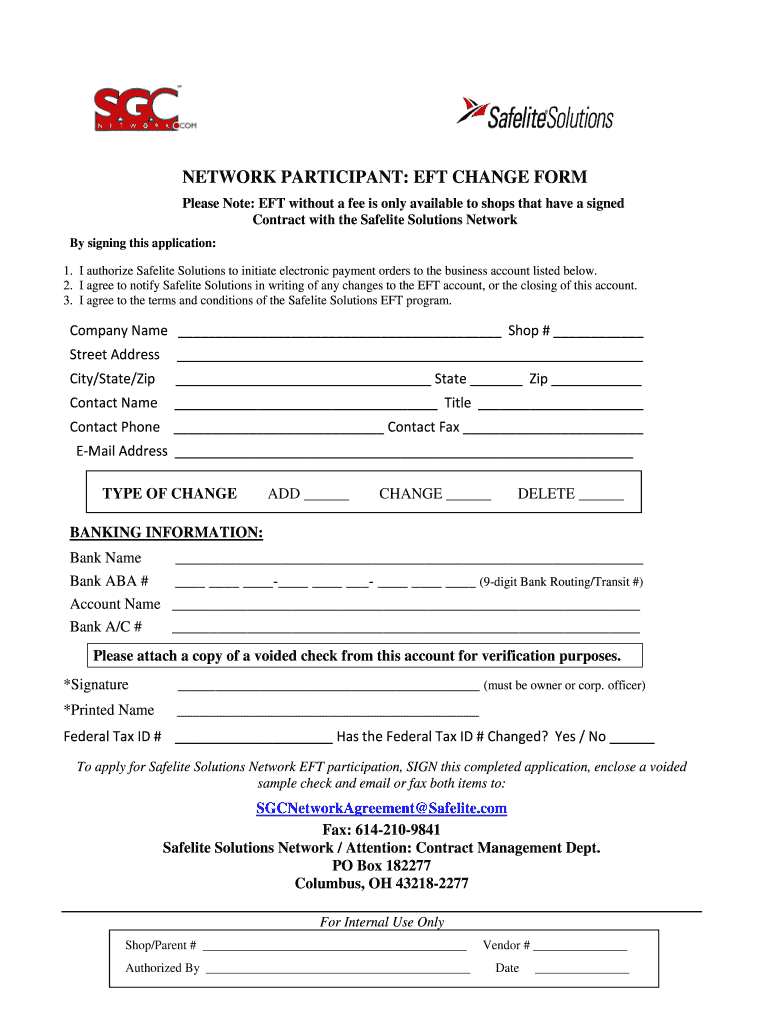
Safelite Solutions to initiate electronic payment orders to the business account listed below. 2. I agree to notify Safelite Solutions in writing of any changes to the EFT account, or the closing of this account. 3. I agree to the terms and conditions of the Safelite Solutions EFT program. Company Name Shop # Street Address City/State/Zip.

Open form follow the instructions

Easily sign the form with your finger

Send filled & signed form or save
How to fill out the Safelite Solutions Network Participant EFT Change Form online
Filling out the Safelite Solutions Network Participant EFT Change Form online is a straightforward process that ensures your electronic payment details are up to date. This guide will walk you through each section of the form, making the process efficient and clear.
Follow the steps to complete the form accurately and efficiently.
- Press the 'Get Form' button to access the Safelite Solutions Network Participant EFT Change Form and open it in your browser.
- In the first section, input your company name and shop number. Ensure this information matches your official documents to avoid processing delays.
- Next, provide your complete street address along with the city, state, and zip code. Confirm the accuracy of your details to facilitate smooth correspondence.
- List the contact person's name and their title within your organization. Include a contact phone number and fax number. This information is crucial for any follow-up communications.
- Enter your email address carefully. It serves as a primary mode for communication regarding your EFT account.
- In the 'Type of Change' section, select the appropriate option by marking 'Add', 'Change', or 'Delete' corresponding to your needs.
- Under banking information, fill in your bank name, ABA routing number, and account name. If unsure about the routing number, consult your bank to ensure accuracy.
- Provide your bank account number. Ensure that all banking details are thoroughly checked to prevent errors in your electronic payments.
- Attach a voided check from the account listed. If you don't have checks available, obtain a counter check from your bank or a verification letter confirming your account details.
- Sign and print your name in the designated sections. The form must be signed by the business owner or a corporate officer.
- Record your Federal Tax ID number correctly. Indicate whether your Federal Tax ID has changed by answering 'Yes' or 'No' as applicable.
- Once you have completed all sections of the form, save any changes, and proceed to download or print the completed form.
- Finally, submit the signed form along with the voided check via email or fax to the provided contact information.
Complete your Safelite Solutions Network Participant EFT Change Form online today to ensure your electronic payments are processed without delay.
Experience a faster way to fill out and sign forms on the web. Access the most extensive library of templates available.
Related content
Historical GSA SmartPay Information. The GSA SmartPay® Program is the largest government...
Sep 24, 2020 — How many total schools were in your district in SY2019-20? 81. What was...
Mar 25, 2021 — If both steps are satisfied, the court must defer to the agency's...
Get answers to your most pressing questions about US Legal Forms API.
What is the phone number for Safelite Solutions Network?
The phone number for Safelite Solutions Network is an essential point of contact for participants needing assistance. By calling this number, you can get support regarding the Safelite Solutions Network Participant EFT Change Form and any other inquiries. It's important to have this number handy to resolve issues quickly and keep your operations running smoothly. For the most accurate and up-to-date contact information, please refer to the official Safelite Solutions Network website.
What is Safelite Solutions Network?
Safelite Solutions Network is a comprehensive platform designed to streamline automotive glass repair and replacement services. Participants in this network benefit from various resources that facilitate better customer service and operational efficiencies. The Safelite Solutions Network Participant EFT Change Form allows participants to manage their payment methods easily and ensure seamless transactions, ultimately enhancing overall service delivery. By joining this network, you gain access to valuable tools that support your business needs.
Use professional pre-built templates to fill in and sign documents online faster. Get access to thousands of forms.
If you believe that this page should be taken down, please follow our DMCA take down process here.