Loading
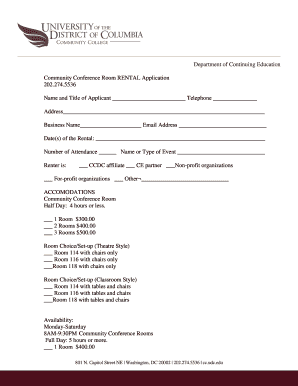
Get Rental Application - Udc Community College
How it works
-

Open form follow the instructions
-

Easily sign the form with your finger
-

Send filled & signed form or save
How to fill out the Rental Application - UDC Community College online
This guide provides a step-by-step approach to filling out the Rental Application for the UDC Community College. Our aim is to help you accurately complete the application to secure a community conference room effectively.
Follow the steps to successfully complete your application.
- Press the ‘Get Form’ button to access the Rental Application form. This will open the form in an editable format for your convenience.
- Begin by entering your name and title as the applicant in the designated fields. Provide a contact telephone number to ensure you can be reached regarding your application.
- Fill in your complete address and the name of your business, if applicable, along with your email address. These details are essential for communication.
- Specify the date(s) you intend to rent the conference room. Use a clear format to prevent any confusion regarding your reservation.
- Indicate the expected number of attendees and provide a brief description of the event for which you are renting the space.
- Select your affiliation by checking the appropriate box: CCDC affiliate, CE partner, non-profit organization, for-profit organization, or other.
- Choose your accommodation type by selecting the appropriate room choice for half-day or full-day rentals, along with your preferred setup style (theatre or classroom). Make sure to review the capacity limits for each room type.
- If you will need food and beverages at the event, mark 'yes' or 'no' in the relevant section.
- If any audiovisual equipment is needed, specify your requirements and list any outside vendor details for additional equipment, if applicable.
- Understand that your reservation is not confirmed until you pay a 25% deposit and sign the rental agreement. Make sure to sign and date the application in the designated sections.
- Once everything is filled out, you can save your changes. Depending on your preference, you may choose to download, print, or share the rental application form.
Take the next step in securing your conference room by completing your rental application online today.
Yes, student apartments typically check rental history as part of the application process. This helps landlords gauge your reliability as a tenant. If you are new to renting, consider explaining your situation in the Rental Application - UDC Community College. Furthermore, providing references or suggesting a co-signer can bolster your application.
Industry-leading security and compliance
US Legal Forms protects your data by complying with industry-specific security standards.
-
In businnes since 199725+ years providing professional legal documents.
-
Accredited businessGuarantees that a business meets BBB accreditation standards in the US and Canada.
-
Secured by BraintreeValidated Level 1 PCI DSS compliant payment gateway that accepts most major credit and debit card brands from across the globe.