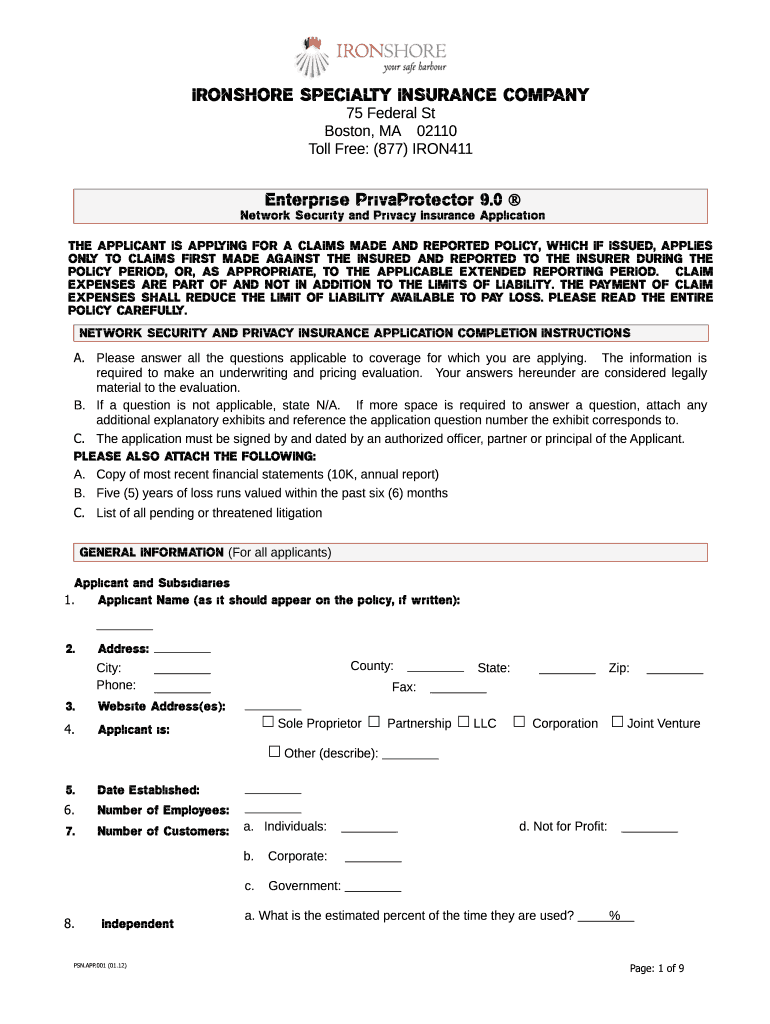
Cation THE APPLICANT IS APPL YING FOR A CLAIMS MADE AND REPORTED POLICY, WHICH IF ISSUED, APPLIES ONL TO CLAIMS FIRST MADE AGAINST THE INSURED AND REPORTED TO THE INSURER DURING THE Y POLICY PERIOD, OR, AS APPROPRIATE, TO THE APPLICABLE EXTENDED REPORTING PERIOD. CLAIM EXPENSES ARE PART OF AND NOT IN ADDITION TO THE LIMITS OF LIABILITY. THE PA YMENT OF CLAIM EXPENSES SHALL REDUCE THE LIMIT OF LIABILITY A AILABLE TO PA LOSS. PLEASE READ THE ENTIRE V Y POLICY CAREFULL Y. NETWORK SECURITY AND PRIV .

Open form follow the instructions

Easily sign the form with your finger

Send filled & signed form or save
How to fill out the Ironshore PSN.APP.001 online
Filling out the Ironshore PSN.APP.001 is an essential step for applicants seeking network security and privacy insurance. This guide provides clear instructions to help you navigate each section of the form efficiently.
Follow the steps to complete your application accurately.
- Click the ‘Get Form’ button to access the application and open it in the editing interface.
- Begin by entering the applicant's name as it should appear on the policy. Ensure the accuracy of this information for proper documentation.
- Fill in the address fields, including street, city, county, state, and zip code. This ensures that all communications are sent to the correct location.
- Provide the primary contact phone number, fax, and any relevant website addresses. These details will facilitate effective communication.
- Indicate the type of business structure by selecting the appropriate option, such as sole proprietor, partnership, LLC, or corporation.
- Specify the date the applicant was established and the number of employees, which gives insight into the operational scale.
- Complete the section regarding the number of customers, segmented as individuals, corporate clients, and government agencies.
- If using independent contractors, please detail their services and number; this information is crucial for assessing risk.
- When applicable, address any inquiries about branch offices and the closure of any such locations in the past five years.
- Attach supplementary documents as needed, such as financial statements, loss runs, and litigation lists.
- Review the requested coverage options carefully. Select any necessary coverages and fill in the relevant requested limits and deductibles.
- Provide detailed information regarding existing insurance coverages if they apply, along with premiums and expiration dates.
- Upon finishing the form, ensure all sections are completed, then save your progress. You can choose to download, print, or share the form as needed.
Start your application today by completing the Ironshore PSN.APP.001 online.
Experience a faster way to fill out and sign forms on the web. Access the most extensive library of templates available.
Related content
... Ironshore Specialty Insurance Company (Ironshore), in the amount of...
Get answers to your most pressing questions about US Legal Forms API.
Why does my phone say too many requests?
If your phone displays a message about too many requests, it usually indicates that the app has exceeded its allowed number of server requests in a given time frame. Using the Ironshore PSN.APP.001 regularly should help you learn the limits and adjust accordingly. It may be beneficial to clear the app’s cache or restart your device if you continue to experience issues.
What is the longest video on PS app?
The longest video available on the PS app varies, but many game trailers and playthroughs can extend up to several hours. To explore content length while using Ironshore PSN.APP.001, navigate to the video section. You can search for popular content among the community to find longer videos readily.
How to bypass 429 too many requests?
While it's not recommended to bypass error 429 by manipulating your requests, you can reduce the number of requests you make to prevent encountering this error. Consider using the features of the Ironshore PSN.APP.001 more strategically. Prioritize important requests and spread tasks over time to sustain smooth access.
Why won't my PS app connect to my PS4?
If your PS app struggles to connect to your PS4, check that both devices are connected to the same Wi-Fi network. Ensure the Ironshore PSN.APP.001 is updated to its latest version. Sometimes, logging out and back into your account can also resolve connection issues.
Does error 429 go away?
Yes, error 429 does go away after a certain time. The Ironshore PSN.APP.001 will automatically resume normal functionality once the rate limit is exceeded and your requests align with the server's capacity. During this waiting period, it is best to refrain from making excessive requests to avoid continuous interruptions.
How do I upload save data to PS app?
Uploading save data to the PS app is straightforward. Begin by navigating to the settings within the Ironshore PSN.APP.001. From there, locate the data management section and select the upload option. Ensure your save data is saved locally, which will allow you to transfer it seamlessly to the cloud.
How to fix this device has sent too many requests?
If your device has sent too many requests, consider waiting for a short period before attempting to use the Ironshore PSN.APP.001 again. This error typically resolves itself after some time. In the meantime, try to adjust the frequency of your requests by pacing your actions within the app.
How do I get rid of too many requests?
To reduce the frequency of too many requests, you can start by closing any unnecessary applications that may be running in the background of your device. Additionally, ensuring a stable internet connection will help improve your experience with the Ironshore PSN.APP.001. If problems persist, you may want to clear your app cache or consider reinstalling the PS app for a fresh start.
Is the PlayStation App real?
Yes, the PlayStation App is a real and official application provided by Sony. This app offers a range of features, including account management and shopping for games. You can also benefit from services linked to Ironshore PSN.APP.001, ensuring a smooth and integrated gaming experience. Make sure to download the official app from trusted sources for optimal security and functionality.
What happened to the PlayStation video app?
The PlayStation video app has been updated, merging into the PlayStation Network services, enhancing accessibility and features for users. With the introduction of Ironshore PSN.APP.001, users can expect better integration of video services within the PlayStation ecosystem. For those looking for video content, you can now access it seamlessly through other existing PlayStation apps.
Use professional pre-built templates to fill in and sign documents online faster. Get access to thousands of forms.
If you believe that this page should be taken down, please follow our DMCA take down process here.