Loading
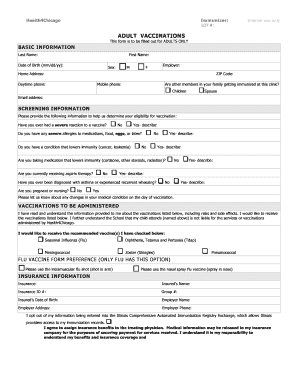
Get Adult Vaccination.doc
How it works
-

Open form follow the instructions
-

Easily sign the form with your finger
-

Send filled & signed form or save
How to fill out the Adult Vaccination.doc online
This guide provides clear and detailed instructions on how to complete the Adult Vaccination.doc form online. With a focus on user-friendly guidance, this resource aims to help individuals navigate each section of the document efficiently.
Follow the steps to successfully complete the form online.
- Click the ‘Get Form’ button to access the Adult Vaccination document and open it in an online editor.
- Begin by filling in your basic information. Enter your last name, first name, and date of birth in the specified formats. Indicate your sex, employer, home address, ZIP code, daytime phone number, mobile phone number, and email address.
- Answer the screening information questions. Indicate whether you have any severe allergies, if you have ever experienced a severe reaction to a vaccine, or if you have a condition that lowers your immunity. Provide details as necessary.
- In the vaccinations section, acknowledge that you have read the supplied information and indicate which vaccinations you wish to receive by checking the appropriate boxes.
- If applicable, select your flu vaccine preference by choosing either the intramuscular shot or the nasal spray option.
- Complete the insurance information section by entering the name of your insurance provider, insured’s name, insurance ID number, group number, insured’s date of birth, employer name, employer address, and employer phone number.
- Indicate whether you opt out of having your information entered into the Illinois Comprehensive Automated Immunization Registry Exchange and agree to assign insurance benefits as described.
- Sign and date the form where indicated to confirm your consent and completion of the document.
- Finally, save your changes, download, print, or share the completed form as needed.
Start filling out your Adult Vaccination.doc form online today for a streamlined vaccination process.
Documentation of an administered vaccine, as included in tools like Quizlet, requires details such as patient identification, date of administration, vaccine type, and provider information. This comprehensive record helps create a clear vaccination history for future use. Ensure that you utilize resources like your Adult Vaccination.doc for a complete understanding of your immunization status.
Industry-leading security and compliance
US Legal Forms protects your data by complying with industry-specific security standards.
-
In businnes since 199725+ years providing professional legal documents.
-
Accredited businessGuarantees that a business meets BBB accreditation standards in the US and Canada.
-
Secured by BraintreeValidated Level 1 PCI DSS compliant payment gateway that accepts most major credit and debit card brands from across the globe.