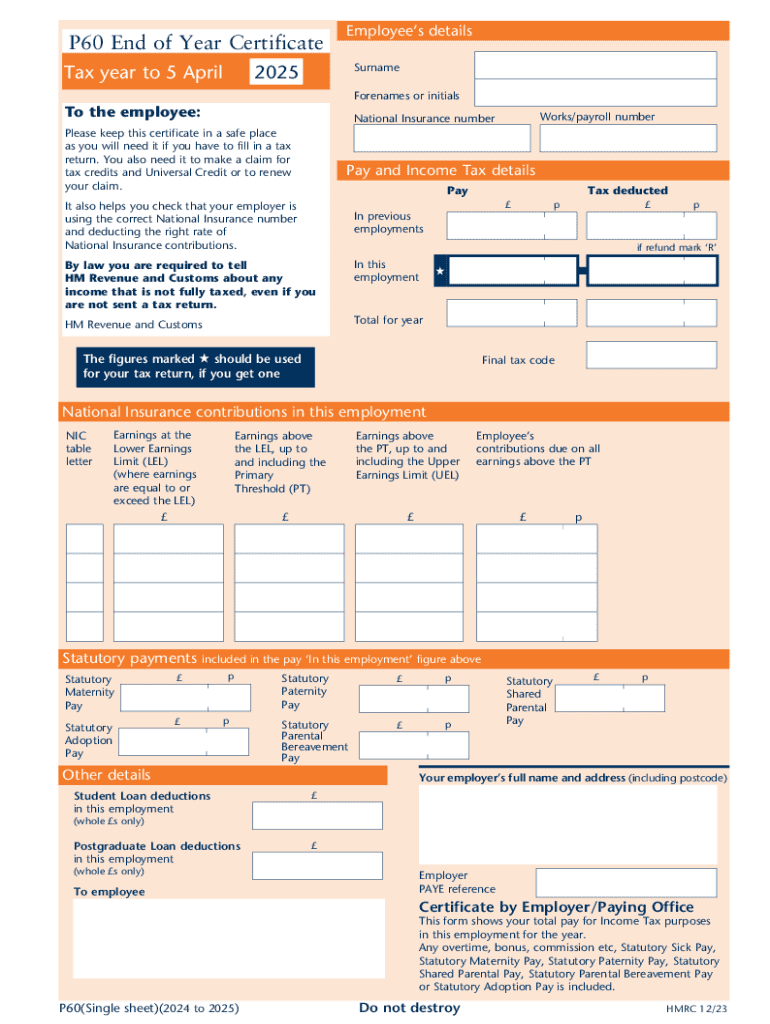
Te in a safe place as you will need it if you have to fill in a tax return. You also need it to make a claim for tax credits and Universal Credit or to renew your claim. Pay and Income Tax details Pay It also helps you check that your employer is using the correct National Insurance number and deducting the right rate of National Insurance contributions. Tax deducted In previous employments p p if refund mark R By law you are required to tell HM Revenue and Customs about any.
Loading

Open form follow the instructions

Easily sign the form with your finger

Send filled & signed form or save
How to fill out the UK HMRC P60 online
The UK HMRC P60 is an important document that summarizes your total pay and taxes for the year. This guide provides a structured approach to completing the P60 online, ensuring you have all the necessary information at your fingertips.
Follow the steps to complete your P60 online effectively.
- Press the 'Get Form' button to retrieve the P60 and open it for editing.
- Begin with the employee’s details section. Enter your surname, forenames or initials, works/payroll number, and National Insurance number accurately.
- In the pay and income tax details section, ensure the 'Pay' field reflects your total earnings for the year. Check the 'Tax deducted' field to confirm the correct amount has been withheld.
- If you had previous employments during the tax year, use the relevant fields to detail those incomes and indicate whether you are seeking a refund by marking 'R' where applicable.
- Review the National Insurance contributions fields, entering figures for earnings at the Lower Earnings Limit, statutory payments, and employee contributions as needed.
- Double-check your employer’s full name and address, ensuring all components are filled out correctly to avoid any discrepancies.
- Finally, after verifying all fields for accuracy, you can proceed to save changes, download, print, or share the completed form as necessary.
Complete your P60 online to ensure accurate tax reporting.
Experience a faster way to fill out and sign forms on the web. Access the most extensive library of templates available.
Related content
A P45 form is a crucial document issued by your employer in the UK when you leave your...
P60 the annual statement of income and deductions provided to you by your employer. You...
At the end of each tax year you should receive a P60 certificate from your employer. This...
Get answers to your most pressing questions about US Legal Forms API.
Can I get my P60 online UK?
Yes, you can obtain your UK HMRC P60 online if your employer offers digital access. Many companies are moving toward electronic records for easy retrieval. Check with your payroll department or employee portal for access. If you need guidance on obtaining your P60, resources like those offered by uslegalforms can be very helpful.
How do I know if I'm due a refund?
To determine if you're due a refund, examine your UK HMRC P60 to assess your total income and tax contributions. Compare this information against your actual income tax liability for the year. If there is a discrepancy indicating an overpayment, you may be eligible for a refund. Seeking assistance through comprehensive platforms like uslegalforms can simplify understanding your tax situation.
What does if refund mark R mean on P60?
If you see a refund mark 'R' on your UK HMRC P60, it indicates you have overpaid your income tax. This status allows you to claim back the excess amount from HMRC. It’s an important indicator of your tax standing for the year. If you have questions about this, platforms like uslegalforms can guide you in claiming your rightful refund.
Do you get a P45 in Ireland?
In Ireland, the P45 is issued to an employee when they leave their job, detailing their earnings and tax contributions up to that point. It's somewhat similar to the UK P60, which is issued annually. If you're working in Ireland, it's important to know how the P45 works to ensure proper tax handling. For comprehensive assistance with tax forms, uslegalforms can be a helpful resource.
Can I get a copy of my P60 online in the UK?
Yes, you can obtain a copy of your UK HMRC P60 online if your employer provides electronic copies. Many employers now offer online access through payroll systems or employee portals. If you cannot find it, contact your employer directly for assistance. Having your P60 readily available helps you keep track of your tax contributions.
What is P11D in the UK?
The P11D form is used in the UK to report benefits and expenses provided to employees. Employers complete this form annually to disclose amounts they need to consider for tax purposes. It is different from the UK HMRC P60, which focuses on income tax and National Insurance contributions. Understanding both forms is essential for accurately managing your tax responsibilities.
What does refund marked R mean on P60?
When you see a refund marked 'R' on your UK HMRC P60, it indicates that you have overpaid your tax for the year. This might happen if you have had periods of non-employment or changes in your earnings. The marked refund represents an amount that you could potentially reclaim. If you need assistance with your tax situation, consider using platforms like uslegalforms.
What does refund mean on tax return?
A refund on your tax return means that you have overpaid your taxes based on your actual earnings. This figure is crucial when completing your UK HMRC P60 as it informs you of any tax discrepancy. If you receive a refund, it serves as a validation of your careful financial planning throughout the year.
What is the equivalent of a P45 in the USA?
The equivalent of a P45 in the USA is the W-2 form, which reports an employee's annual wages and the taxes withheld. Both forms serve a similar purpose by providing vital tax information to both employees and tax authorities. Understanding how these documents function can help streamline your tax process.
What is the refund on the P60?
The refund on the UK HMRC P60 represents any overpayment of tax you made during the tax year. If your income was lower than expected or if you had multiple income sources, you might be due a refund. It is crucial to check your P60 to understand your tax situation fully.
Use professional pre-built templates to fill in and sign documents online faster. Get access to thousands of forms.
If you believe that this page should be taken down, please follow our DMCA take down process here.