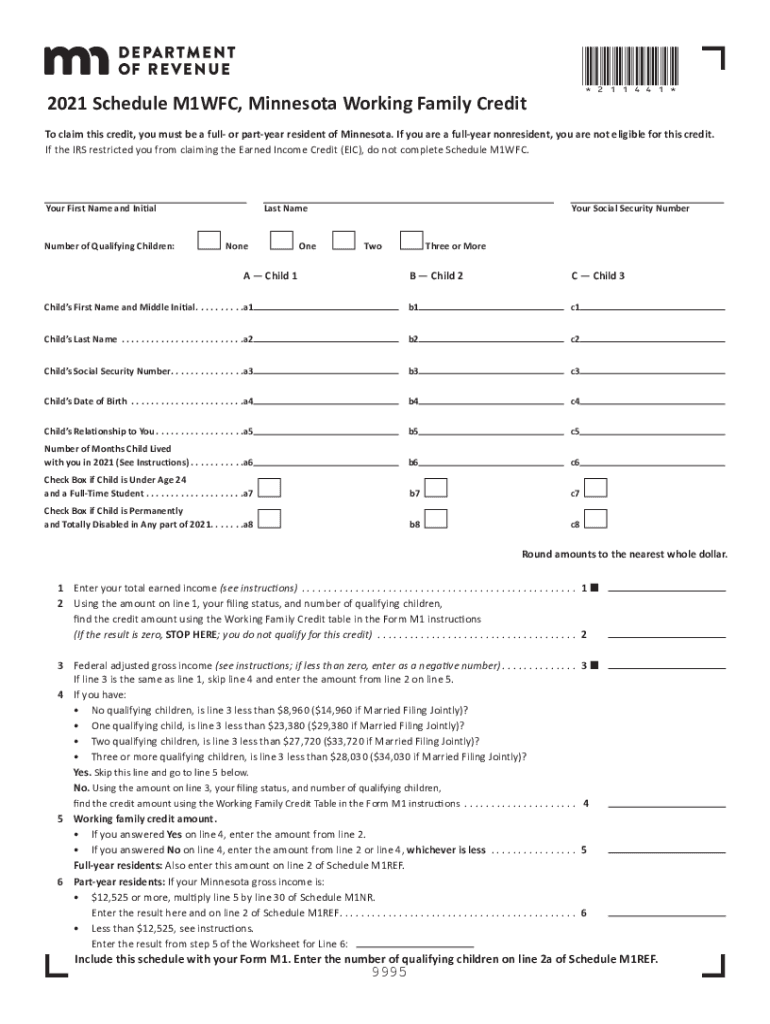
*211441*2021 Schedule M1WFC, Minnesota Working Family CreditTo claim this credit, you must be a full or partyear resident of Minnesota. If you are a fullyear nonresident, you are not eligible for.
Loading

Open form follow the instructions

Easily sign the form with your finger

Send filled & signed form or save
How to fill out the MN DoR Schedule M1WFC online
This guide provides step-by-step instructions on how to fill out the Minnesota Department of Revenue Schedule M1WFC form. Designed to aid both full-year and part-year residents of Minnesota, this guide ensures you accurately complete the form to claim the Working Family Credit.
Follow the steps to fill out the Schedule M1WFC online effectively.
- Click the ‘Get Form’ button to obtain the Schedule M1WFC form and open it in your editor.
- Begin with entering your first name, middle initial, and last name in the respective fields. Next, input your Social Security Number to identify your tax records.
- Specify the number of qualifying children you have by checking the appropriate box: 'None', 'One', 'Two', or 'Three or More'. Then, proceed to enter the information for each qualifying child. You will need to fill out fields for their first name, last name, Social Security Number, date of birth, and relationship to you, making sure to enter the months each child lived with you during 2021.
- If applicable, check the boxes for children who are under age 24 and full-time students or those who are permanently and totally disabled.
- Calculate your total earned income using the relevant worksheets and round the amount to the nearest whole dollar. Enter this figure on line 1 of the form.
- Based on your total earned income and the information provided, refer to the Working Family Credit table to find your credit amount and enter it accordingly.
- Determine your federal adjusted gross income and enter this on line 3, ensuring to check if qualifying income limits apply based on your filing status and number of children.
- Complete the final step by including this schedule with your Form M1 and encoding the number of qualifying children on line 2a of Schedule M1REF before saving your changes, downloading, or printing the form.
Start filling out your MN DoR Schedule M1WFC online to claim your Working Family Credit today!
Experience a faster way to fill out and sign forms on the web. Access the most extensive library of templates available.
Related content
Results 1 - 10 of 80 — Form Search | Minnesota Department of Revenue ... 15.pdf 2016...
The Minnesota Department of Revenue's vision is: “Everyone reports, pays, ... This is...
Dec 12, 2019 — 27 Minnesota. 28 Misisipi. 29 Misuri. 30 Montana. 31 Nebraska. 32 Nevada...
Get answers to your most pressing questions about US Legal Forms API.
What is schedule M1W?
Use Schedule M1W to report your wages and income tax withheld. Only report your Minnesota income tax withheld. Do not report federal income tax withheld, Social Security tax withheld, or another state's tax withheld. Nonresident Partners or Shareholders may have Minnesota tax withheld on Schedule KPI or Schedule KS.
What is Earned Income Tax Credit and how much is it?
Earned income tax credit 2022 For the 2022 tax year (taxes filed in 2023), the earned income credit ranges from $560 to $6,935, depending on your filing status and how many children you have. Below are the maximum 2022 earned income tax credit amounts, plus the max you can earn before losing the benefit altogether.
How do I track my MN property tax refund?
If you are waiting for a refund and want to know its status: Use our Where's My Refund? system. Call our automated phone system (available 24/7) at 651-296-4444 or 1-800-657-3676.
What is an example of earned income tax credit?
Example of the EITC If a taxpayer has a total tax liability of $1,000 and a credit of $1,500, then the taxpayer should be entitled to a refund of $500.
How do I know if I qualify for earned income credit?
To qualify for the EITC, you must: Have worked and earned income under $59,187. Have investment income below $10,300 in the tax year 2022. Have a valid Social Security number by the due date of your 2022 return (including extensions)
Why are MN tax refunds delayed?
Errors on the return and further review by the Minnesota Department of Revenue can also cause a delay. Ensure your tax return is accurate and contains all necessary information. An amended tax return may also cause a refund delay and may be necessary if someone notices an error.
What is the federal earned income tax credit?
The Earned Income Tax Credit (EITC) helps low- to moderate-income workers and families get a tax break. If you qualify, you can use the credit to reduce the taxes you owe – and maybe increase your refund. Did you receive a letter from the IRS about the EITC?
How much is the earned income credit?
Find the maximum AGI, investment income and credit amounts for tax year 2023. The maximum amount of credit: No qualifying children: $600. 1 qualifying child: $3,995.
Use professional pre-built templates to fill in and sign documents online faster. Get access to thousands of forms.
If you believe that this page should be taken down, please follow our DMCA take down process here.