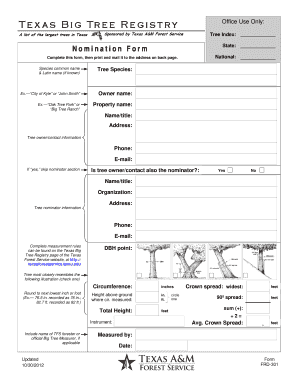
Get Nomination Form - Texas Forest Service
How it works
-

Open form follow the instructions
-

Easily sign the form with your finger
-

Send filled & signed form or save
How to fill out the Nomination Form - Texas Forest Service online
This guide provides clear instructions on how to effectively complete the Nomination Form for the Texas Forest Service. By following these steps, you can ensure that all necessary information is accurately provided, facilitating the nomination process.
Follow the steps to complete the Nomination Form with ease.
- Press the ‘Get Form’ button to obtain the Nomination Form and open it for editing.
- Begin by entering the tree's common name and, if known, the Latin name in the designated fields. This helps identify the specific species you are nominating.
- Fill in the tree species field with the relevant type of tree you are nominating. For example, you might write 'City of Kyle' or 'John Smith' based on the tree's context.
- Provide the owner's name, specifying who owns the tree. You could use examples like 'Oak Tree Park' or 'Big Tree Ranch' as guidance for this section.
- Complete the property name field, which indicates the name or title of the property where the tree is located.
- Input the address of the tree location, ensuring that you include accurate contact information such as phone number and email for the tree owner or contact person.
- Indicate whether the tree owner/contact is also the nominator by selecting 'Yes' or 'No' in the provided field.
- If 'No' is selected, complete the fields for the nominator's name, organization, and address, as well as contact details.
- Follow the measurement rules provided on the Texas Big Tree Registry page to complete necessary measurements, such as diameter at breast height (DBH), circumference, height, and crown spread.
- Record the latitude and longitude in the specified format (degrees/minutes/seconds), and provide written directions to the tree's location.
- Draw a map indicating the location of the tree from the nearest highway or town, providing visual assistance for the location.
- Include any additional relevant information or notes regarding the tree that may be helpful for the registry.
- Complete the form by reviewing all the entered information for accuracy. You can then save your changes, download, print, or share the form as needed.
Take the next step in recognizing Texas's majestic trees by completing your nomination online.
Yes, Texas A&M University offers a comprehensive forestry program that prepares students for careers in forest management, conservation, and environmental science. Students engage in hands-on learning experiences that equip them with practical skills in forestry practices. This program not only provides education but also fosters a connection to the Texas Forest Service. If you're looking to get involved, submitting a Nomination Form - Texas Forest Service through the university can be an excellent start.
Industry-leading security and compliance
-
In businnes since 199725+ years providing professional legal documents.
-
Accredited businessGuarantees that a business meets BBB accreditation standards in the US and Canada.
-
Secured by BraintreeValidated Level 1 PCI DSS compliant payment gateway that accepts most major credit and debit card brands from across the globe.