Loading
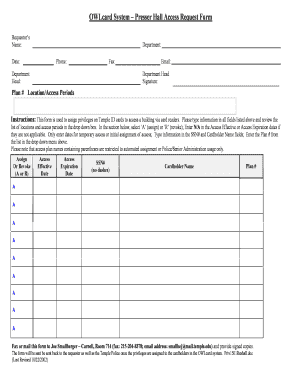
Get Presser Hall Access Request Form
How it works
-

Open form follow the instructions
-

Easily sign the form with your finger
-

Send filled & signed form or save
How to fill out the Presser Hall Access Request Form online
Filling out the Presser Hall Access Request Form online is an important step for users seeking to assign or revoke access privileges on Temple ID cards. This guide will walk you through the process, ensuring that you complete the form accurately and efficiently.
Follow the steps to complete your request effectively.
- Click ‘Get Form’ button to access the Presser Hall Access Request Form and open it for editing.
- In the requestor’s name field, enter the name of the individual submitting the request. This should be the person responsible for ensuring the form is filled out correctly.
- Fill in the department field with the appropriate department name, which will help identify the request within the organizational context.
- Provide the current date in the date field for record-keeping purposes.
- Enter the phone number in the phone field, ensuring it is a number where the requestor can be reached for any follow-up inquiries.
- If applicable, provide a fax number in the fax field, although this is optional.
- Enter the email address in the email field to facilitate communication regarding the request.
- The department head signature field should be signed by the department head, confirming the request.
- Fill in the department head’s name to identify the signatory on the form.
- Select the plan number from the dropdown menu indicating the requested access period and location.
- Decide whether to assign or revoke access by selecting 'A' for assign or 'R' for revoke.
- For access effective and expiration dates, only enter dates if temporary access or initial assignment is requested; otherwise, use 'N/A'.
- Enter the Social Security Number without dashes in the SSN# field to facilitate identification.
- Type the cardholder name in the designated field to ensure correct identification of the individual receiving access.
- Once all fields are completed, review the information for accuracy before proceeding.
- Finally, fax or mail the completed form to Joe Smallberger in Carnell, Room 714. Be sure to include the signed copies and keep track of the contact information for future correspondence.
Start filling out your Presser Hall Access Request Form online today to ensure your access needs are met.
Industry-leading security and compliance
US Legal Forms protects your data by complying with industry-specific security standards.
-
In businnes since 199725+ years providing professional legal documents.
-
Accredited businessGuarantees that a business meets BBB accreditation standards in the US and Canada.
-
Secured by BraintreeValidated Level 1 PCI DSS compliant payment gateway that accepts most major credit and debit card brands from across the globe.