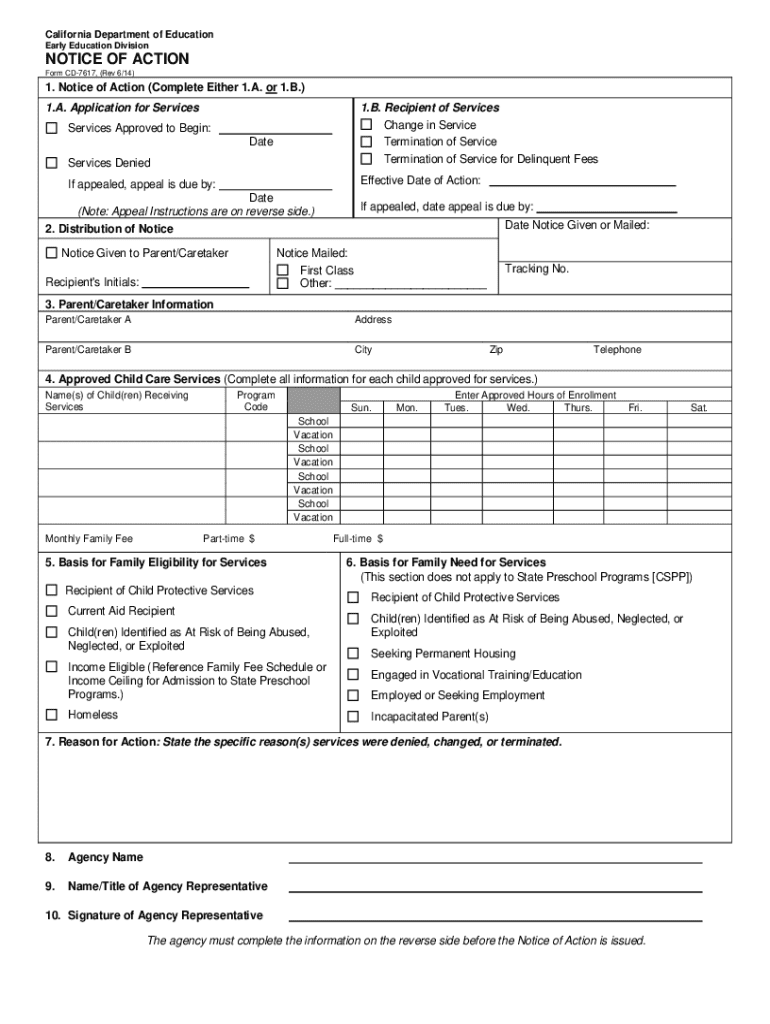
This form is used to notify parents or caretakers about the status of their application for child care services, including approval, denial, changes, or termination of services. It includes sections.
Loading

Open form follow the instructions

Easily sign the form with your finger

Send filled & signed form or save
How to fill out the CA Form CD-7617 online
Filling out the CA Form CD-7617 correctly is essential for ensuring that your application for services is processed efficiently. This guide provides a clear, step-by-step approach to completing the form online, helping users navigate each section with ease.
Follow the steps to complete the CA Form CD-7617 effectively.
- Click ‘Get Form’ button to retrieve the CA Form CD-7617 and open it in the appropriate editor to begin filling it out.
- In section 1, select either 1.A or 1.B to indicate whether you are applying for services or notifying of a change or termination of services.
- In section 1.A, if you're applying for services, mark 'Services Denied' if applicable. In section 1.B, indicate if the recipient of services is changing or being terminated for any reason, including delinquent fees. Fill in the effective date of action and the date services are approved to begin.
- Complete section 2 by noting how the notice was given to the parent or caretaker. Indicate whether it was mailed first class or through another method and add the recipient's initials and tracking number if applicable.
- In section 3, provide the information for parent/caretaker A and B, including names, addresses, cities, zip codes, and telephone numbers.
- Section 4 requires details about the approved child care services. Enter the names of children receiving services, the program code, and their approved hours of enrollment for each day of the week, including school vacations.
- For section 5, indicate the basis for family eligibility for services by selecting the appropriate options such as aid recipient status or child protective services.
- In section 6, outline the family's need for services, noting any relevant circumstances such as housing instability or need for employment assistance.
- Specify the reasons for action in section 7, detailing why services were denied, changed, or terminated.
- Complete sections 8 through 10 by providing the agency name, the representative's name and title, and obtain the signature of the agency representative.
- Finally, review all entered information, make any necessary changes, and save the completed form. You can download, print, or share the form as needed.
Start filling out your CA Form CD-7617 online today to ensure timely processing of your application.
Experience a faster way to fill out and sign forms on the web. Access the most extensive library of templates available.
Related content
Forms for contractors of Early Learning and Care Division subsidized child care to give...
to exceed three years form the date on which the Board of. Trustees recognizes the...
Producing Software, Corel PDF Engine Version 10.397 ... transmitted, transcribed...
Get answers to your most pressing questions about US Legal Forms API.
How do I pay an invoice on stripe?
By default, customers can pay invoices with any of the payment methods that you enable in your invoice template. If you're a first-time user, Stripe automatically enables card, Link, bank transfers, Cash App Pay, and WeChat Pay payment methods.
What is launch servicing loan?
Launch Servicing is here to assist you from the time we start servicing your loans until they are paid in full. We recognize the repayment period can sometimes be challenging. That's why we make loan repayment easy, offering you a variety of repayment options.
Who owns FedLoan servicing?
FedLoan Servicing is a student loan servicer for federal and private student loans operated by the Pennsylvania Higher Education Assistance Agency (PHEAA), a nonprofit providing financial aid services and administering several state grant programs.
Who owns Launch Servicing LLC?
Launch is a wholly-owned subsidiary of Goal Structured Solutions, who is the largest third-party provider of student loan services and currently manages a portfolio of over $26 billion.
Is launch servicing a debt collector?
Launch Servicing, LLC California Debt Collection License #: 10174-99 As required by law, you are hereby notified that a negative credit report reflecting on your credit record may be submitted to a credit reporting agency if you fail to fulfill the terms of your credit obligations.
Who owns launch servicing?
Launch Servicing is a wholly owned subsidiary of Goal Structured Solutions that provides third party servicing of student loans. Our Mission is to be a trusted partner who delivers exceptional loan servicing, maximizing the experience and results for all stakeholders.
What is the revenue of launch servicing?
Launch Servicing's revenue is $20.7 Million What is Launch Servicing's SIC code? Launch Servicing's SIC: 61,616 What is Launch Servicing's NAICS code?
What is payment before delivery of goods?
Common payment terms PIA: This stands for “payment in advance,” meaning payment must be made in full before the goods or services will be delivered. CIA: This stands for “cash in advance,” which means the full payment must be made in cash before the goods or services will be delivered.
Use professional pre-built templates to fill in and sign documents online faster. Get access to thousands of forms.
If you believe that this page should be taken down, please follow our DMCA take down process here.