We use cookies to improve security, personalize the user experience, enhance our marketing activities (including cooperating with our marketing partners) and for other business use.
Click "here" to read our Cookie Policy. By clicking "Accept" you agree to the use of cookies. Read less
Read more
Accept
Loading
Form preview
  • US Legal Forms
  • Form Library
  • More Forms
  • More Multi-State Forms
  • International Student Address Student Signature - Registrar ...

Get International Student Address Student Signature - Registrar ...

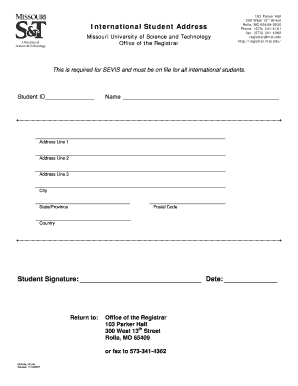
62 registrar mst.edu http://registrar.mst.edu/ This is required for SEVIS and must be on file for all international students. Student ID Name Address Line 1 Address Line 2 Address Line 3.

How it works

  1. Open form

    Open form follow the instructions

  2. Easily sign form

    Easily sign the form with your finger

  3. Share form

    Send filled & signed form or save

How to fill out the International Student Address Student Signature - Registrar online

Filling out the International Student Address Student Signature form is a vital step for international students, ensuring compliance with SEVIS requirements. This guide provides clear, step-by-step instructions to help you complete the form accurately and efficiently.

Follow the steps to complete your form online.

  1. Click ‘Get Form’ button to obtain the form and open it in the editor.
  2. Enter your Student ID in the designated field. This identifier is crucial for your records.
  3. Fill in your full name, ensuring the accuracy of spelling as it appears on your official documents.
  4. Provide your address. Start with Address Line 1. If necessary, fill in Address Line 2 and Address Line 3.
  5. Next, enter the city you reside in. Ensure this aligns with the address provided.
  6. Select your State or Province from the dropdown menu to accurately represent your location.
  7. Fill in the Postal Code appropriate for your address, ensuring it corresponds to your chosen city.
  8. Indicate your Country in the following field. This is essential for establishing your international status.
  9. Sign the form in the Student Signature section. Be sure to date the signature correctly.
  10. Finally, save your changes, and decide whether to download, print, or share the completed form as per your requirements.

Complete your form online to ensure timely processing and compliance.

Get form

Experience a faster way to fill out and sign forms on the web. Access the most extensive library of templates available.
Get form

Related content

Students and the Form I-20 | Study in the States
All F and M students that study in the United States need a Form I-20, “Certificate of...
Learn more
Forms for F-1 Students | ISSS - University of...
Aug 5, 2024 — Forms for F-1 Students · Travel Signature · Replace a...
Learn more
international student ID - NamuWiki
Apr 16, 2025 — The issuance cost is 3,500 won, and you can pick up the card for free, or...
Learn more

Related links form

CT DRS CT-1041 2021 NY DTF IT-2104 2022 Form CT-1041 K-1T, Transmittal Of Schedule CT-1041 K-1 ... NYC TC201_DSA

Questions & Answers

Get answers to your most pressing questions about US Legal Forms API.

Contact support

An international student declaration is a formal statement indicating your status as a student studying in a foreign country. This document typically includes your personal information, program details, and confirmation that you are adhering to study permit regulations. You may require this declaration for various administrative processes, including the International Student Address Student Signature - Registrar.

When searching for affordable options, consider institutions like Miami Dade College or Lone Star College. These colleges offer competitive tuition rates and valuable programs for international students. It's important to compare tuition costs and potential fees. Always check the latest rates on their official websites to ensure you're getting the most accurate information.

In general, USCIS forms should be signed in blue ink to ensure the validity of the application. Using blue ink helps USCIS differentiate between the original and duplicate submissions. For additional clarification, you can always refer to guidelines from your institution or legal advisors.

Most institutions prefer the I-20 form to be printed in color, especially the signature and seal sections. This requirement helps prevent fraud and misrepresentation. Always verify with your particular institution's guidelines, as they may provide specific instructions regarding the I-20 format.

The local address for international students refers to the place where you currently reside while studying in the U.S. This address may differ from your permanent address in your home country. It is crucial to provide the local address on forms, including your I-20 and SEVIS, to ensure proper correspondence and compliance with regulations.

For your I-20 form, it is typically required that the signature appears in blue ink. This requirement ensures that your signature is original and easily identifiable. Always check the latest guidelines from your institution or Registrar to confirm this requirement and avoid delays.

When completing the SEVIS form, it is essential to provide your current address. This address should reflect your actual residence in the United States and must be kept up-to-date. Remember, maintaining accurate information helps ensure a smooth process at the Registrar's office and supports your status as an international student.

As an international student, your permanent address is the address that you have on record in your home country. This is often the address you provide when applying for your student visa and entering the United States. Keeping both your permanent address and current address updated is crucial for receiving information from your institution and for legal documentation. Make sure to communicate any changes to your registrar promptly.

The I-20 form does not necessarily need to be signed in blue ink, but it is recommended. Many institutions prefer signatures in blue ink for authenticity, which makes it distinct from photocopies. Always verify the specific requirements set by your school or the appropriate regulatory body. This adherence helps ensure your compliance with the International Student Address Student Signature - Registrar standards.

To register as a student on SEVIS, you must begin by obtaining Form I-20 from your institution. After receiving this form, create an account on the SEVIS website. Follow the instructions provided to complete your registration. Remember, this ties into the International Student Address Student Signature - Registrar process, ensuring that your record reflects accurate and current information.

Get This Form Now!

Use professional pre-built templates to fill in and sign documents online faster. Get access to thousands of forms.
Get form
If you believe that this page should be taken down, please follow our DMCA take down processhere.

Industry-leading security and compliance

US Legal Forms protects your data by complying with industry-specific security standards.
  • In businnes since 1997
    25+ years providing professional legal documents.
  • Accredited business
    Guarantees that a business meets BBB accreditation standards in the US and Canada.
  • Secured by Braintree
    Validated Level 1 PCI DSS compliant payment gateway that accepts most major credit and debit card brands from across the globe.
Get International Student Address Student Signature - Registrar ...
Get form
Form Packages
Adoption
Bankruptcy
Contractors
Divorce
Home Sales
Employment
Identity Theft
Incorporation
Landlord Tenant
Living Trust
Name Change
Personal Planning
Small Business
Wills & Estates
Packages A-Z
Form Categories
Affidavits
Bankruptcy
Bill of Sale
Corporate - LLC
Divorce
Employment
Identity Theft
Internet Technology
Landlord Tenant
Living Wills
Name Change
Power of Attorney
Real Estate
Small Estates
Wills
All Forms
Forms A-Z
Form Library
Customer Service
Terms of Service
Privacy Notice
Legal Hub
Content Takedown Policy
Bug Bounty Program
About Us
Help Portal
Legal Resources
Blog
Affiliates
Contact Us
Delete My Account
Site Map
Industries
Forms in Spanish
Localized Forms
State-specific Forms
Forms Kit
Legal Guides
Real Estate Handbook
All Guides
Prepared for You
Notarize
Incorporation services
Our Customers
For Consumers
For Small Business
For Attorneys
Our Sites
US Legal Forms
USLegal
FormsPass
pdfFiller
signNow
airSlate WorkFlow
DocHub
Instapage
Social Media
Call us now toll free:
+1 833 426 79 33
As seen in:
  • USA Today logo picture
  • CBC News logo picture
  • LA Times logo picture
  • The Washington Post logo picture
  • AP logo picture
  • Forbes logo picture
© Copyright 1997-2025
airSlate Legal Forms, Inc.
3720 Flowood Dr, Flowood, Mississippi 39232
Form Packages
Adoption
Bankruptcy
Contractors
Divorce
Home Sales
Employment
Identity Theft
Incorporation
Landlord Tenant
Living Trust
Name Change
Personal Planning
Small Business
Wills & Estates
Packages A-Z
Form Categories
Affidavits
Bankruptcy
Bill of Sale
Corporate - LLC
Divorce
Employment
Identity Theft
Internet Technology
Landlord Tenant
Living Wills
Name Change
Power of Attorney
Real Estate
Small Estates
Wills
All Forms
Forms A-Z
Form Library
Customer Service
Terms of Service
Privacy Notice
Legal Hub
Content Takedown Policy
Bug Bounty Program
About Us
Help Portal
Legal Resources
Blog
Affiliates
Contact Us
Delete My Account
Site Map
Industries
Forms in Spanish
Localized Forms
State-specific Forms
Forms Kit
Legal Guides
Real Estate Handbook
All Guides
Prepared for You
Notarize
Incorporation services
Our Customers
For Consumers
For Small Business
For Attorneys
Our Sites
US Legal Forms
USLegal
FormsPass
pdfFiller
signNow
airSlate WorkFlow
DocHub
Instapage
Social Media
Call us now toll free:
+1 833 426 79 33
As seen in:
  • USA Today logo picture
  • CBC News logo picture
  • LA Times logo picture
  • The Washington Post logo picture
  • AP logo picture
  • Forbes logo picture
© Copyright 1997-2025
airSlate Legal Forms, Inc.
3720 Flowood Dr, Flowood, Mississippi 39232