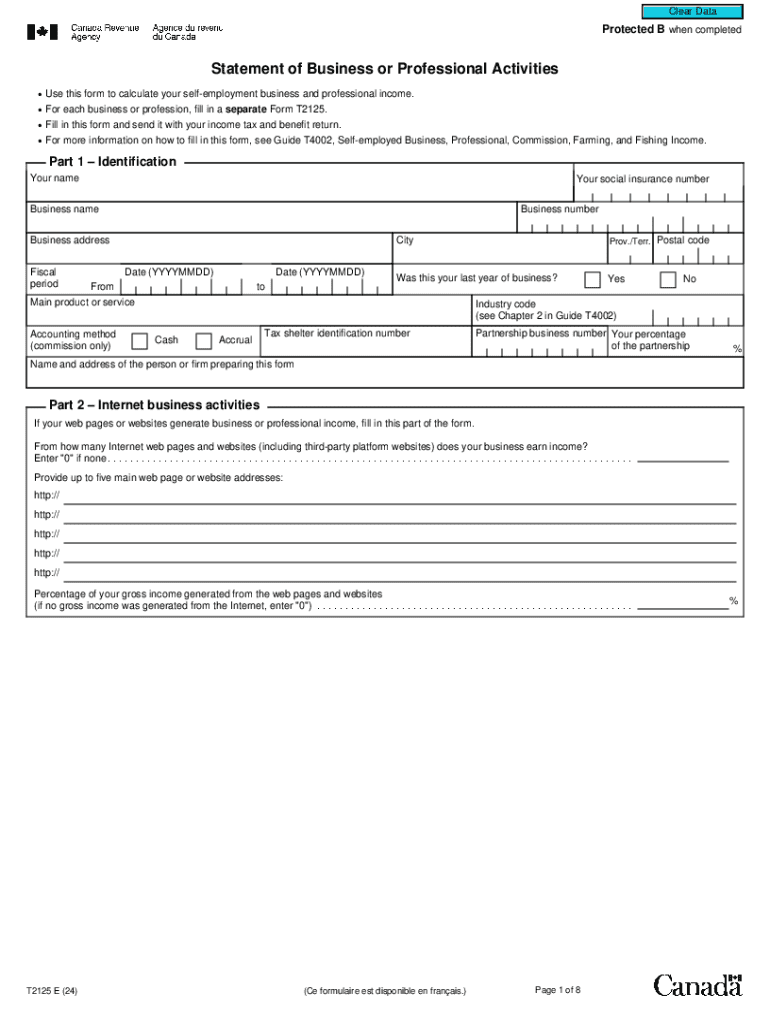
Clear Data Protected B when completed Statement of Business or Professional Activities Use this form to calculate your self-employment business and professional income. For each business or.
Loading

Open form follow the instructions

Easily sign the form with your finger

Send filled & signed form or save
How to fill out the Canada T2125 online
The Canada T2125 form, known as the Statement of Business or Professional Activities, is essential for self-employed individuals to report their business and professional income. This guide offers professional and instructive steps to help users fill out the form accurately online.
Follow the steps to complete your Canada T2125 online effectively.
- Press the ‘Get Form’ button to access the T2125 form, ensuring you open it in a suitable online editor.
- In Part 1, fill in your personal identification details, including your name, social insurance number, business name, and business address. Indicate the fiscal period by entering the start and end dates.
- Specify whether this is your last year of business and provide information about your main product or service, accounting method, and industry code.
- In Part 2, report any internet business activities. Input the number of websites generating income and list the main web addresses. Calculate the percentage of gross income coming from these online sources.
- Proceed to Part 3A for business income or Part 3B for professional income. Detail gross sales or professional fees, deduct any applicable taxes, and calculate adjusted amounts as instructed.
- In Part 4, calculate your net income before adjustments by listing all business expenses across several categories, from advertising to utilities.
- Complete subsequent sections, including those for deductions related to partnerships and business-use-of-home expenses, ensuring accuracy in all amounts claimed.
- After filling out all relevant sections, review the form for completion and correctness, then save your changes.
- Finally, download your completed T2125 form, print it if needed, or share it as required before submitting it with your income tax return.
Start filling out your Canada T2125 online today to ensure your self-employment income is reported accurately.
Experience a faster way to fill out and sign forms on the web. Access the most extensive library of templates available.
Related content
AN ACT CONCERNING EXPENDITURES AND REVENUE FOR THE BIENNIUM ENDING JUNE 30, 2005. Be it...
Then, you must submit the 2023 Canadian T5013(s) and T2125(s) for each business/farm via...
Complete Canada Revenue Agency Form T2121 or T2125. Additional Materials required from...
Get answers to your most pressing questions about US Legal Forms API.
What is the 90% rule for newcomers to Canada?
The 90% rule for newcomers pertains to the income reporting obligations they face in Canada. Newcomers must declare income from all sources, but they can take specific deductions to reduce their taxable income. Understanding this rule can be particularly helpful when completing the Canada T2125 form, as it aids in accurate income reporting. It is essential to stay informed to fulfill tax responsibilities properly.
How do I enter Canadian income in TurboTax?
To enter Canadian income in TurboTax, first select the 'self-employment' section of the program. Then, input your income as reported on your Canada T2125 form. TurboTax provides guidance throughout the process, making it easier to complete your tax return. By following the prompts, you can ensure that your reporting is accurate and complete.
How much income from a side hustle needs to be reported?
In Canada, you must report all income from your side hustle, regardless of the amount. Even if you earn a small amount, it should be declared on your income tax return and the Canada T2125 form. Full transparency in reporting your side hustle income is vital and can prevent complications with tax authorities. Ensure you understand the reporting requirements to maintain compliance.
How to report side hustle income in Canada?
To report side hustle income in Canada, you must include your earnings on your income tax return. You will use the Canada T2125 form to declare your business revenue and any associated expenses. This comprehensive reporting allows you to accurately reflect your income situation. Remember, being clear about your side hustle income helps you stay compliant with the tax regulations.
How to calculate small business deduction Canada?
To calculate your small business deduction in Canada, you start by determining your active business income. After that, you can apply the federal and provincial tax rates to this income. Using the Canada T2125 form helps track your income and expenses, which is essential for this calculation. The deduction reduces your taxable income, so it can significantly lower the taxes you owe.
What is the 90% rule in Canada?
The 90% rule in Canada refers to a guideline for self-employed individuals regarding income. Specifically, it means you need to report all income earned, but if you make some expenses, they need to be for business purposes. Understanding the 90% rule is crucial, especially when completing your Canada T2125 form. Accurate reporting ensures compliance and helps you avoid issues with the Canada Revenue Agency.
How do I prove I am self-employed in Canada?
To prove you are self-employed in Canada, you typically need to provide documentation such as your Canada T2125 form, business registration, or client contracts. Keeping detailed records of your income and expenses is also helpful. These documents can support your claims when dealing with financial institutions or during tax assessments.
Are tax forms available at the post office?
Many post offices provide access to Canadian tax forms, but it varies by location. If you're looking for a specific form like the Canada T2125, it's best to contact your local post office to confirm availability. For greater convenience, the CRA website remains an excellent resource to access and print forms.
Can you still get paper tax forms?
Yes, you can still request paper tax forms, such as the Canada T2125, from the CRA. However, digital options have become more popular, as they allow for easier access and faster submission. If you prefer paper forms, ensure you order them early enough to meet your filing deadlines.
How do I qualify for small business deductions in Canada?
To qualify for small business deductions in Canada, ensure you report all eligible income and expenses on your Canada T2125 form. You must be self-employed and running a business generating revenue. Familiarize yourself with the specific deductions available, such as expenses for home office or business travel.
Use professional pre-built templates to fill in and sign documents online faster. Get access to thousands of forms.
If you believe that this page should be taken down, please follow our DMCA take down process here.