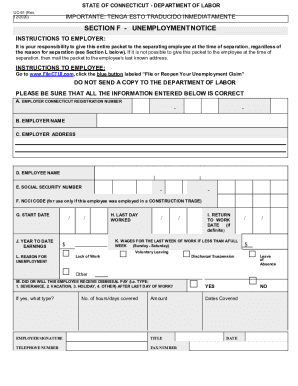
IMPORTANTE: TENGA ESTO TRADUCIDO INMEDIATAMENTE UC62 T (R.3/2020)STATE OF CONNECTICUT DEPARTMENT OF LABORINFORMATION FOR FILING YOUR INITIAL UNEMPLOYMENT CLAIM FILE BY INTERNET 24 HOURS/7 DAYS A.

How it works
  • Open form

    Open form follow the instructions

  • Easily sign form

    Easily sign the form with your finger

  • Share form

    Send filled & signed form or save

How to fill out the CT UC-62 T online

This guide provides clear instructions on filling out the CT UC-62 T form for filing your initial unemployment claim online. Ensure that you have all necessary information ready to facilitate a smooth filing process.

Follow the steps to complete the CT UC-62 T form effectively.

  1. Click ‘Get Form’ button to access the CT UC-62 T form and open it in your browser.
  2. Begin by filling in Section A, which includes general information regarding your identity and claim. Ensure accuracy in your name, address, and Social Security number.
  3. Proceed to Section B, where you will file your claim. Follow the instructions carefully, providing details about your employment history and the reason for unemployment.
  4. In Section C, if applicable, indicate if you wish to voluntarily withhold taxes from your unemployment benefits. This includes federal and state taxes based on the provided guidelines.
  5. Review all sections to confirm that all information is accurate and complete. Remember that errors can delay the processing of your claim.
  6. Once you have finalized your entries, you can choose to save your changes, download the form for your records, or print it directly.
  7. Submit your completed form through the designated online process, ensuring to adhere to any additional instructions given.

Start filling out the CT UC-62 T online today to apply for your unemployment benefits.

Get form

Experience a faster way to fill out and sign forms on the web. Access the most extensive library of templates available.

Related content

Shared Work CT - CT.gov

Already a Shared Work employer? Amended/Corrected Certification Report (PDF, 235KB) ·...

Learn more
Connecticut Agricultural Business Management Guide

Sep 22, 2011 — Determine the legal form of your business; sole proprietor, limited...

Learn more
Parental leave - Wikipedia

Parental leave, or family leave, is an employee benefit available in almost all countries...

Learn more
Questions & Answers

Get answers to your most pressing questions about US Legal Forms API.

Contact support

How do I get through to unemployment in CT?

Unemployment Insurance (UI), booklets containing laws - (860) 263-6755. Unemployment Insurance Claimant Inquiries: ... Unemployment Insurance Employer Inquiries: ... Unfair Labor Practices - (860) 566-4398. Union Complaints Against Employers - (860) 263-6860.

After that date, you must file a claim or check your account status at: www.FileCTUI.com. Connecticut Department of Labor (CT DOL) Dial to File Applying for Unemployment Benefits in Connecticut is now done online by visiting, www.FileCTUI.com, and clicking on File or Reopen Your Unemployment Claim button.

Conn. Agencies Reg., § 31-222-9 requires all employers to provide employees with a signed and completed unemployment notice (form UC-61) and employee information packet immediately upon layoff or separation from employment.

The referee will mail you the decision in about two to four weeks. If you lose, you will not be able to get unemployment until you get another job and earn enough money to be eligible. This normally takes about 5 weeks.

Get This Form Now!

Use professional pre-built templates to fill in and sign documents online faster. Get access to thousands of forms.

If you believe that this page should be taken down, please follow our DMCA take down process here.

Get CT UC-62 T