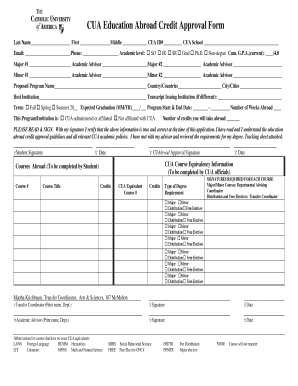
Get Last Name First Middle Cua Id# Cua School - Cuabroad Cua
How it works
-

Open form follow the instructions
-

Easily sign the form with your finger
-

Send filled & signed form or save
How to fill out the Last Name First Middle CUA ID# CUA School - Cuabroad CUA online
This guide offers a detailed walkthrough for users looking to complete the Last Name First Middle CUA ID# CUA School - Cuabroad CUA online form. Each section of the form is explained to ensure clarity and accuracy during the submission process.
Follow the steps to fill out the form accurately.
- Click 'Get Form' button to access the form and open it in the digital document editor.
- Begin by entering your last name in the designated space, followed by your first name and middle name if applicable. Ensure you spell each name correctly.
- Input your CUA ID number in the provided field. This information is vital for identifying your academic records.
- Select your CUA school from the dropdown menu or text entry. This should reflect your current academic affiliation.
- Provide your email address and phone number for contact purposes. Ensure that these are active and monitored regularly.
- Indicate your academic level by checking the appropriate box, selecting from sophomore, junior, senior, graduate, Ph.D., or non-degree status.
- Enter your cumulative GPA on a scale of 4.0 in the specified field.
- Fill in the information for your primary major, including the major name and the academic advisor’s name. Repeat this process for any additional majors and minors.
- Provide the proposed program name, host institution, and location where you will study abroad. Include the country and city/cities.
- Select the term for which you are applying — Fall, Spring, or Summer — and fill in the expected graduation date, program start and end dates, and the total number of weeks you will spend abroad.
- Indicate whether the program is CUA-administered or affiliated. This is critical for understanding the relationship between your home institution and the host institution.
- Specify the number of credits you aim to take abroad. This number may impact your degree requirements.
- Read the agreement at the bottom of the form. By signing, you affirm the accuracy of the provided information and your understanding of the education abroad credit approval guidelines.
- Finally, add your signature and the date. Ensure you also have space available for the required signatures from CUA officials.
- Once completed, you can save changes, download the document, print it for physical submission, or share it as needed.
Complete your documentation online now to ensure a smooth application process.
In the context of education, CUA stands for Catholic University of America, an institution that integrates academics with spiritual development. Students at CUA benefit from a robust educational framework that promotes critical thinking and ethical leadership. The university's diverse programs challenge students to achieve their goals and contribute to society. Enrolling at CUA provides an opportunity to blend academic pursuits with a rich spiritual life.
Industry-leading security and compliance
-
In businnes since 199725+ years providing professional legal documents.
-
Accredited businessGuarantees that a business meets BBB accreditation standards in the US and Canada.
-
Secured by BraintreeValidated Level 1 PCI DSS compliant payment gateway that accepts most major credit and debit card brands from across the globe.