Loading
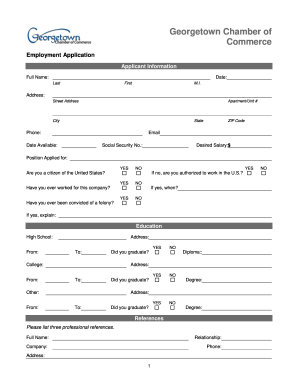
Get Georgetown Chamber Of Commerce Employment Application
How it works
-

Open form follow the instructions
-

Easily sign the form with your finger
-

Send filled & signed form or save
How to fill out the Georgetown Chamber of Commerce Employment Application online
Completing the Georgetown Chamber of Commerce Employment Application online can be a simple and efficient process with the right guidance. This guide will help you navigate each section of the application, ensuring that you provide all necessary information accurately and completely.
Follow the steps to complete your employment application successfully.
- Click ‘Get Form’ button to obtain the form and open it for completion.
- Begin by entering your applicant information. Fill in your full name, including last name, first name, and middle initial. Provide your current address, including street address, apartment/unit number (if applicable), city, state, and ZIP code. Complete the phone number and email fields as well.
- Indicate your availability date and input your Social Security number. State your desired salary and the position you are applying for.
- Respond to the citizenship question by indicating if you are a citizen of the United States. If you answer 'no', specify if you are authorized to work in the U.S. Provide details regarding your previous employment with the company, including any felony convictions, if applicable.
- Move on to the education section. List your high school information, including whether you graduated, along with your college education if applicable. Provide specific details like the address and graduation status.
- Fill out the references section by listing three professional references. For each reference, provide their full name, relationship to you, company, phone number, and address.
- In the previous employment section, list your past employers starting with the most recent. Include the company name, phone number, address, supervisor name, job title, starting and ending salary, responsibilities, and reasons for leaving.
- For each previous employer listed, indicate if they may contact your previous supervisor for a reference.
- If applicable, complete the military service section, including the branch, rank at discharge, dates of service, and type of discharge.
- Finally, review the disclaimer and signature section. Certify the accuracy of your information by signing and dating the application.
- Once all fields are completed, save any changes made to the document. You can download, print, or share the completed application as needed.
Begin completing your Georgetown Chamber of Commerce Employment Application online now.
Industry-leading security and compliance
US Legal Forms protects your data by complying with industry-specific security standards.
-
In businnes since 199725+ years providing professional legal documents.
-
Accredited businessGuarantees that a business meets BBB accreditation standards in the US and Canada.
-
Secured by BraintreeValidated Level 1 PCI DSS compliant payment gateway that accepts most major credit and debit card brands from across the globe.