Loading
Get Account Or Fund Number And Percentage Allocated To Each In The - Hr Virginia
How it works
-

Open form follow the instructions
-

Easily sign the form with your finger
-

Send filled & signed form or save
How to use or fill out the Account Or Fund Number And Percentage Allocated To Each In The - Hr Virginia online
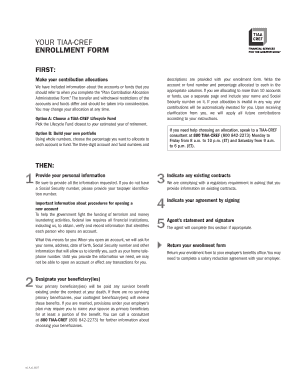
Filling out the Account Or Fund Number And Percentage Allocated To Each In The - Hr Virginia form is crucial for managing your contributions effectively. This guide will walk you through each section of the form, ensuring you understand how to allocate your contributions properly.
Follow the steps to complete your allocation form accurately.
- Click the ‘Get Form’ button to obtain the form and access it in the document editor.
- Begin filling out the form by providing your personal information, including full name, Social Security number, and contact details in the designated sections.
- Select Option A or Option B for your allocation strategy. Option A is to choose a TIAA-CREF Lifecycle Fund, while Option B allows you to build your own portfolio by entering the account or fund numbers and the corresponding allocation percentages.
- If you select Option B, ensure that you list the percentages allocated to each account or fund in whole numbers, making sure that the total equals 100%. If you exceed this number or leave it empty, default allocations may apply.
- Designate your beneficiary or beneficiaries, ensuring that their respective percentages also total 100%. Fill in their names, Social Security numbers, and other requested information.
- Indicate any existing contracts you may have, which may affect your enrollment and allocations.
- Review all entered details for accuracy before signing the document. Ensure that you agree to the terms outlined regarding your contributions.
- Once completed, return your enrollment form as instructed, ensuring all relevant details are accurate.
Start completing your forms online today to manage your contributions effectively.
Industry-leading security and compliance
US Legal Forms protects your data by complying with industry-specific security standards.
-
In businnes since 199725+ years providing professional legal documents.
-
Accredited businessGuarantees that a business meets BBB accreditation standards in the US and Canada.
-
Secured by BraintreeValidated Level 1 PCI DSS compliant payment gateway that accepts most major credit and debit card brands from across the globe.