Loading
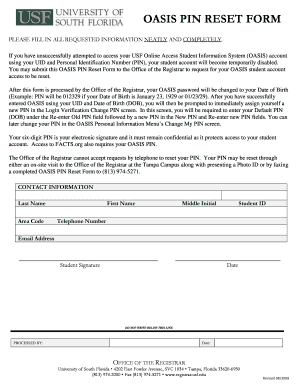
Get Oasis Pin Reset Form - Office Of The Registrar - University Of South ...
How it works
-

Open form follow the instructions
-

Easily sign the form with your finger
-

Send filled & signed form or save
How to fill out the OASIS PIN Reset Form - Office Of The Registrar - University Of South Florida online
Resetting your OASIS PIN is essential for regaining access to your student information system. This guide will walk you through each step to successfully complete the OASIS PIN Reset Form online, ensuring a smooth and efficient process.
Follow the steps to fill out the OASIS PIN Reset Form.
- Press the ‘Get Form’ button to obtain the OASIS PIN Reset Form, which you will need to open and complete.
- Fill in your last name in the designated field, ensuring it is spelled correctly to match your records.
- Enter your first name and middle initial, if applicable, in the provided spaces.
- Provide your student ID number, which identifies you within the university system.
- Fill in your telephone number, including the area code, so the registrar's office can contact you if needed.
- Include your email address in the appropriate field for any further communications regarding your request.
- Sign the form in the student signature section to authorize the request. Ensure that your signature matches your official university records.
- Indicate the date on which you are submitting the form, which is necessary for processing your request.
- Once all fields are neatly and completely filled out, review the form for accuracy. Save changes as needed, and prepare to submit the completed form by faxing it to the registrar's office at (813) 974-5271.
Complete the OASIS PIN Reset Form online today to regain access to your student account.
All USC faculty, staff, and students receive a USC NetID account, also known as your Shibboleth or enterprise account. These accounts grant you access to your USC email account, USC network and wireless services, and a wide variety of online services, including the Brightspace learning management system and Workday.
Industry-leading security and compliance
US Legal Forms protects your data by complying with industry-specific security standards.
-
In businnes since 199725+ years providing professional legal documents.
-
Accredited businessGuarantees that a business meets BBB accreditation standards in the US and Canada.
-
Secured by BraintreeValidated Level 1 PCI DSS compliant payment gateway that accepts most major credit and debit card brands from across the globe.