Loading
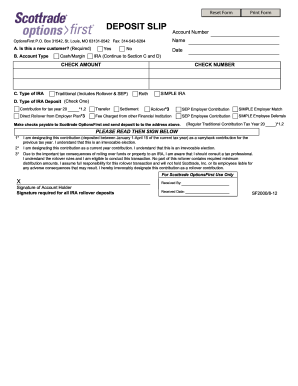
Get Scottrade Ira Deposit Slip 2012-2026
How it works
-

Open form follow the instructions
-

Easily sign the form with your finger
-

Send filled & signed form or save
How to fill out the Scottrade IRA Deposit Slip online
Filling out the Scottrade IRA Deposit Slip online is an essential step for users wishing to manage their IRA contributions effectively. This guide provides you with clear, step-by-step instructions to ensure a smooth completion of the form.
Follow the steps to complete your deposit slip accurately
- Click ‘Get Form’ button to retrieve the deposit slip and open it in your editor.
- Enter your account number in the designated field. Ensure that the number is correct to avoid processing issues.
- Fill in your name in the appropriate section. This should match the name on your account.
- Indicate whether you are a new customer by selecting 'Yes' or 'No' in Section A.
- Select your account type in Section B by choosing either 'Cash/Margin' or 'IRA'. If you select 'IRA', proceed to complete Sections C and D.
- In Section C, specify the type of IRA by selecting from the options: 'Traditional', 'Roth', or 'SIMPLE IRA'. Make sure to choose the one that applies to your situation.
- In Section D, select the type of IRA deposit you are making by checking the appropriate box. Options include contributions for the current tax year, rollovers, transfers, and employer contributions.
- Indicate the check amount on the designated line and enter the check number if applicable.
- Read the statements provided, then sign and date the form in the designated signature area. This signature is required for all IRA rollover deposits.
- Review all entries for accuracy, and once confirmed, you can save changes, download, print, or share the completed deposit slip as needed.
Complete your Scottrade IRA Deposit Slip online today to ensure your contributions are processed smoothly.
To file your IRA contributions, gather the necessary forms, including form 5498. Use your Scottrade IRA Deposit Slip to help calculate the total amount contributed over the year. Then, report this information accurately on your tax return.