Loading
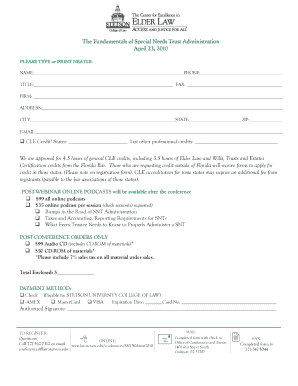
Get Post-webinar Form 2010.indd - Stetson University College Of Law - Law Stetson
How it works
-

Open form follow the instructions
-

Easily sign the form with your finger
-

Send filled & signed form or save
How to fill out the Post-Webinar Form 2010.indd - Stetson University College Of Law - Law Stetson online
Filling out the Post-Webinar Form 2010 is an essential step for participants looking to gain continuing legal education credits and obtain audio materials from the webinar. This guide outlines the necessary steps to complete the form accurately and effectively.
Follow the steps to fill out the form online.
- Click the ‘Get Form’ button to access the Post-Webinar Form 2010. This will open the form in a new window for you to begin completing it.
- Begin by providing your name, phone number, and title in the designated fields. Make sure to type or print clearly to ensure accurate processing.
- Fill out the firm name and address information. Include the city, state, and ZIP code in their respective fields.
- Enter your email address for correspondence. This will be important for confirmation of your submission and any future communications.
- Indicate if you are requesting CLE credits. List the states for which you are seeking credits and any additional professional credits in the provided space.
- Review the options for online podcasts and post-conference audio materials. Check the sessions you are interested in, and calculate the total cost, including sales tax if applicable.
- Select your payment method from the options provided, including check, AMEX, MasterCard, or VISA. Fill in the required payment information accurately.
- Sign the form in the designated area to authorize your payment and acknowledge your registration details.
- Once you have completed the form, you can save your changes. You may also download, print, or share the form as necessary before final submission.
Complete your Post-Webinar Form online to access valuable resources and credits.
Industry-leading security and compliance
US Legal Forms protects your data by complying with industry-specific security standards.
-
In businnes since 199725+ years providing professional legal documents.
-
Accredited businessGuarantees that a business meets BBB accreditation standards in the US and Canada.
-
Secured by BraintreeValidated Level 1 PCI DSS compliant payment gateway that accepts most major credit and debit card brands from across the globe.