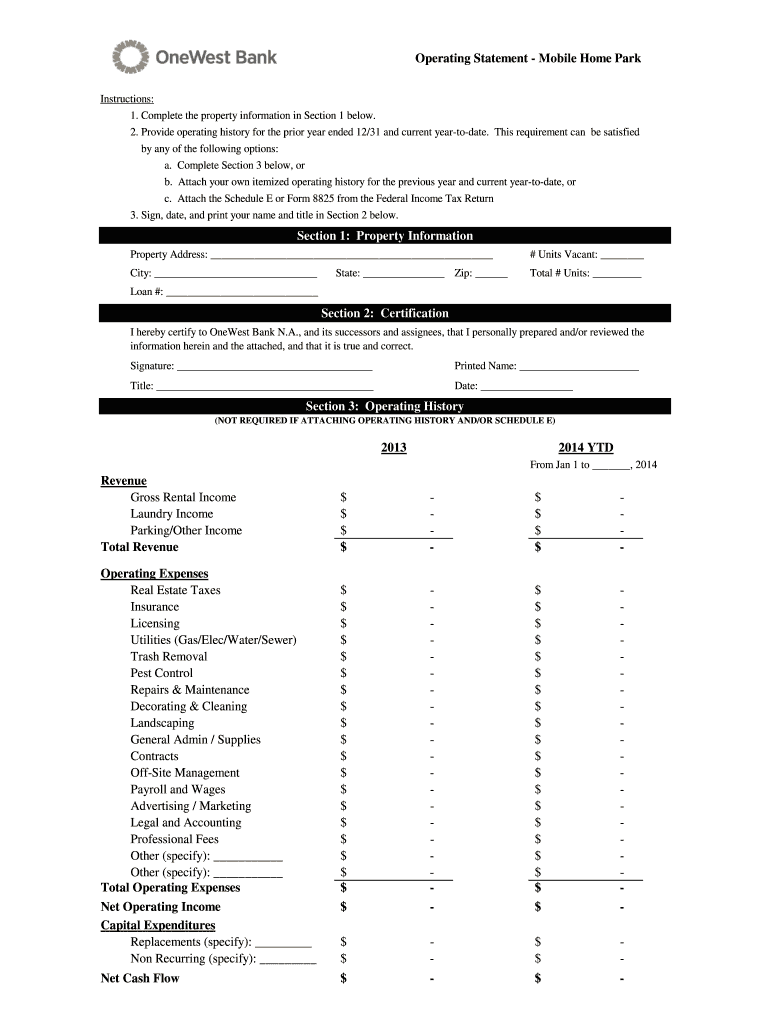
Operating Statement - Mobile Home Park Instructions: 1. Complete the property information in Section 1 below. 2. Provide operating history for the prior year ended 12/31 and current year-to-date.
Loading

Open form follow the instructions

Easily sign the form with your finger

Send filled & signed form or save
How to fill out the OneWest Bank Operating Statement MHP online
Filling out the OneWest Bank Operating Statement MHP online can streamline your documentation process and ensure accurate reporting. This guide provides clear instructions on how to complete each section of the form effectively.
Follow the steps to accurately complete your operating statement.
- Click ‘Get Form’ button to obtain the form and open it in the editor.
- In Section 1, enter the property information. Fill in the property address, number of vacant units, city, total number of units, state, zip code, and loan number as applicable.
- Provide the operating history for the prior year ended 12/31 and current year-to-date. You can either complete Section 3, attach your own itemized operating history, or include the Schedule E or Form 8825 from your Federal Income Tax Return.
- In Section 2, certify the accuracy of the information provided. Sign, print your name, and state your title, along with the date.
- Once all sections are completed, review your entries for accuracy. Save any changes made to the online document.
- Finally, download, print, or share the completed form as needed.
Complete your documents online today for quick and efficient processing.
Experience a faster way to fill out and sign forms on the web. Access the most extensive library of templates available.
Related content
... statements relating to the Company’s current business plan and expectations...
by K Eggert · 2011 · Cited by 13 — Not coincidentally, federally regulated banks and...
Get answers to your most pressing questions about US Legal Forms API.
What happened to OneWest Bank?
OneWest Bank was acquired by CIT Group in a strategic move to expand banking services and enhance customer offerings. As a result, customers now access their banking needs through CIT Bank, though the legacy services, such as the OneWest Bank Operating Statement MHP, remain available. This merger aims to combine resources for better service and access for all banking clients.
Where can I get my bank statement online?
You can easily access your bank statement online through the CIT Bank website. Once you log into your account, head to the statements section, and you'll find your OneWest Bank Operating Statement MHP readily available for download. This way, you can efficiently manage your financial documents with just a few clicks.
What bank is Bank One now?
Bank One is now known as part of JPMorgan Chase after its merger. If you were a customer seeking your statements, you might encounter some information linked to the OneWest Bank Operating Statement MHP as well, depending on the transfers and records during the merger. It's essential to check with JPMorgan Chase for any past account details.
Does OneWest Bank still exist?
OneWest Bank, as a standalone entity, does not exist anymore; it has been merged into CIT Bank. However, you can still access your previous account information and services, including the OneWest Bank Operating Statement MHP, under the CIT Bank platform. This transition aims to provide clients with an even broader range of banking services.
What is the new name for OneWest Bank?
The new name for OneWest Bank is CIT Bank, following the acquisition by CIT Group. Despite the name change, many of the products and services continue to operate under the OneWest Bank Operating Statement MHP framework. So, if you are searching for specific services, look for CIT Bank alongside OneWest functionalities.
Is OneWest Bank the same as CIT?
OneWest Bank is now a part of CIT Group, having merged to enhance its banking services. While the brands have merged, you may still find references to OneWest Bank in some documentation and services, including the OneWest Bank Operating Statement MHP. Thus, for clarity, it's important to understand they are now under the CIT umbrella but serve similar client needs.
How do I get a running bank statement?
To get a running bank statement from OneWest Bank, you can log into your online banking account. Simply navigate to the statements section and select the date range for the statement you need. Alternatively, you may request a physical statement by contacting customer service directly. Remember, your OneWest Bank Operating Statement MHP will provide detailed account transactions.
What bank does this routing number belong to 122000247?
Routing number 122000247 is associated with Wells Fargo Bank. This routing number is commonly used for various types of transactions, including ACH and wire transfers. If you're navigating financial statements, such as the OneWest Bank Operating Statement MHP, using accurate routing information is crucial for effective banking.
What bank is routing number 122037760?
The routing number 122037760 belongs to the New York branch of JPMorgan Chase Bank. This routing number facilitates transactions for accounts within this branch. If you're dealing with financial records, including the OneWest Bank Operating Statement MHP, it is important to reference the correct routing numbers for smooth processing.
Did First Citizens Bank buy Silicon Valley Bank?
Yes, First Citizens Bank did indeed acquire the assets and deposits of Silicon Valley Bank in March 2023. This acquisition significantly expanded First Citizens Bank's footprint in the banking sector. For clients needing details about their banking history or related documents like the OneWest Bank Operating Statement MHP, US Legal Forms can provide the necessary resources.
Use professional pre-built templates to fill in and sign documents online faster. Get access to thousands of forms.
If you believe that this page should be taken down, please follow our DMCA take down process here.