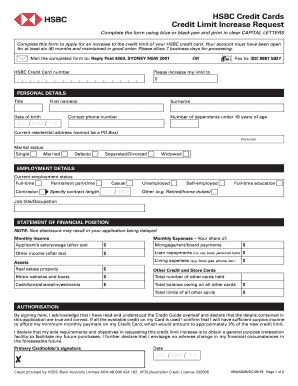
To the credit limit of your HSBC credit card. Your account must have been open for at least six (6) months and maintained in good order. Please allow 7 business days for processing. Mail the completed form to: Reply Paid 4263, SYDNEY NSW 2001 HSBC Credit Card number OR Fax to: (02) 8987 5927 Please increase my limit to $ PERSONAL DETAILS Title First name(s) Date of birth DD Surname Contact phone number Number of dependants under 18 years of age MM YY Current residential address (cann.
Loading
Open form follow the instructions
Easily sign the form with your finger
Send filled & signed form or save
How to fill out the HSBC Credit Cards HBAA528VCC online
This guide provides clear, step-by-step instructions for completing the HSBC Credit Cards HBAA528VCC form online. Following these detailed directions will help ensure that your application for a credit limit increase is submitted accurately.
Follow the steps to complete your credit limit increase request form.
- Press the ‘Get Form’ button to obtain the form and open it in an online editor.
- Begin by entering your HSBC credit card number as requested at the top of the form.
- In the personal details section, fill in your title, first name(s), surname, date of birth, contact phone number, and current residential address. Be sure to enter this information in clear capital letters.
- Indicate your marital status by selecting one of the options provided: single, married, de facto, separated/divorced, or widowed.
- Next, complete your employment details, including your current employment status and job title/occupation. If you are a contractor, specify the contract length.
- Move on to the statement of financial position section. Accurately fill in your monthly expenses and income as requested. Include figures for your salary, other income, mortgage or rent, loan repayments, and living expenses.
- Provide information regarding your financial assets, including real estate, motor vehicles, cash, and investments, as well as details about other credit and store cards.
- In the authorisation section, read thoroughly and then sign to acknowledge that you have understood the credit guide and that the information provided is accurate. Print your name and provide the date.
- Once you have filled out the form entirely, save your changes, then download, print, or share the completed form according to your preference.
Complete your HSBC Credit Cards HBAA528VCC form online today to request your credit limit increase.
Experience a faster way to fill out and sign forms on the web. Access the most extensive library of templates available.
Related content
... 738704 terms 738152 parameter 728946 library 726826 option 726721 view 720749 lang...
Get answers to your most pressing questions about US Legal Forms API.
How to autofill card information?
To autofill your card information, enable the autofill feature in your web browser's settings. When entering details for your HSBC Credit Cards HBAA528VCC for the first time, save your card data securely. In future transactions, your browser will suggest or automatically fill in your information, streamlining the checkout process.
How do I fill out my credit card information?
When filling out your credit card information, start with your name, then enter the card number associated with your HSBC Credit Cards HBAA528VCC. After that, provide the expiration date and security code found on the back of the card. Ensure you input each detail accurately to avoid any transaction issues.
How to find HSBC credit card sort code and account number?
You typically find your HSBC credit card sort code and account number on your bank statements or within your online banking account. If you have your HSBC Credit Cards HBAA528VCC, log into your account to view these details. Alternatively, your sort code may also appear on checks linked to your HSBC account.
What is the correct format for credit card number?
The correct format for a credit card number follows a 16-digit pattern, commonly arranged in four groups of four digits. For example, the number on your HSBC Credit Cards HBAA528VCC will look something like this: 1234 5678 9012 3456. Always ensure you enter the number without spaces or dashes when prompted online.
How to check HSBC credit card online?
To check your HSBC credit card online, go to the HSBC website and log into your account. Then, select the credit card option to view all relevant information about your HSBC Credit Cards HBAA528VCC. This process allows you to keep track of your finances, transactions, and rewards in one convenient location.
How can I check my credit card details online?
To check your credit card details online, visit the HSBC website and log into your account. Navigate to the credit card management section, where you can view your HSBC Credit Cards HBAA528VCC details, including your credit limit, transactions, and payment history. This transparency helps in managing your card effectively.
How to see credit card details on HSBC app?
To see your credit card details through the HSBC app, open the app and log in to your account. Once logged in, select your HSBC Credit Cards HBAA528VCC, and you will be able to view your balance, recent transactions, and any offers available to you at a glance. This feature enhances the accessibility of your account on the go.
How can I check my credit card online?
You can check your credit card details online by logging into your HSBC online banking account. Look for the 'Credit Card' tab to view your balance, transaction history, and payment due dates associated with your HSBC Credit Cards HBAA528VCC. This makes it convenient for you to monitor your finances at any time.
How do I view my HSBC credit card statement online?
To view your HSBC credit card statement online, log in to your HSBC online banking account. Then, navigate to the 'Statements' section, where you will find monthly statements for your HSBC Credit Cards HBAA528VCC. This feature helps you keep track of your spending and manage your finances effectively.
How to find HSBC credit card number?
You can easily find your HSBC credit card number printed on the front of your card. If you don’t have your card, you can access your card details online through your HSBC account. You simply need to log into your account, and navigate to the card section for your HSBC Credit Cards HBAA528VCC.
Use professional pre-built templates to fill in and sign documents online faster. Get access to thousands of forms.
If you believe that this page should be taken down, please follow our DMCA take down process here.
This form is available in several versions. Select the version you need from the drop-down list below.