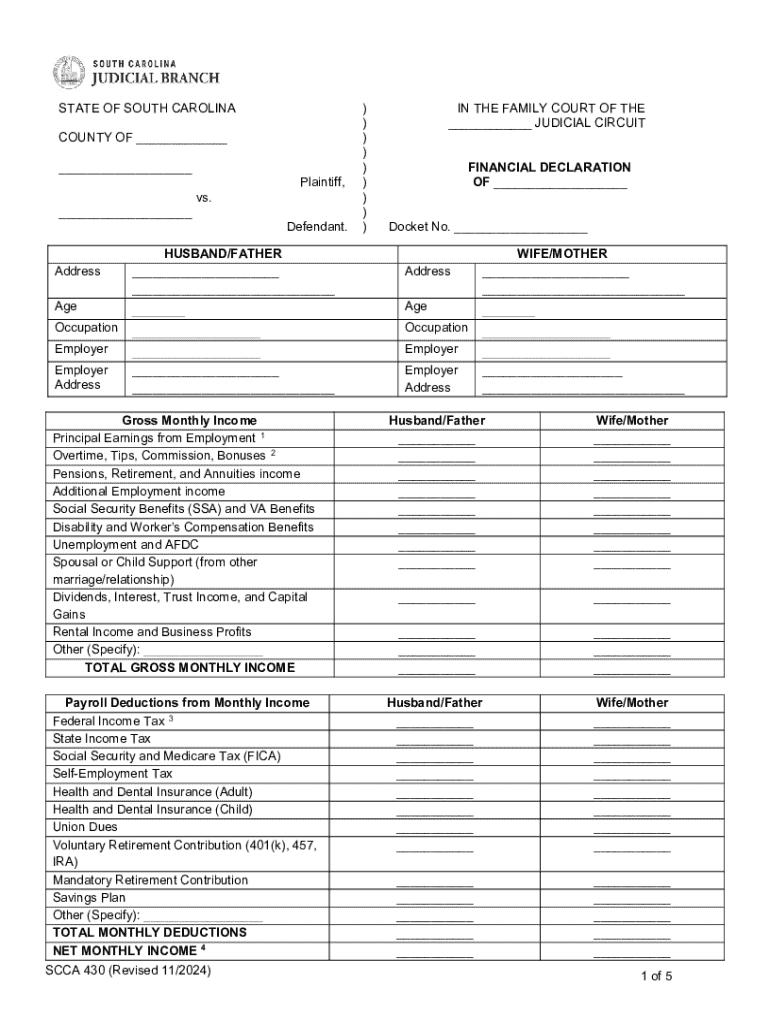
) ) ) ) ) ) ) IN THE FAMILY COURT OF THE JUDICIAL CIRCUIT FINANCIAL DECLARATION OF Docket No. Address Occupation Employer Age Employer Address Employer Address Age WIFE/MOTHER Occupation Employer.
Loading

Open form follow the instructions

Easily sign the form with your finger

Send filled & signed form or save
How to use or fill out the SC Tax Forms Fillable - Fill Online, Printable, Fillable, Blank ... online
Completing the SC Tax Forms Fillable online can streamline your tax filing process, ensuring accuracy and efficiency. This guide provides a straightforward approach to help you navigate each section and field of the form with ease.
Follow the steps to successfully fill out the SC Tax Forms Fillable online
- Select the ‘Get Form’ button to retrieve the form and launch it in your preferred digital environment.
- Begin by filling in your personal information, including your name, address, and the county name in the appropriate fields. Make sure that all information is current and accurate.
- For the financial declaration, accurately input your occupation and employer details, along with your age. Repeat this for your partner as well, ensuring both parties’ details are captured.
- In the gross monthly income section, provide detailed entries for all income sources such as salaries, bonuses, social security benefits, and any additional employment income. This will create a comprehensive picture of monthly earnings for both parties.
- Enter the payroll deductions for each individual, which may include federal tax, state tax, social security, health insurance, and other deductions. This will help in calculating the net monthly income.
- Estimate and list all monthly expenses. Clearly specify the custodial parent and list the names and relationships of all household members whose expenses are included. Itemize each expense category carefully.
- Provide details for installment loan payments, including the creditor, monthly payment amounts, and balances owed.
- Outline other debts and obligations, noting any that are in arrears. Indicate whether you are currently in bankruptcy.
- Detail all marital property known to both parties, outlining assets for both individuals, including bank accounts, retirement accounts, and real estate, with their corresponding values.
- If total assets are less than $300,000, sign and notarize the document. If greater, complete additional sections as necessary and proceed to finalize your entries.
- Once all information is accurately filled, you can save changes, download, or print the completed form for submission.
Start filling out your SC Tax Forms online today for a smooth and efficient tax filing experience.
Experience a faster way to fill out and sign forms on the web. Access the most extensive library of templates available.
Related content
South Carolina Fillable Forms provides the option to fill out your return online and mail...
Nov 30, 2023 — INSTRUCTIONS. Employee instructions. Complete the SC W-4 so your employer...
Form NameDeferred Income Taxes for South Carolina, Form NumberSC SCH TD-1 ; Form...
Get answers to your most pressing questions about US Legal Forms API.
What is SC form 8453?
Taxpayers and electronic return originators (EROs) use this form to send any required paper forms or supporting documentation listed next to the checkboxes on the front of the form. Form 8453 is used solely to transmit the forms listed on the front of the form.
How much is $100,000 in income tax in SC?
If you make $100,000 a year living in the region of South Carolina, USA, you will be taxed $28,917. That means that your net pay will be $71,083 per year, or $5,924 per month. Your average tax rate is 28.9% and your marginal tax rate is 38.3%.
Does SC have fillable tax forms?
South Carolina Fillable Forms is a FREE online forms based tool enabling you to: Prepare your South Carolina resident income tax return and limited schedules by filling in your tax information online just like completing a paper return. Perform basic mathematical calculations.
What is the income tax rate in South Carolina for 2024?
Visit dor.sc.gov/iit-filing for information on your electronic filing options. Free and low cost options are available! For tax year 2024, the top marginal Individual Income Tax rate changed to 6.2%.
What is the income tax rate in SC for 2024?
Individual Income Tax rates: 0 to a top rate of 6.2% for tax year 2024. 0 to a top rate of 6.4% for tax year 2023. 0 to a top rate of 6.5% for tax year 2022. 0 to a top rate of 7% for tax years 2021 and prior.
Is income taxed in South Carolina over 65?
You are not required to file a South Carolina Income Tax return if you are a South Carolina resident age 65 or older and: Your filing status is single, qualifying widow(er), or head of household and your gross income is less than the federal gross income filing requirement plus the age 65 and older deduction.
What is the state income tax rate in SC 2025?
"My Executive Budget continues cutting the state's personal income tax, dropping the rate from 6.2% to 6% – allowing taxpayers to keep an additional $193.5 million of their hard-earned money instead of sending it to state government.
What is form PT100 for South Carolina?
Business Personal Property Return PT-100 (State of SC) After the initial return, businesses are required to file on or before the last day of the fourth month after the close of the accounting period regularly employed by the taxpayer, for income tax purposes. Contact number 803-898-5222.
Use professional pre-built templates to fill in and sign documents online faster. Get access to thousands of forms.
If you believe that this page should be taken down, please follow our DMCA take down process here.