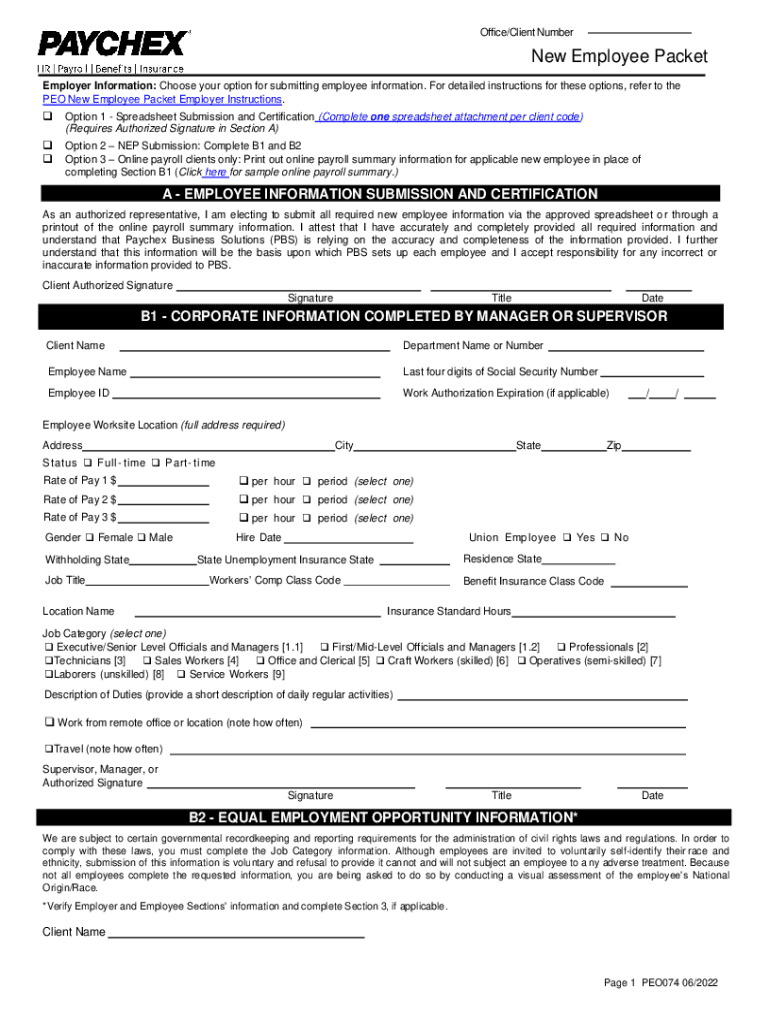
Et Employer Instructions. Option 1 - Spreadsheet Submission and Certification (Complete one spreadsheet attachment per client code) (Requires Authorized Signature in Section A) Option 2 NEP Submission: Complete B1 and B2 Option 3 Online payroll clients only: Print out online payroll summary information for applicable new employee in place of completing Section B1 (Click here for sample online payroll summary.) A - EMPLOYEE INFORMATION SUBMISSION AND CERTIFICATION As an a.

Open form follow the instructions

Easily sign the form with your finger

Send filled & signed form or save
How to fill out the Paychex PEO074 online
This guide provides a comprehensive overview of how to fill out the Paychex PEO074 form online. You'll find detailed instructions on each section, helping you to submit accurate and complete employee information.
Follow the steps to successfully complete the Paychex PEO074 form.
- Click ‘Get Form’ button to obtain the Paychex PEO074 form and open it in your preferred editor.
- Choose the submission method for employee information as outlined in the Employer Information section. You can select either Option 1, Option 2, or Option 3. Make sure to read the relevant instructions provided for each option.
- In Section A, indicate your method of submission by checking the appropriate box and provide your authorized signature, title, and date. This section certifies that you are submitting all required information accurately.
- Section B1 requires you to fill in corporate information such as client name, department, employee name, and employee ID. Ensure you complete all fields accurately, including worksite location and employment status.
- Continue to provide details such as the employee's rate of pay, gender, hire date, job title, and indicate if the employee is a union member. Complete the additional sections regarding job category and description as needed.
- In Section B2, complete the Equal Employment Opportunity Information. Remember that submission of this information is voluntary, and you can make a visual assessment if the employee didn't provide their race or ethnicity information.
- Finally, ensure you have completed any necessary sections for the employee, and have them read and sign the document in the Employee Signature section, including their personal information.
- After filling out all sections, review the form for accuracy. You can then save your changes, download a copy, print it for your records, or share the form as necessary.
Complete your Paychex PEO074 form online today to streamline your employee management process.
Experience a faster way to fill out and sign forms on the web. Access the most extensive library of templates available.
Get answers to your most pressing questions about US Legal Forms API.
What is the Paychex controversy?
Paychex sued for negligence after data breach exposes workers' names and Social Security numbers. The plaintiff said the payroll services company “betrayed [the] trust” of workers whose information it handled.
What does Paychex charge?
Paychex typically costs between $18-26 per employee per month (PEPM), offering competitive pricing for payroll, HR, and compliance services.
How does Paychex pay?
Through direct deposit, employees provide a bank account where funds will be transferred to payday. Each employee will fill out a direct deposit form and ensure the banking information such as the routing and account numbers are correct. For each pay period, workers' funds are deposited directly into their account.
Does Paychex have a cancellation fee?
Reasons To Choose Paychex Payment Processing Services You have a budget, and we make it easy for you to work within that with pricing that is easy to understand; transparent rates, no surprises, and no long-term contracts or cancellation fees.
Is Paychex worth it?
“We have used paychex for a few years. The platform is easy to use for employees and employers.” “I enjoy working with Paychex because they keep us informed and provides regular check-ins to make sure we have all the tools and information we need to provide for our staff and organization.”
Is Paychex the same as QuickBooks?
Both QuickBooks Payroll and Paychex offer full-service payroll, but you may be incurring some extra fees for standard services (like W-2 filing) from Paychex. And of the two providers, only QuickBooks provides an accuracy guarantee on your taxes.
What is a Paychex PEO?
What Is a Professional Employer Organization? A PEO is an all-in-one HR solution that helps make it easier for you to manage employee benefits, HR, payroll, and compliance.
Use professional pre-built templates to fill in and sign documents online faster. Get access to thousands of forms.
If you believe that this page should be taken down, please follow our DMCA take down process here.