PLICATION FOR DBBL INTERNET BANKING: 1.1. These Terms & Conditions form the contact between the User and DBBL for using Internet Banking. The User shall apply in the prescribed form for use of Internet Banking. DBBL at its sole discretion to accept or reject any such applications. 1.2. By applying for Internet Banking for the first time, the User acknowledges and accepts these Terms & Conditions. Notwithstanding anything contained herein, all Terms & Conditions pertaining to the accounts shall c.
Loading

Open form follow the instructions

Easily sign the form with your finger

Send filled & signed form or save
How to fill out the Dutch-Bangla Bank Limited Internet Banking Application Form online
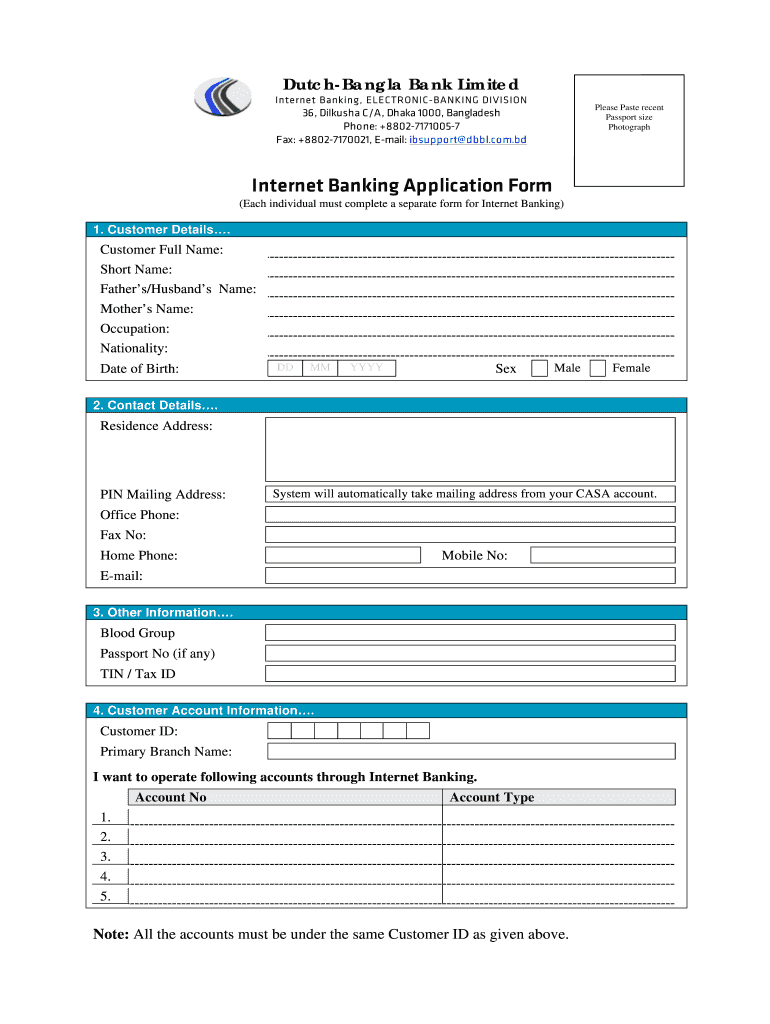
This guide provides clear and detailed instructions on how to fill out the Dutch-Bangla Bank Limited Internet Banking Application Form online. Whether you are familiar with online applications or not, this step-by-step approach will help you complete the form with ease.
Follow the steps to successfully complete your Internet Banking Application Form.
- Press the ‘Get Form’ button to access the application form. This will allow you to download and open the form in your preferred document editor.
- Provide your customer details in the designated sections, including your full name, short name, father's/husband's name, mother's name, occupation, nationality, date of birth, and sex. Ensure accuracy in every field.
- Fill in your contact details, including your residential address, home phone number, office phone number, mobile number, fax number, and email address. The mailing address will automatically be taken from your CASA account, so confirm that it is correct.
- Complete the additional information section by providing your blood group, passport number if applicable, and Tax Identification Number (TIN) or Tax ID.
- In the customer account information section, enter your customer ID and primary branch name. Specify the accounts you wish to operate through Internet Banking by entering the account numbers and types.
- Indicate any extra facilities you wish to enjoy by ticking the appropriate boxes for utility bill payment services or pre-paid card services. Ensure you provide the necessary company names and account/customer numbers for those services.
- Read and confirm the declaration by stating that the information provided is true and complete. Provide your signature and the date to validate your application.
- For branch use, ensure that an authorized personnel completes the verification section after reviewing your details, providing their signatures and date.
- Once the form is complete, save your changes. You may then download the completed form, print it for your records, or share it as necessary.
Complete your application form online today to access the Dutch-Bangla Bank Internet Banking services.
Experience a faster way to fill out and sign forms on the web. Access the most extensive library of templates available.
Related content
The process for trade licensing, tax registration, and VAT registration required as of...
(iii) the major online banking services are offered have been: View statements and account...
Nov 17, 2016 — Within regions, within nations and even within subnational jurisdictions...
Get answers to your most pressing questions about US Legal Forms API.
Can I open a Dutch bank account online?
Yes, you can open a Dutch bank account online through the official website of Dutch-Bangla Bank Limited. The process involves filling out the Dutch-Bangla Bank Limited Internet Banking Application Form with your personal information, verifying your identity, and following the subsequent instructions provided. This convenient option allows you to manage your finances directly from your device.
How to apply for Internet Banking?
To apply for Internet Banking, navigate to your bank's official website and find the Internet banking application section. Complete the Dutch-Bangla Bank Limited Internet Banking Application Form by entering the necessary personal and financial details. After your application is processed, you will receive your login information to access your online banking services.
How to open a Dutch mobile banking account?
You can open a Dutch mobile banking account by downloading the Dutch-Bangla Bank Limited mobile app or visiting their official website. Follow the registration guide to enter your personal and account details, ensuring you provide accurate information for identity verification. Once you complete the Dutch-Bangla Bank Limited Internet Banking Application Form, your new account will be ready for use.
How to apply for BOC online banking?
Applying for Bank of China (BOC) online banking typically involves visiting their website and selecting the online banking application option. Fill out the application form with your pertinent details and submit it. Make sure to check for additional requirements, as each bank may have different criteria compared to the Dutch-Bangla Bank Limited Internet Banking Application Form.
How to apply for Internet Banking in DBBL?
To apply for Internet Banking in Dutch-Bangla Bank Limited, visit their official website and locate the Internet banking application section. Fill out the required fields in the Dutch-Bangla Bank Limited Internet Banking Application Form, and submit it for processing. After verification, you will receive your login credentials to access your online account.
What is the code for Dutch mobile banking?
The code for Dutch mobile banking often refers to the specific PIN or access code you set up during registration. This code helps secure your account and allows you to perform transactions safely. Always keep your code confidential to ensure your account remains secure while using services associated with the Dutch-Bangla Bank Limited Internet Banking Application Form.
How to create a Dutch mobile banking account?
To create a Dutch mobile banking account, you first need to visit the Dutch-Bangla Bank Limited website or download their mobile banking application. From there, follow the prompts to complete the registration process, which includes entering your personal details and verifying your identity. Once completed, you can access your account and manage your finances easily using the Dutch-Bangla Bank Limited Internet Banking Application Form.
How do I add a beneficiary to my net banking account?
To add a beneficiary to your net banking account, first log in with your secure credentials. Navigate to the 'Beneficiaries' section, then select 'Add Beneficiary.' Enter all required information accurately, and confirm the details to finalize. For additional guidelines on managing your banking needs, keep the Dutch-Bangla Bank Limited Internet Banking Application Form handy.
How to add beneficiary on Nedbank online banking?
To add a beneficiary on Nedbank online banking, log into your account and navigate to the 'Payments' section. From there, locate the 'Manage Beneficiaries' feature and click on 'Add New Beneficiary.' Enter the requisite details such as account information and description, then confirm the addition. Don’t hesitate to review the Dutch-Bangla Bank Limited Internet Banking Application Form if you have questions about the process.
How much does a Dutch Bank officer earn?
The salary of a Dutch Bank officer can vary based on factors like experience and location. On average, a bank officer may earn between $50,000 and $75,000 annually. This compensation reflects the responsibilities involved in managing banking services and customer relations. For a closer look at potential earnings within the banking sector, consider checking relevant financial publications or resources.
Use professional pre-built templates to fill in and sign documents online faster. Get access to thousands of forms.
If you believe that this page should be taken down, please follow our DMCA take down process here.