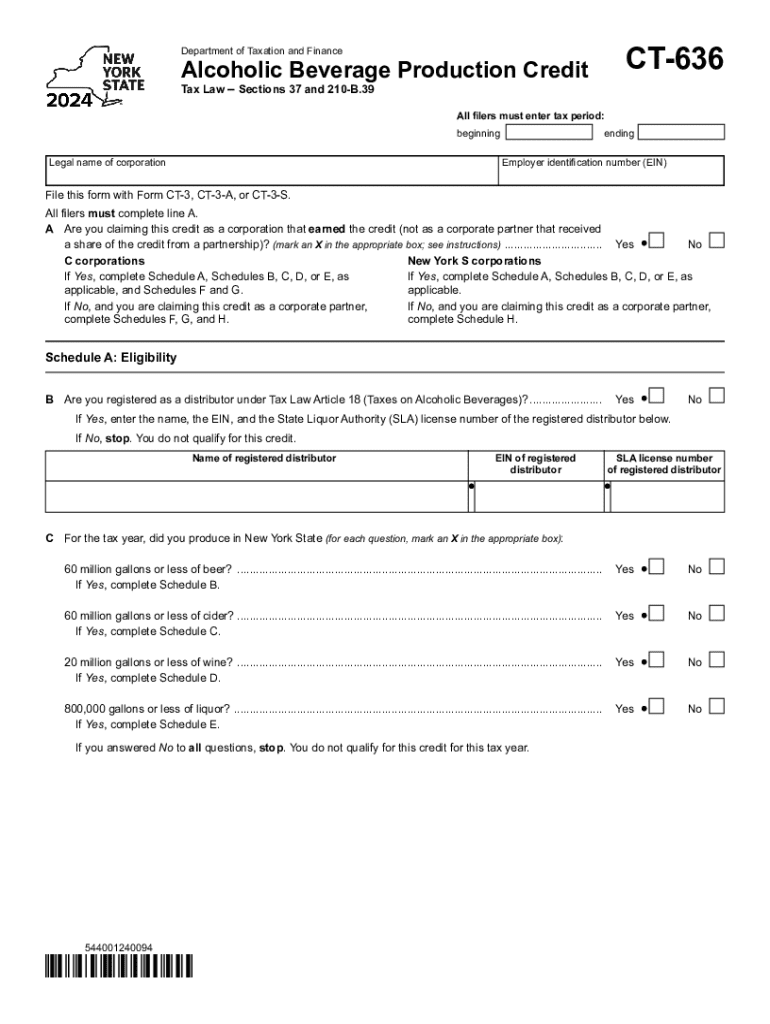
Dentification number (EIN) File this form with Form CT-3, CT-3-A, or CT-3-S. All filers must complete line A. A Are you claiming this credit as a corporation that earned the credit (not as a corporate partner that received No a share of the credit from a partnership)? (mark an X in the appropriate box; see instructions) ................................ Yes New York S corporations C corporations If Yes, complete Schedule A, Schedules B, C, D, or E, as If Yes, complete Schedule A, Schedules B,.
Loading

Open form follow the instructions

Easily sign the form with your finger

Send filled & signed form or save
How to fill out the NY DTF CT-636 online
Filling out the NY DTF CT-636 form can be straightforward when approached with a clear understanding of each component. This guide offers step-by-step instructions to help you accurately complete the form online, ensuring you include all necessary information to claim the Alcoholic Beverage Production Credit.
Follow the steps to complete your NY DTF CT-636 form online.
- Click the ‘Get Form’ button to obtain the CT-636 form and open it in the online editor.
- Enter the tax period, including the beginning and ending dates. Ensure that these dates correspond to the tax year for which you are filing.
- Complete line A, indicating whether you are claiming the credit as a corporation that earned the credit or as a corporate partner. Mark an 'X' in the appropriate box.
- If you answered 'Yes' to line A, you must complete Schedule A, as well as any applicable Schedules B, C, D, or E. If 'No', fill out Schedule H.
- For Schedule A, indicate if you are registered as a distributor under Tax Law Article 18. If 'Yes', provide the required details of the registered distributor including name, EIN, and SLA license number.
- Answer each production question for the tax year regarding beer, cider, wine, and liquor by marking 'Yes' or 'No'. Complete the corresponding schedules (B, C, D, E) if you meet the production thresholds.
- For Schedules B through E, follow the outlined calculation steps for the credit based on your production quantities.
- Review all filled sections for accuracy before saving your changes.
- Once completed, you can download, print, or share the form as required for your filing process.
Begin the process of completing your NY DTF CT-636 form online today!
Experience a faster way to fill out and sign forms on the web. Access the most extensive library of templates available.
Related content
Dec 15, 2024 — CT-636 · CT-636-I (Instructions), Alcoholic Beverage Production Credit ;...
prevent the return of your offer, wait until you have received a bill for at least one tax...
This pUblication contains information on the emula- tion of 1401, 1440, and 1460 object...
Use professional pre-built templates to fill in and sign documents online faster. Get access to thousands of forms.
If you believe that this page should be taken down, please follow our DMCA take down process here.