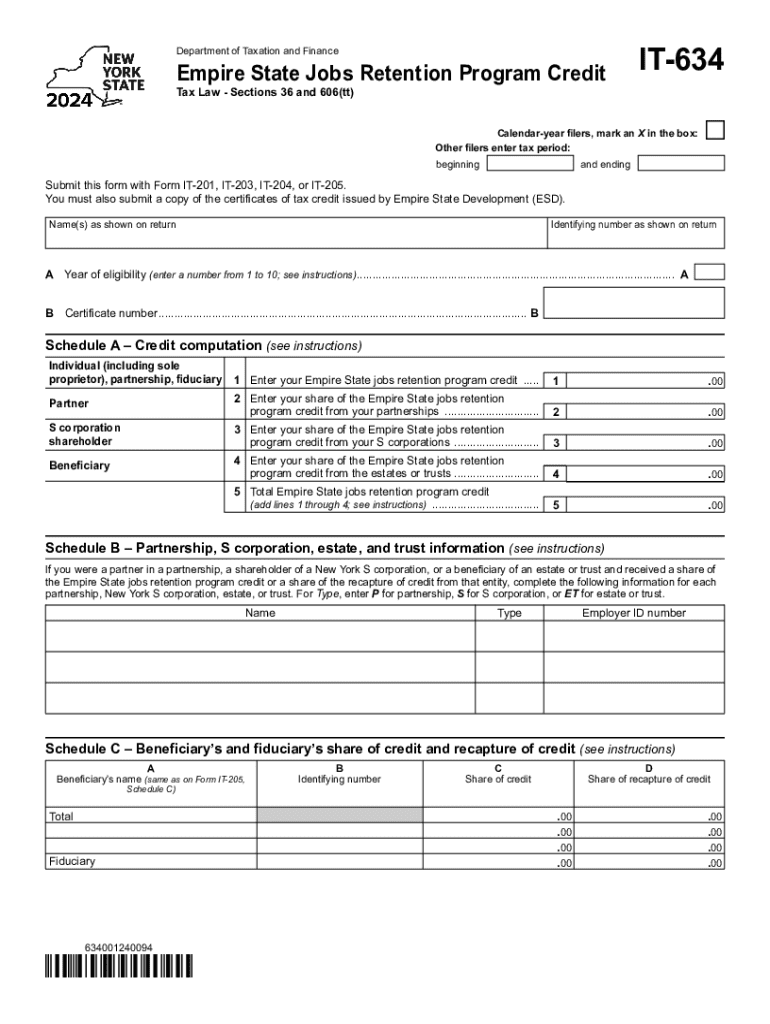
Ning and ending Submit this form with Form IT-201, IT-203, IT-204, or IT-205. You must also submit a copy of the certificates of tax credit issued by Empire State Development (ESD). Name(s) as shown on return Identifying number as shown on return A Year of eligibility (enter a number from 1 to 10; see instructions)...................................................................................................... A B Certificate number.

Open form follow the instructions

Easily sign the form with your finger

Send filled & signed form or save
How to fill out the NY IT-634 online
The NY IT-634 form is essential for documenting and claiming the Empire State jobs retention program credit. This guide provides a step-by-step approach to filling it out online, ensuring a smooth and accurate submission process.
Follow the steps to accurately complete the NY IT-634 online.
- Press the ‘Get Form’ button to access the form and open it in your preferred editor.
- Identify yourself as either a calendar-year filer or another filer. For calendar-year filers, mark an X in the appropriate box. Other filers should enter the tax period by specifying the beginning and ending dates.
- Enter your name as shown on your return and your identifying number, ensuring accuracy for proper identification.
- Complete section A by entering a number from 1 to 10 as the year of eligibility. Then fill in the certificate number in section B.
- Proceed to Schedule A to compute your credits. Fill in the Empire State jobs retention program credit based on your individual or partnership status. For each relevant category, enter your share of the credit from partnerships, S corporations, or estates as applicable.
- In Schedule B, provide the necessary details for each partnership, S corporation, estate, or trust in which you participated. Include their names, types (using P, S, or ET as indicated), and employer identification numbers.
- Move to Schedule C to report the beneficiary’s and fiduciary’s share of credit and recapture of credit. Enter the names and identifying numbers for all beneficiaries and their respective shares.
- Complete Schedule D to summarize any recapture of credits. Follow the instructions closely to calculate each line accurately.
- Once you have filled out all sections and schedules, review your entries carefully for accuracy.
- Finally, save your changes, and choose to download, print, or share the completed form as needed.
Complete your documents online to ensure a timely and efficient submission.
Experience a faster way to fill out and sign forms on the web. Access the most extensive library of templates available.
Related content
Submit this form with Form IT-201, IT-203, IT-204, or IT-205. You must also submit a copy...
Nov 6, 2024 — To ask for a lower monthly repayment amount, use SSA Form 634, the Request...
Mar 8, 1999 — This report is a work prepared for the United States Air Force Center for...
Use professional pre-built templates to fill in and sign documents online faster. Get access to thousands of forms.
If you believe that this page should be taken down, please follow our DMCA take down process here.