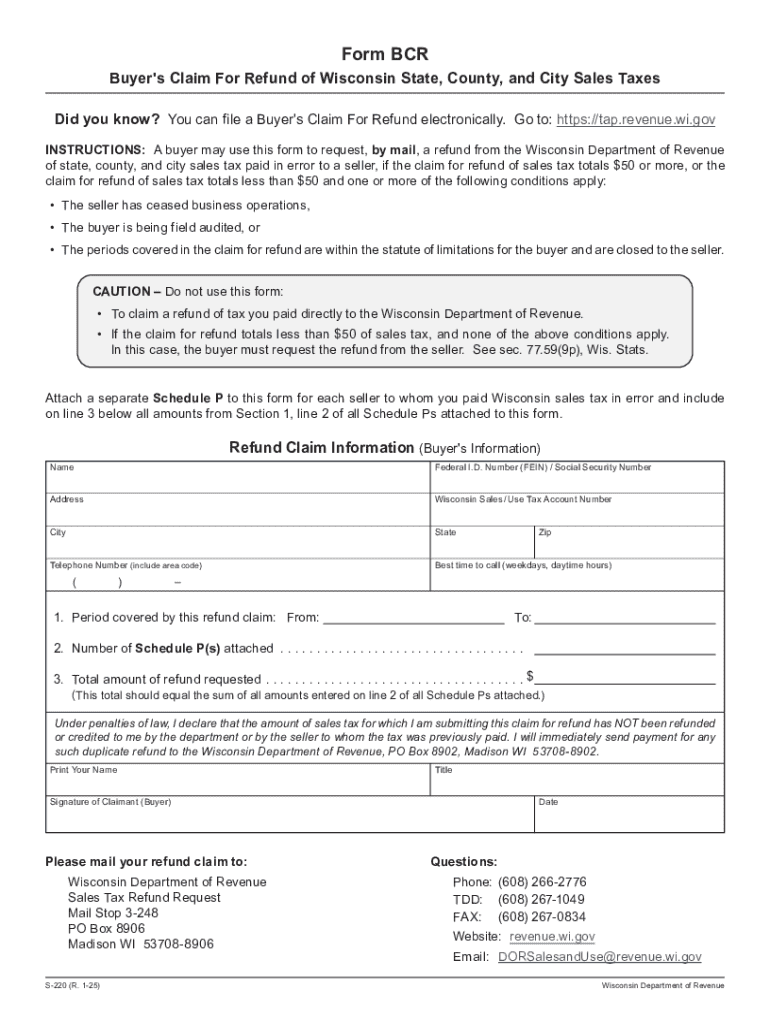
Buyer may use this form to request, by mail, a refund from the Wisconsin Department of Revenue of state, county, and city sales tax paid in error to a seller, if the claim for refund of sales tax totals $50 or more, or the claim for refund of sales tax totals less than $50 and one or more of the following conditions apply: The seller has ceased business operations, The buyer is being field audited, or The periods covered in the claim for refund are within the statute of limitations.

Open form follow the instructions

Easily sign the form with your finger

Send filled & signed form or save
How to fill out the WI S-220 online
Filing a Buyer's Claim for Refund of Wisconsin State, County, and City Sales Taxes can seem daunting. This guide provides clear, step-by-step instructions to help you successfully complete the WI S-220 online, ensuring you understand each section and its requirements.
Follow the steps to complete your WI S-220 refund claim.
- Click ‘Get Form’ button to obtain the form and open it in the appropriate editing tool.
- Begin by providing your name in the 'Buyer's Information' section. This should be the name of the individual or entity requesting the refund.
- Enter your Federal I.D. Number (FEIN) or Social Security Number. This information is critical for the processing of your claim.
- Fill in your address, including city, state, and zip code. Ensure all details are accurate and complete.
- Provide your Wisconsin Sales/Use Tax Account Number. This helps the Department of Revenue locate your account.
- Input your telephone number, including the area code, and indicate the best time for contact during weekdays.
- Specify the period covered by your refund claim by entering the start and end dates in the designated fields.
- Indicate the number of Schedule P(s) attached. Each Schedule P should detail amounts paid in error for specific sellers.
- Calculate and enter the total amount of refund requested. This total should match the sum of all amounts from Section 1, line 2 of all attached Schedule Ps.
- Read the declaration statement carefully. Ensure that you understand the under penalties of law notes before signing.
- Print your name and title, and sign the form as the claimant.
- Mail your completed refund claim to the provided address for the Wisconsin Department of Revenue.
Complete your WI S-220 online now to efficiently process your sales tax refund.
Experience a faster way to fill out and sign forms on the web. Access the most extensive library of templates available.
Related content
INSTRUCTIONS: A buyer may use this form to request, by mail, a refund from the Wisconsin...
Form W-220 (Fill-In Form), Nonresident Employee's Withholding Reciprocity Declaration...
Jun 5, 1997 — The policies and procedures set forth here are intended as guidance to...
Get answers to your most pressing questions about US Legal Forms API.
How do taxes work if I live in Wisconsin but work in Illinois?
Wisconsin has an income tax reciprocity agreement with Illinois, under which residents of one state that work in the other are required to file a tax return and pay taxes only in the state of legal residence.
What is the household employee tax in Wisconsin?
If you pay cash wages of $2,700 or more to any household employee in 2024 (or will pay a domestic worker $2,800 or more in 2025), then you need to withhold and pay FICA taxes. FICA taxes are 15.3 percent of cash wages. As an employer, you pay 7.65 percent (6.2 percent for Social Security and 1.45 percent for Medicare).
How do I report a new hire in Wisconsin withholding exemption certificate?
Visit https://dwd.wi.gov/uinh/ to report new hires. If you do not report new hires electronically, mail the original form to the Depart- ment of Workforce Development, New Hire Reporting, PO Box 14431, Madison WI 53708-0431 or fax toll free to 1-800-277-8075.
How do I claim my Wisconsin sales tax refund?
Sellers may claim a refund by amending a return previously filed electronically through My Tax Account, or by using Form ST-12 or sending a letter to the Department of Revenue indicating the claimant's name and address, seller's tax account number, amount of the claim, reporting period for which the overpayment was ...
How do I get property tax exemption in Wisconsin?
To apply for an exemption, you must complete a Wisconsin Department of Revenue application form, which may be obtained from the local assessor. The form must be filed for any property that was taxed in the previous year but, because of a change in the use, occupancy, or ownership, may now qualify for exemption.
Who is exempt from Wisconsin withholding?
You may claim exemption from withholding of Wisconsin income tax if you had no liability for income tax last year, and you expect to incur no liability for income tax this year. To claim complete exemption from withholding use Wisconsin Form WT-4, Employee's Wisconsin Withholding Exemption Certificate.
Who is exempt from sales tax in Wisconsin?
Some customers are exempt from paying sales tax under Wisconsin law. Examples include government agencies, some nonprofit organizations, and merchants purchasing goods for resale. Sellers are required to collect a valid exemption or resale certificate from buyers to validate each exempt transaction.
What is a W 220?
Form W-220 Nonresident Employee's Withholding Reciprocity Declaration.
Use professional pre-built templates to fill in and sign documents online faster. Get access to thousands of forms.
If you believe that this page should be taken down, please follow our DMCA take down process here.