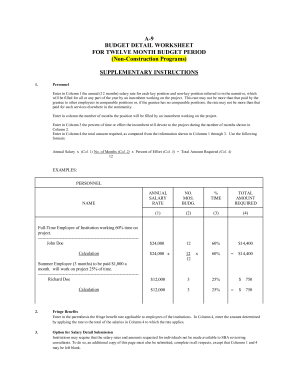
Salary rate for each key position and nonkey position referred to in the narrative, which will be filled for all or any part of the year by an incumbent working on the project. This rate may not be more than that paid by the grantee to other employees in comparable positions or, if the grantee has no comparable positions, the rate may not be more than that paid for such services elsewhere in the community. Enter .
Open form follow the instructions
Easily sign the form with your finger
Send filled & signed form or save
How to fill out the Budget Detail Worksheet online
The Budget Detail Worksheet is essential for outlining the budget requirements for your project over a twelve-month period. This guide provides a comprehensive walkthrough to help users complete the form accurately and efficiently.
Follow the steps to complete the Budget Detail Worksheet successfully
- Click the ‘Get Form’ button to access the Budget Detail Worksheet and open it in your preferred online editor.
- Begin by entering the annual salary rate for each key and non-key personnel in Column 1, ensuring it complies with existing salary scales or community standards.
- Indicate in Column 2 the number of months each position will be filled for the project.
- Provide the percentage of time each incumbent will devote to the project in Column 3.
- Calculate the total amount required for each position in Column 4 using the formula: Annual Salary x Number of Months x Percent of Effort / 12.
- In the Fringe Benefits section, enter the applicable fringe benefit rate and calculate the total by applying the rate to the sum of salaries entered in Column 4.
- For the Key Personnel List, document the names and positions of key individuals who play a crucial role in the project, along with their salary rates, months budgeted, and the percent of time devoted.
- Complete the Direct Costs section by providing details on personal services, fringe benefits, consultancy costs, travel expenses, equipment purchases, and any other applicable costs, ensuring each is supported by narrative justification.
- Finalize by reviewing all entries for accuracy and completeness before saving your changes, downloading, printing, or sharing the completed worksheet.
Complete your Budget Detail Worksheet online today to ensure a smooth budgeting process for your project!
Experience a faster way to fill out and sign forms on the web. Access the most extensive library of templates available.
Related content
Feb 3, 2020 — The following budget detail and narrative is a user-friendly, fillable...
BUDGET DETAIL FOR NON-SALARY ITEMS & STUDENT ASSISTANTS. 3 ... *Please submit a Student...
Please see detail worksheet and narrative section for further descriptions and...
Get answers to your most pressing questions about US Legal Forms API.
What is the 50/30/20 rule on a budget spreadsheet?
The 50/30/20 rule on a budget spreadsheet allows you to categorize your expenses and savings effectively. This rule guides you in allocating your income by highlighting the importance of balancing needs, wants, and savings. Implementing this structure within a Budget Detail Worksheet not only simplifies tracking but also promotes disciplined financial behavior. A budget spreadsheet offering this perspective can help safeguard your financial future.
How to fill out a budget worksheet?
To fill out a budget worksheet, first assess your total monthly income from all sources. Next, list all your expenses under appropriate categories, including fixed and variable costs. By utilizing a Budget Detail Worksheet, you can easily input your numbers and see where you stand. Regular updates to your worksheet will give you a clearer picture of your financial health and help you make informed decisions.
What to include on a budget spreadsheet?
When creating a budget spreadsheet, include your total income, fixed expenses like housing and utilities, and variable expenses, such as groceries and discretionary spending. You should also account for savings goals and debt repayments. A Budget Detail Worksheet can structure this information, providing clear visibility into your financial landscape. Including these elements will help you manage your finances effectively and plan for the future.
How does the 50/30/20 rule work for budgeting?
The 50/30/20 rule divides your after-tax income into three categories: 50% for needs, 30% for wants, and 20% for savings and debt repayment. This simple guideline helps you allocate your resources effectively without feeling overwhelmed. By employing this rule in your Budget Detail Worksheet, you can visualize your spending habits more clearly, helping you make better financial decisions. Remember, the balance is essential for long-term financial health.
How do you write a detailed budget?
To write a detailed budget, start by listing all your income sources, such as salaries and bonuses. Next, categorize your expenses into fixed costs, like rent, and variable costs, such as groceries and entertainment. Using a Budget Detail Worksheet can help you organize these figures clearly, making it easier to identify areas for improvement and savings. Regularly review and update your worksheet to reflect changes in your financial situation.
Does Excel have a budget template?
Yes, Excel offers various budget templates, including Budget Detail Worksheets. These templates provide a solid foundation for your budgeting process, allowing you to input your financial data easily. However, if you prefer a more tailored and comprehensive solution, consider exploring the budget templates available on US Legal Forms. We provide tools that are designed to enhance your budgeting experience.
How do I create a budget spreadsheet?
Creating a budget spreadsheet is straightforward with the right tools. Start by gathering all your financial information, such as income and expenses. You can use our Budget Detail Worksheet from US Legal Forms to structure your data effectively. This will help you visualize your finances and make informed decisions about your spending.
Where can I find a budget template?
You can easily find a budget template by visiting the US Legal Forms website. We offer a variety of Budget Detail Worksheets designed to meet your budgeting needs. Each template is user-friendly and customizable, making it simple for you to track your income and expenses. Explore our collection to find the perfect fit for your financial planning.
How do you write a budget document?
Writing a budget document requires clear and organized structuring of your income and expenses. Start by listing all sources of income, followed by fixed and variable expenses. After detailing your needs, wants, and savings goals, summarize the totals at the end. A Budget Detail Worksheet helps in presenting this information in a concise and accessible format.
How do you calculate 50/30/20 rule examples?
To calculate 50/30/20 rule examples, take your total income and multiply it by 0.50 for needs, 0.30 for wants, and 0.20 for savings. For instance, if your income is $5,000, allocate $2,500 to needs, $1,500 to wants, and $1,000 to savings. This clear breakdown simplifies financial decision-making. Using a Budget Detail Worksheet allows for easy adjustments as your income changes.
Use professional pre-built templates to fill in and sign documents online faster. Get access to thousands of forms.
If you believe that this page should be taken down, please follow our DMCA take down process here.