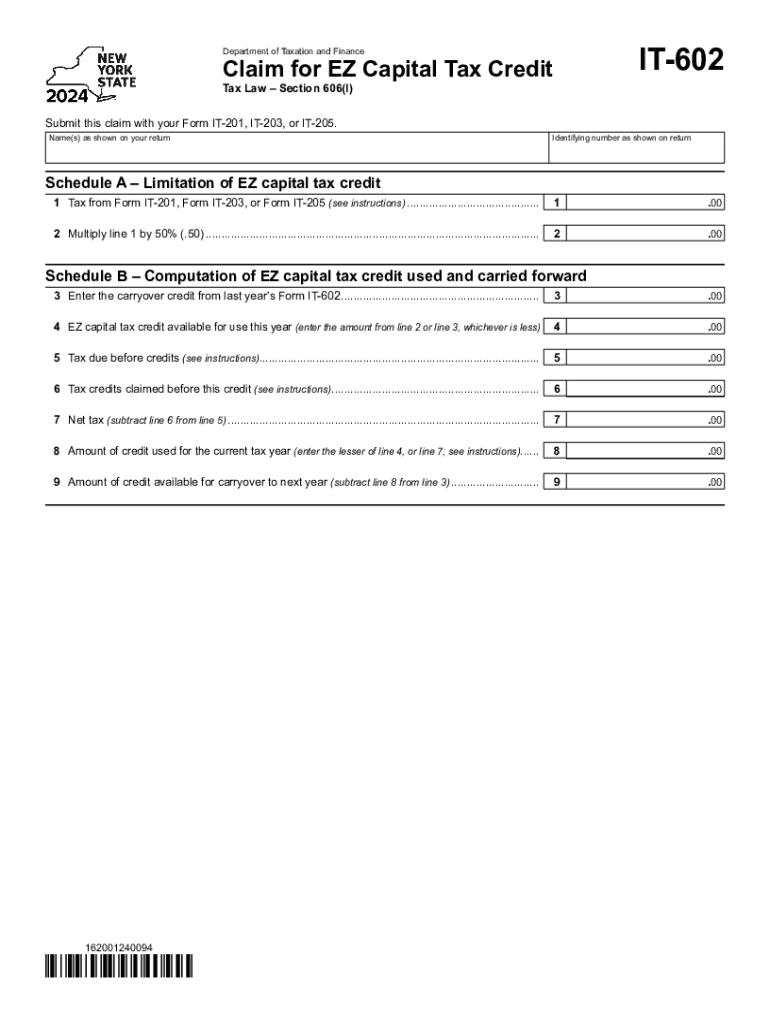
Ing number as shown on return Schedule A Limitation of EZ capital tax credit 1 Tax from Form IT-201, Form IT-203, or Form IT-205 (see instructions)........................................... 1 .00 2 Multiply line 1 by 50% (.50)........................................................................................................... 2 .00 Schedule B Computation of EZ capital tax credit used and carried forward 3 Enter the carryover credit from last year s Form IT-602.

Open form follow the instructions

Easily sign the form with your finger

Send filled & signed form or save
How to fill out the NY DTF IT-602 online
This guide provides users with a step-by-step approach to completing the NY DTF IT-602 form online. This form is essential for claiming the EZ capital tax credit and includes specific instructions tailored to ensure accurate filing.
Follow the steps to easily complete the NY DTF IT-602 form online.
- Click ‘Get Form’ button to access the form and open it in your online editor.
- Fill in your name(s) as shown on your tax return in the designated field for 'Name(s) as shown on your return.'
- Enter the identifying number exactly as it appears on your return in the 'Identifying number as shown on return' field.
- Proceed to Schedule A and calculate the tax amount based on your specific tax form (IT-201, IT-203, or IT-205) and enter the result on line 1.
- Multiply the amount from line 1 by 50% (0.50) and enter this value on line 2.
- For Schedule B, input the carryover credit from last year's IT-602 on line 3.
- Determine the available EZ capital tax credit for this year by entering the lesser of line 2 or line 3 on line 4.
- Enter the total tax due before credits from your original tax form on line 5.
- List any tax credits you have claimed prior to this credit on line 6.
- Calculate your net tax by subtracting the amount on line 6 from the amount on line 5 and enter the result on line 7.
- Input the amount of credit used this year on line 8, selecting the lesser of line 4 or line 7.
- Calculate the carryover credit for next year by subtracting line 8 from line 3 and entering this value on line 9.
- Once all fields are completed, review your entries for accuracy. You can then save changes, download the form, print it, or share it as necessary.
Complete your forms online today for a streamlined tax filing experience.
Experience a faster way to fill out and sign forms on the web. Access the most extensive library of templates available.
Related content
DTF-602 New York State Department of Taxation and Finance. Claim for EZ Capital Tax...
Mark your choice at line 68: • Direct deposit is still the easiest, fastest way to get...
Line 21 – EZ capital tax credit — Enter the amount of EZ capital tax credit deducted...
Get answers to your most pressing questions about US Legal Forms API.
What is the form for NY sales tax refund?
If you're an individual taxpayer and want to request a refund of sales or use tax paid, you must file for a refund using paper Form AU-11.
Who is required to file a NYC tax return?
New York City residents must pay a personal income tax, which is administered and collected by the New York State Department of Taxation and Finance. Most New York City employees living outside of the five boroughs (hired on or after January 4, 1973) must file form NYC-1127.
What is the efile mandate in NYC?
You're required to electronically file your return if you meet all three of the following conditions: you use software to prepare your own personal income tax return; and. your software supports the electronic filing of your return; and. you have broadband Internet access.
What is NY throwback tax?
The throwback tax was enacted by New York to address a perceived abuse by nongrantor trusts qualifying for the New York Resident Trust Exception, which resulted in those trusts accumulating and then distributing income to resident beneficiaries free of state income tax.
Is efiling mandatory in New York?
ELECTRONIC FILING THROUGH THE NEW YORK STATE COURTS ELECTRONIC FILING SYSTEM IS MANDATORY FOR ALL CASES COMMENCED IN THIS COURT (EXCEPT ARTICLE 70 AND 78 PROCEEDINGS, AND MATRIMONIAL, MENTAL HYGIENE LAW AND ELECTION LAW MATTERS).
Is Efile mandatory?
Mandatory e-file requirement California law requires business entities that prepare an original or amended return using tax preparation software to electronically file (e-file) their return with us.
What does I received nonresident income from New York sources mean?
If you are a nonresident individual, estate, or trust, you are subject to tax on your New York source income. New York source income includes income derived from or connected with a business, trade, profession, or occupation carried on in New York State.
How to avoid NYC city tax?
The most straightforward way to avoid NYC city tax is by ensuring you are not considered a resident of the city. NYC residents are subject to local income tax, which can range from 3.078% to 3.876%. To avoid NYC city tax, you must establish residency outside of the city.
Use professional pre-built templates to fill in and sign documents online faster. Get access to thousands of forms.
If you believe that this page should be taken down, please follow our DMCA take down process here.