Loading
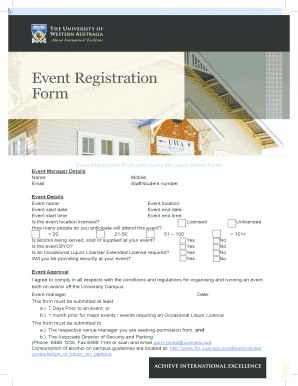
Get Event Registration Form - The University Of Western Australia
How it works
-

Open form follow the instructions
-

Easily sign the form with your finger
-

Send filled & signed form or save
How to fill out the Event Registration Form - The University Of Western Australia online
This guide provides a comprehensive overview of how to complete the Event Registration Form for The University Of Western Australia online. Following these detailed steps will ensure that you fill out the form accurately and efficiently, facilitating a smooth event planning process.
Follow the steps to successfully complete the registration form.
- Click ‘Get Form’ button to obtain the form and open it in your preferred editor.
- Begin by filling out the Event Manager Details section. Input your name, mobile number, email, and either your staff or student number.
- Proceed to the Event Details section. Enter the event name and location, followed by the start and end dates and times of the event.
- Indicate whether the event location is licensed by selecting 'Licensed' or 'Unlicensed'.
- Estimate the number of attendees by checking one of the options provided: less than 20, 21-50, 51-100, or more than 101.
- Specify if alcohol will be served, sold, or supplied at your event by selecting 'Yes' or 'No'.
- Indicate if the event is BYO (Bring Your Own) by selecting 'Yes' or 'No'.
- State whether you require an Occasional Liquor License or Extended License by choosing 'Yes' or 'No'.
- Decide if you will provide security for the event by selecting 'Yes' or 'No'.
- In the Event Approval section, confirm your agreement to comply with all conditions and regulations for organizing and running the event. Enter your name and the date.
- Make sure to submit the form at least 7 days before the event, or 1 month prior for major events or those requiring a liquor license.
- Submit the completed form to the respective venue manager and the Associate Director of Security and Parking. Include necessary contact numbers if required.
- Once you have completed all sections, review the form for accuracy. You can then save changes, download, print, or share the form as needed.
Complete the Event Registration Form online today to ensure your event runs smoothly.
Industry-leading security and compliance
US Legal Forms protects your data by complying with industry-specific security standards.
-
In businnes since 199725+ years providing professional legal documents.
-
Accredited businessGuarantees that a business meets BBB accreditation standards in the US and Canada.
-
Secured by BraintreeValidated Level 1 PCI DSS compliant payment gateway that accepts most major credit and debit card brands from across the globe.