Loading
Get Va State Tax
How it works
-

Open form follow the instructions
-

Easily sign the form with your finger
-

Send filled & signed form or save
How to fill out the Va State Tax online
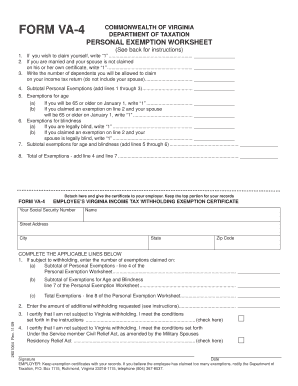
Filling out the Va State Tax form VA-4 is essential for notifying your employer about your exemptions from Virginia income tax withholding. This guide will walk you through each section of the form, ensuring you complete it accurately and efficiently.
Follow the steps to complete your VA-4 form online.
- Click ‘Get Form’ button to access the VA-4 form and open it in the editor.
- Begin by filling out your personal information, including your Social Security number, name, street address, city, state, and zip code.
- Proceed to the Personal Exemption Worksheet. For line 1, if you wish to claim yourself, enter '1'.
- For line 2, if you are married and your spouse is not already claimed on their own certificate, enter '1'.
- On line 3, enter the total number of dependents you claim on your income tax return, excluding your spouse.
- Calculate your subtotal personal exemptions and enter the sum on line 4 by adding lines 1 through 3.
- For section five, if you will be 65 or older on January 1, write '1' on line 5(a). If your spouse will also be 65 or older, enter '1' on line 5(b).
- If legally blind, note '1' on line 6(a). If your spouse is legally blind, enter '1' on line 6(b).
- Add the amounts from lines 5 and 6 to find your subtotal exemptions for age and blindness, and enter the total on line 7.
- Calculate your total exemptions by adding line 4 and line 7, then enter this total on line 8.
- Complete the applicable lines in the Employee’s Virginia Income Tax Withholding Exemption Certificate section based on the totals from the Personal Exemption Worksheet.
- If needed, indicate any additional withholding on line 2 and check the appropriate boxes as applicable on lines 3 and 4 regarding exemption certifying.
- Finally, sign and date the form, ensuring all information is accurate before submitting it.
Start completing your Virginia State Tax form online today!
Related links form
Use our Where's my Refund tool or call 804.367. 2486 for our automated refund system.