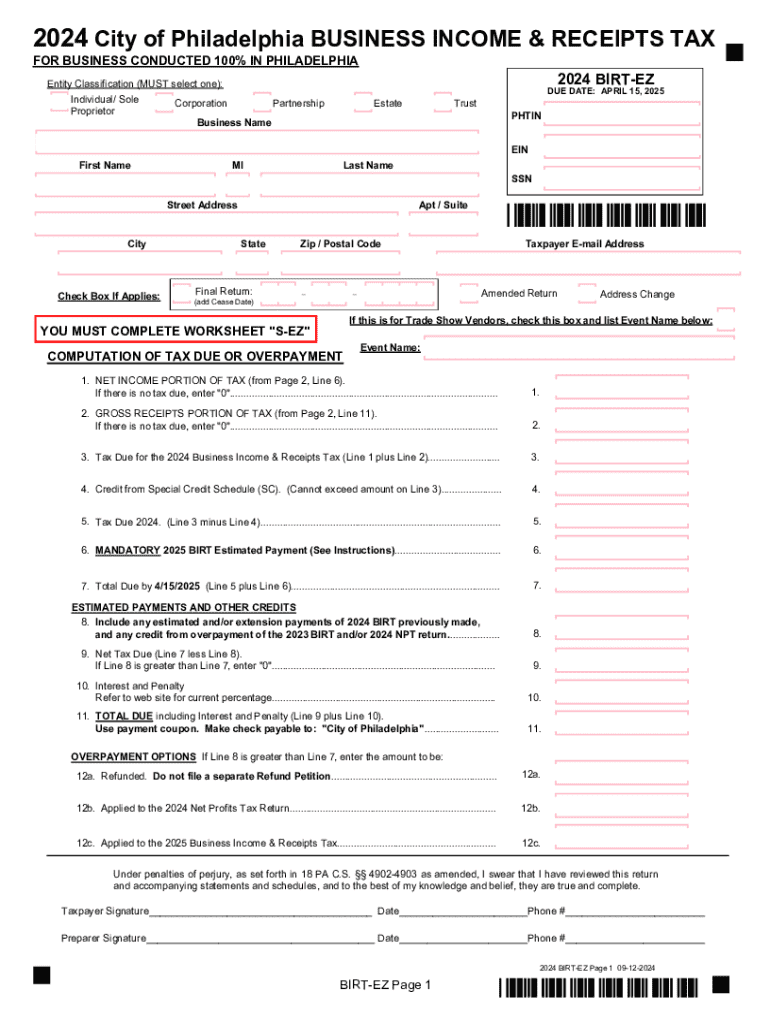
Tion Estate DUE DATE: APRIL 15, 2025 Trust PHTIN Business Name EIN First Name MI Last Name SSN Street Address City Check Box If Applies: Apt / Suite State Final Return: (add Cease Date) Zip / Postal Code - - Taxpayer E-mail Address Amended Return Address Change If this is for Trade Show Vendors, check this box and list Event Name below: YOU MUST COMPLETE WORKSHEET "S-EZ" COMPUTATION OF TAX DUE OR OVERPAYMENT Event Name: 1. NET INCOME PORTION OF TAX (from Page 2, Line 6).

Open form follow the instructions

Easily sign the form with your finger

Send filled & signed form or save
How to fill out the 2024 Birt-ez online
This guide provides clear instructions on completing the 2024 Birt-ez online. Designed for users of all experience levels, this comprehensive resource will help ensure your business income and receipts tax forms are filled out accurately and efficiently.
Follow the steps to successfully complete the 2024 Birt-ez online.
- Press the ‘Get Form’ button to obtain the 2024 Birt-ez and open it in your preferred editor.
- Begin by selecting your entity classification. Choose from individual/sole proprietor, partnership, corporation, estate, or trust, ensuring to mark only one.
- Enter your business name and the Employee Identification Number (EIN). Provide your first name, middle initial (MI), last name, Social Security Number (SSN), and complete street address, including the city, state, and ZIP code.
- If applicable, check the box for final return, amended return, or address change. For trade show vendors, check the appropriate box and include the event name.
- Complete the worksheet 'S-EZ' for the computation of tax due or overpayment. Start with the net income portion of tax from Page 2, line 6. If there’s no tax due, enter '0'.
- Next, provide the gross receipts portion of tax from Page 2, line 11. Similar to the previous step, enter '0' if there’s no tax due.
- Calculate the total tax due by adding lines 1 and 2. Input this value on Line 3.
- If eligible, enter any credit from the special credit schedule on Line 4. Ensure this does not exceed the amount on Line 3.
- Determine the tax due for 2024 by subtracting line 4 from line 3 and entering the result on line 5.
- Complete the mandatory estimated payment for 2025 (line 6) and calculate the total amount due by adding lines 5 and 6. This total should be entered on line 7.
- Include any estimated payments made and overpayments as described on line 8, and calculate net tax due on line 9.
- If applicable, indicate the interest and penalty on line 10 based on current percentages.
- Sum lines 9 and 10 for the final total due, which can be paid using the provided payment coupon.
- For overpayment options if line 8 exceeds line 7, you can indicate how to apply them in lines 12a, 12b, and 12c.
- Finally, sign the form, date it, and provide contact information before saving your changes, downloading, or printing the finalized form.
Complete your documents online today to ensure compliance and accuracy in your tax filings.
Experience a faster way to fill out and sign forms on the web. Access the most extensive library of templates available.
Related content
Jan 2, 2025 — Instructions for using the 2024 BIRT–EZ Form and 2024 NPT return (if...
Students may register a confidential missing person contact at the following link:...
Use professional pre-built templates to fill in and sign documents online faster. Get access to thousands of forms.
If you believe that this page should be taken down, please follow our DMCA take down process here.