Loading
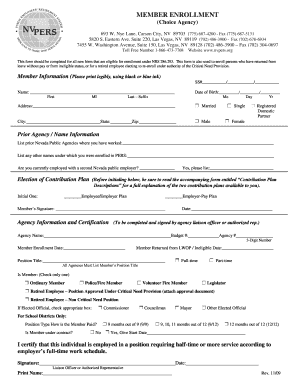
Get Member Enrollment - Public Employees' Retirement System Of Nevada
How it works
-

Open form follow the instructions
-

Easily sign the form with your finger
-

Send filled & signed form or save
How to fill out the Member Enrollment - Public Employees' Retirement System Of Nevada online
Filling out the Member Enrollment form for the Public Employees' Retirement System of Nevada is a critical step for eligible individuals looking to enroll in the retirement program. This guide provides clear and supportive instructions to help you successfully complete the online enrollment process.
Follow the steps to fill out the Member Enrollment form online.
- Press the ‘Get Form’ button to access the enrollment form and open it in your preferred online editor.
- Begin with the member information section. Enter your Social Security number, ensuring accuracy as this is a key identifier.
- Provide your full name, including first name, last name, and any suffixes, followed by your middle initial.
- Fill in your date of birth in the specified format—month, day, and year.
- Enter your current address, including the city, state, and zip code.
- Select your marital status by checking the appropriate box, either married, single, or registered domestic partner.
- Indicate your gender by selecting either male or female.
- List any prior Nevada public agencies where you have worked in the designated field.
- If applicable, enter any other names you were enrolled under in PERS.
- Indicate whether you are currently employed with a second Nevada public employer and provide that agency's name if relevant.
- In the election of contribution plan section, read the accompanying descriptions carefully before initialing your choice between the employee/employer plan and the employer-pay plan.
- Sign and date the form to confirm the information is accurate and that you understand the terms.
- For the agency information, the authorized representative or liaison officer must complete the required fields, including the agency name, budget number, and member enrollment date.
- Complete the member’s position title and select whether the position is full-time or part-time.
- Check the member's designation, only selecting one from the options provided.
- If applicable to school districts, provide information regarding the position type and whether the member is under contract.
- The authorized representative must sign and date the certification section, confirming the individual is employed per the required service schedule.
- Once all the fields have been completed accurately, review the entire form. Save your changes, and you can choose to download, print, or share the completed form.
Begin the member enrollment process today to secure your retirement benefits.
Industry-leading security and compliance
US Legal Forms protects your data by complying with industry-specific security standards.
-
In businnes since 199725+ years providing professional legal documents.
-
Accredited businessGuarantees that a business meets BBB accreditation standards in the US and Canada.
-
Secured by BraintreeValidated Level 1 PCI DSS compliant payment gateway that accepts most major credit and debit card brands from across the globe.