Loading
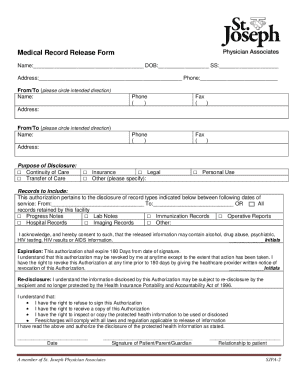
Get St. Joseph Physician Associates Sjpa-2 2021-2026
How it works
-

Open form follow the instructions
-

Easily sign the form with your finger
-

Send filled & signed form or save
How to fill out the St. Joseph Physician Associates SJPA-2 online
Filling out the St. Joseph Physician Associates SJPA-2 medical record release form online is a crucial step for users requesting the transfer of their health information. This guide will assist you in completing the form accurately and efficiently, ensuring a smooth process for you.
Follow the steps to fill out the SJPA-2 form online.
- Press the ‘Get Form’ button to access the SJPA-2 online document. This will allow you to obtain the necessary form and open it for editing.
- Begin by entering your full name, date of birth (DOB), and Social Security number (SS) in the respective fields at the top of the form.
- Provide your current address and phone number in the indicated sections to ensure your contact information is up to date.
- Indicate the direction of the record transfer by circling either 'From' or 'To.' Fill in the name and contact information (phone and fax) for both the sending and receiving parties.
- Select the purpose of the disclosure by checking the appropriate box. Options include continuity of care, transfer of care, insurance, legal, personal use, or other. If selecting 'other,' specify the purpose in the space provided.
- In the 'Records to include' section, specify which types of records you wish to disclose. This may include progress notes, lab notes, immunization records, operative reports, hospital records, imaging records, or any other records relevant to your request.
- Acknowledge and consent to the release of information by providing your initials next to the statement regarding sensitive information, such as alcohol, drug abuse, psychiatric, or HIV-related information.
- Complete the expiration date section by noting that this authorization will expire 180 days from the date you sign the document.
- Understand your rights regarding this authorization and indicate your initials beside each acknowledgment as required.
- Finally, sign and date the form, ensuring that you also include your relationship to the patient if you are signing on their behalf.
- Once you have filled out the form, you can save your changes, download, print, or share the document as needed.
Complete your documents online with ease to ensure your medical records are transferred smoothly.