Loading
Get Salter College Acfm-37 2010-2026
How it works
-

Open form follow the instructions
-

Easily sign the form with your finger
-

Send filled & signed form or save
How to fill out the Salter College ACFM-37 online
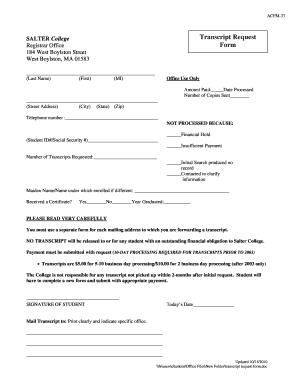
The Salter College ACFM-37 is an essential form for requesting academic transcripts. This guide will provide you with clear, detailed instructions on how to successfully fill out the form online, ensuring a smooth and efficient process for obtaining your transcripts.
Follow the steps to complete your transcript request form online.
- Press the ‘Get Form’ button to obtain the Salter College ACFM-37 form and open it in your preferred editor.
- Fill in your last name, first name, and middle initial in the designated fields.
- Provide your complete street address, city, state, and zip code in the respective sections.
- Enter your telephone number in the corresponding field for any necessary follow-up.
- If applicable, fill in your student ID number or Social Security number, especially if there's an issue with processing.
- Indicate the number of transcripts you are requesting by filling in the appropriate number.
- If your name has changed since enrollment, provide your maiden name or the name under which you were enrolled.
- Indicate whether you received a certificate by marking 'Yes' or 'No' and fill in the year you graduated.
- Please read the instructions carefully, ensuring to use a separate form for each mailing address to avoid any delays.
- Sign and date the form at the designated areas to confirm your request.
- Specify the mailing address where the transcript should be sent, ensuring to print clearly.
- Once all sections have been completed, save your changes, and if required, download or print the form for submission.
Start filling out your Salter College ACFM-37 online today to ensure timely processing of your transcript request.
In 2019, the company was again charged by the state Attorney General for misleading students. The company settled for $1.6 million, can no longer enroll students in Massachusetts, and will shut down its two remaining campuses by the end of the year.