Loading
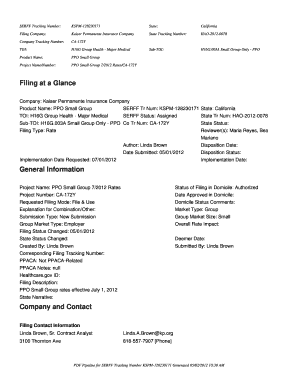
Get Serff Tracking Number: Kspm-128230171 State: California Filing Company: Kaiser Permanente Insurance
How it works
-

Open form follow the instructions
-

Easily sign the form with your finger
-

Send filled & signed form or save
How to fill out the SERFF Tracking Number: KSPM-128230171 State: California Filing Company: Kaiser Permanente Insurance online
This guide provides clear, step-by-step instructions for filling out the SERFF Tracking Number: KSPM-128230171, which is designed for the online filing of Kaiser Permanente Insurance company documents in the state of California. It aims to assist users, regardless of their legal experience, in successfully completing the filing process.
Follow the steps to complete your filing efficiently.
- Click ‘Get Form’ button to obtain the document necessary for your filing and open it in the designated format.
- Fill out the SERFF Tracking Number field by entering KSPM-128230171. This unique identifier will help in tracking your submission.
- Enter the State as California in the relevant field to indicate where the filing is being submitted.
- Input Kaiser Permanente Insurance as the Filing Company, ensuring it accurately represents the submitting entity.
- Complete the State Tracking Number with HAO-2012-0078, which corresponds to the state filing for tracking purposes.
- Provide the Company Tracking Number CA-172Y. This tracking number is specific to the insurance company and helps identify the document.
- Select the appropriate TOI (Type of Insurance) which is H16G Group Health - Major Medical in this case.
- Specify the Sub-TOI as H16G.003A Small Group Only - PPO, indicating the specific market segment of the filing.
- Fill out the Product Name field with 'PPO Small Group', ensuring the title reflects the product associated with the filing.
- Indicate the Project Name/Number as 'PPO Small Group 7/2012 Rates/CA-172Y', which provides additional context about the filing purpose.
- Complete any rate change fields, entering the request for a proposed rate increase as necessary and providing appropriate percentage details.
- Review all completed fields for accuracy, ensuring all necessary information has been captured fully.
- Finalize your filing by saving any changes made, and consider options to download or print the completed form for your records.
Submit your documents online to ensure the filing process is handled promptly and efficiently.
A “me too” filing is when one company adopts another company's filing. Usually they are not part of the same group. You should check with each state to determine their rules on these filings. If permitted, use this area to indicate either an advisory organization name or “me too” company name.
Industry-leading security and compliance
US Legal Forms protects your data by complying with industry-specific security standards.
-
In businnes since 199725+ years providing professional legal documents.
-
Accredited businessGuarantees that a business meets BBB accreditation standards in the US and Canada.
-
Secured by BraintreeValidated Level 1 PCI DSS compliant payment gateway that accepts most major credit and debit card brands from across the globe.